Import cURL, HAR, Postman or OpenAPI to a k6 Test
Import an existing request into a k6 test
You do not need to write a k6 script by hand to get started. If you already have a request captured as a cURL command, a HAR file, a Postman collection or an OpenAPI spec, LoadFocus can convert it into a runnable k6 script and attach it to your test in one step.
The conversion runs entirely in your browser. Nothing is sent to our servers during the conversion, and the generated script is attached to the test exactly as if you had uploaded it yourself.
Where to find it
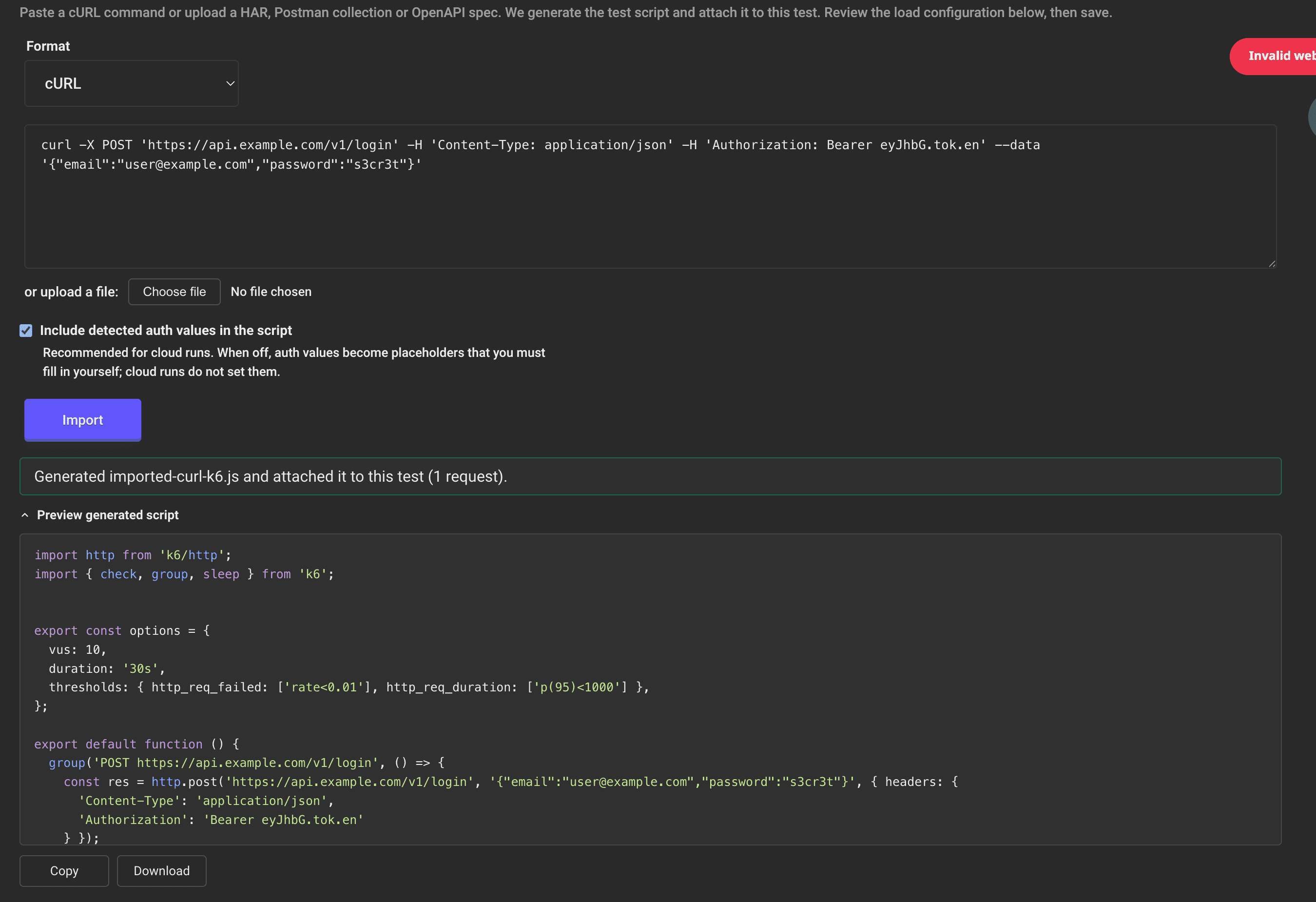
Open the New k6 Test page (you need to be logged in) and expand the Import from cURL, HAR, Postman or OpenAPI panel, just above the script upload section.
Supported formats
- cURL: paste a
curlcommand, for example one copied from your browser's network tab ("Copy as cURL"). - HAR: an HTTP Archive exported from your browser's developer tools. Static assets (images, CSS, fonts) are filtered out by default so the test focuses on real API calls.
- Postman: a Postman collection exported as JSON. Collection variables are resolved where possible.
- OpenAPI: an OpenAPI or Swagger specification. Request bodies are synthesized from the schema when no example is provided.
Step by step
- Choose the format in the Format selector.
- Provide the source. Paste the cURL command or file content into the text area, or click Choose file to upload a HAR, Postman or OpenAPI file. When you upload a file, the format is detected automatically from its name.
- Decide how to handle detected auth values. The Include detected auth values in the script checkbox is on by default.
- On (recommended for cloud runs): detected
Authorization,Cookieand API-key headers are written into the script as-is, so the test works on the first run. - Off: those values become
__ENVplaceholders that you fill in yourself. Cloud runs do not set these placeholder values, so the test would fail authentication until you provide them.
- On (recommended for cloud runs): detected
- Click Import. LoadFocus generates a k6 script, attaches it to the test as a
.jsfile, and fills in a test name based on the request host if you have not set one. If you upload a file, the import runs automatically. - Review the generated script. Expand Preview generated script to see the k6 code, with buttons to Copy it or Download it.
- Configure the load and save. Set your virtual users, duration, ramp-up and load distribution as usual, then run or save the test. See How to Run a New k6 Load Test for the full configuration walkthrough.
Notes
- Importing again replaces the previously imported script. Files you uploaded manually are left untouched.
- The generated
optionsblock (virtual users, duration) is a local-run default. In the cloud the values you set in the Load Configuration section take precedence. - Prefer to work outside the app? The same conversion is available as free public tools: cURL to k6, HAR to k6, Postman to k6 and OpenAPI to k6.