OAuth 2.0 Authorization
OAuth 2.0 is an authorization framework (RFC 6749) for granting access to protected resources. It allows third-party applications to gain access to user data without exposing the user's credentials. Instead of sharing passwords, services provide tokens.
Background
Imagine you want to use a third-party application that needs to access data from your Google account. You wouldn't want to provide this third-party app with your Google username and password, right? This is where OAuth comes in. It lets you grant this application access to your Google data without sharing your Google credentials.
Basics of OAuth 2.0
OAuth 2.0 focuses on client developer simplicity while providing specific authorization flows for web applications, desktop applications, mobile phones, and living room devices. Here's a simplified breakdown:
Resource Owner: The user who authorizes an application to access their account. The application's access to the user's account is limited to the "scope" of the authorization granted (e.g., reading or writing a specific type of data).
Client: The application that wants to access the user's account. Before it may do so, it must be authorized by the user and the authorization must be validated by the API.
Resource Server: The server hosting the user accounts. It can accept and respond to protected resource requests using access tokens.
Authorization Server: This server verifies the identity of the user then issues access tokens to the application.
OAuth 2.0 Flows
There are several "flows" or "grant types" for different types of applications and use cases:
Authorization Code (for apps running on a web server): This is the most common flow, especially for web apps. It involves redirecting the user to the service, where they log in. After login, they are redirected back to the application with an authorization code, which the application can exchange for an access token.
Implicit (legacy, for apps running in a browser): The access token is returned immediately without an authorization code exchange step. Current security guidance (RFC 9700) recommends against it; use the authorization code flow instead where you can.
Resource Owner Password Credentials (legacy): The application sends the user's username and password directly to the authorization server. It defeats the purpose of OAuth (the app sees the password) and current security guidance (RFC 9700) says not to use it for new systems.
Client Credentials: No user is involved. The client authenticates as itself to get a token, for example a background service calling an API.
Tokens
Instead of using the user's credentials, OAuth 2.0 uses tokens. There are two types:
Access Token: Allows the application to make API requests on behalf of the user. It typically has a short lifetime.
Refresh Token: Optional. Can be used to obtain a new access token when the access token has expired, so the user does not have to log in again.
Security
OAuth 2.0 relies on TLS to protect tokens and credentials between the client, authorization server, and resource server. Access tokens are usually bearer tokens: whoever holds one can use it. Short lifetimes and narrow scopes limit the damage if one leaks, so keep tokens out of logs and URLs.
OAuth 2.0 in LoadFocus
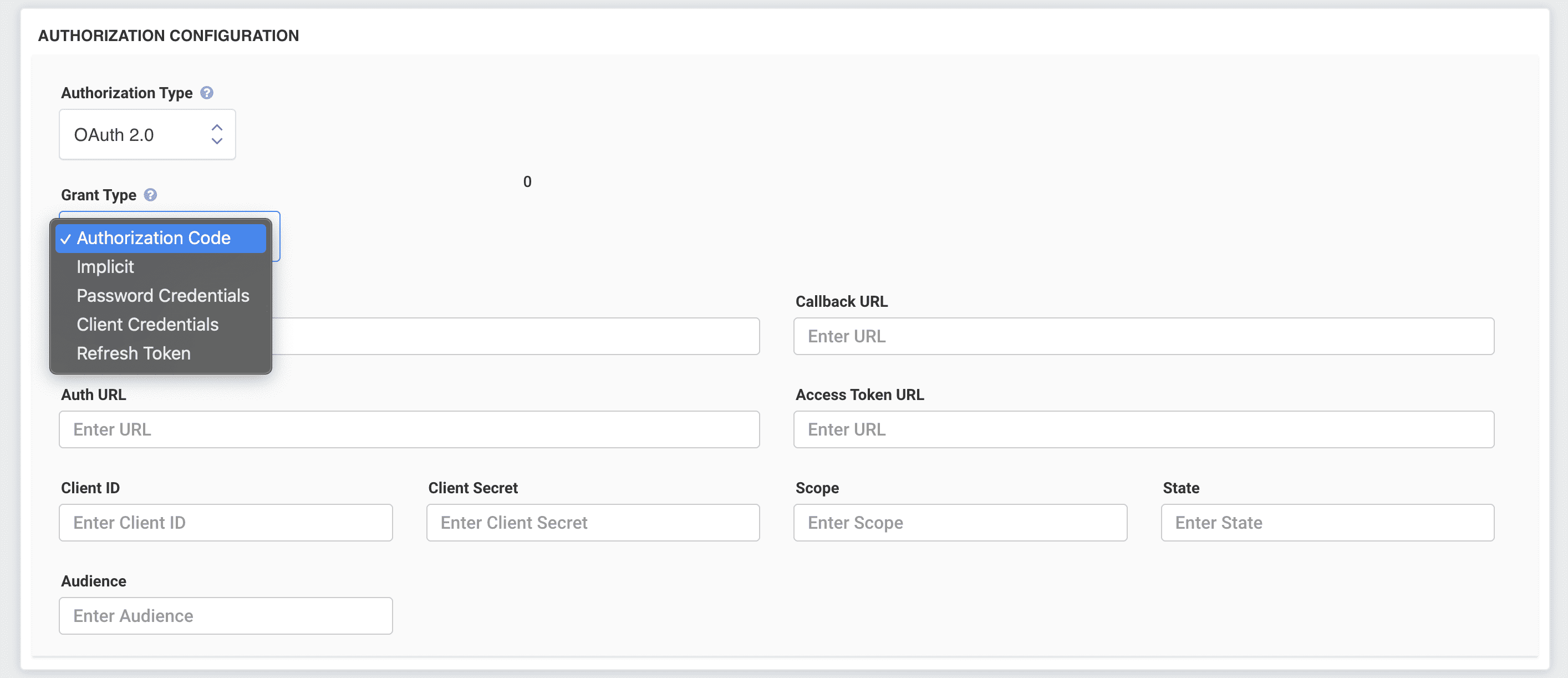
To load test an API that is protected with OAuth 2.0, open the Authorization configuration section of a request in the new test form, set Authorization Type to OAuth 2.0, and pick the Grant Type your API uses: Authorization Code, Implicit, Password Credentials, Client Credentials or Refresh Token. If you are not sure which one that is, read What is a Grant Type?. Each grant type has its own guide, for example Client Credentials and Authorization Code.