Alert Channels
API Check Alert Channels
What are Alert Channels?
Alert channels allow you to receive notifications when an API Check fails, recovers, degrades, or when the SSL certificate of a monitored HTTPS endpoint is about to expire. These notifications ensure that you are promptly informed about the status of your API checks, enabling you to take immediate action if necessary.
LoadFocus supports four channel types:
- Email — notifications to any email address.
- Slack — messages to a Slack channel via an incoming webhook.
- Microsoft Teams — messages to a Teams channel via an incoming webhook.
- Webhook — an HTTP POST with a JSON payload to any URL you control. Works with PagerDuty Events, Opsgenie, Zapier, n8n, or your own endpoint.
How to Configure Alert Channels
- Access Alert Settings: Navigate to the alert settings for your API Check.
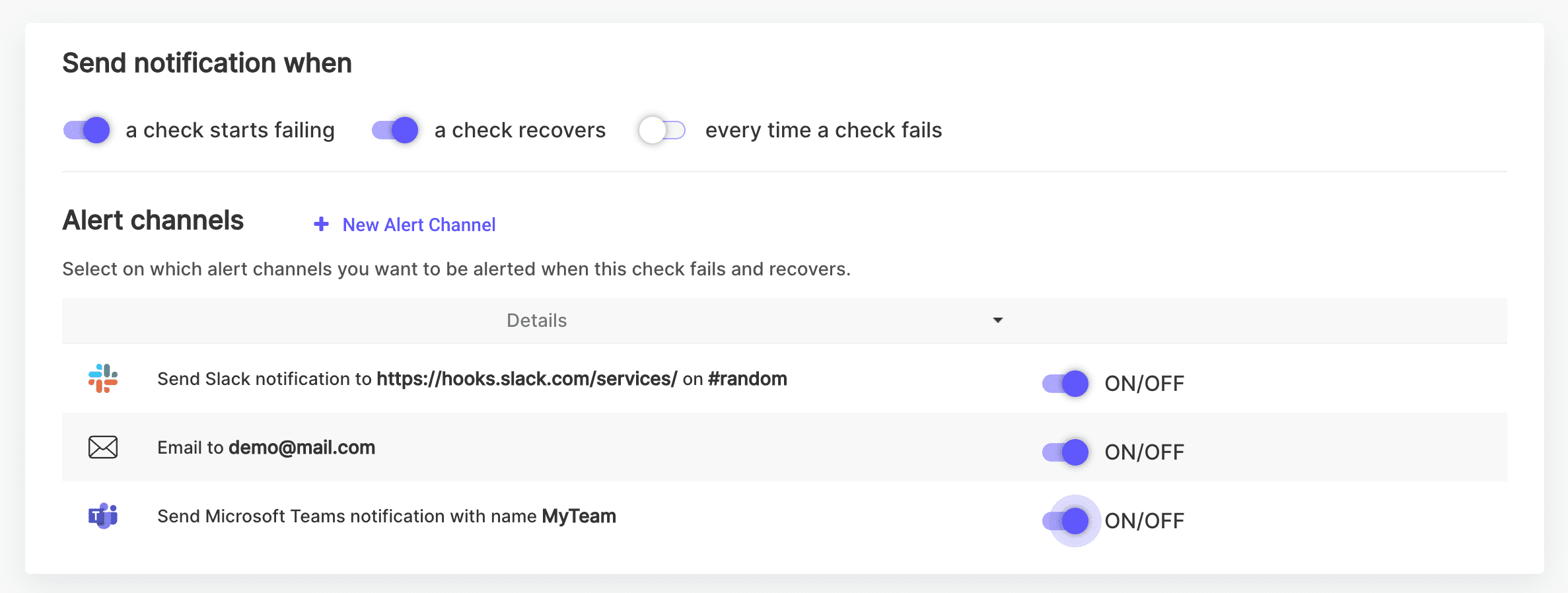
- Select Channels: Choose from the available alert channels where you want to receive notifications. You can set alerts to multiple email addresses, Slack channels, Microsoft Teams channels and/or webhooks.
- Test the Channel: Use the Test button next to each channel to send a sample notification and verify the channel works before you rely on it.
Notification Options
For each API Check, you can configure notifications for the following events:
- A Check Starts Failing: Receive a notification as soon as the API Check detects a failure.
- A Check Recovers: Get notified when the API Check recovers from a failure.
- Every Time a Check Fails: Receive notifications for every failed check occurrence.
- A Check Degrades: Get notified when response times cross the degraded threshold without failing.
- An SSL Certificate Expires Soon: Receive warnings 14, 7 and 3 days before the certificate of a monitored HTTPS endpoint expires, and on the day it expires.
These options help you stay informed about the status of your API checks and ensure you can respond quickly to any issues.
Per-Channel Event Routing
Each enabled channel shows four pills — Fail, Recover, Degraded and SSL — so you can decide which events go where. For example, route failures to PagerDuty via a webhook, recoveries to Slack, and SSL expiry warnings to email only. All events are enabled by default; click a pill to turn that event off for that channel.
Webhook Payload
Webhook channels receive an HTTP POST with a JSON body shaped like:
{"source": "loadfocus","event": "check.failed","check": { "id": "...", "name": "...", "url": "https://..." },"status": "failed","location": "us-east-1","timestamp": "2026-06-07T12:00:00.000Z"}
The event field is one of check.failed, check.recovered, check.degraded, ssl.expiry or test. SSL expiry events include a details object with daysRemaining and validTo. Webhook URLs must use https.
How to Set Notification Preferences
- Toggle Notifications: Use the toggles to enable or disable notifications for each event type.
- Route per Channel: Adjust the event pills under each channel if you want different events on different channels.
- Save Settings: Make sure to save your settings to apply the changes.
Viewing All Alert Channels
You can view and manage all your alert channels from the Alert Channels page. This page provides a comprehensive list of all configured alerts and allows you to make adjustments as needed.
Visit the Alert Channels page to see all your alert channels.
You can also create one without leaving the check editor: click + New Alert Channel in the Alert channels section, fill in the form inline, and the new channel is added to the check already switched on.
Practical Use Cases
- Immediate Action: Receive instant notifications when a critical API fails, allowing you to take immediate action.
- Recovery Monitoring: Be informed when an issue is resolved, ensuring you are aware of your system's status.
- Continuous Monitoring: Set notifications for every failure to continuously monitor the performance and reliability of your APIs.
- Certificate Hygiene: Get SSL expiry warnings before customers see certificate errors — on every plan, including free.
- On-Call Integration: Point a webhook channel at PagerDuty or Opsgenie and route only failures there, keeping recovery and SSL noise out of your incident queue.
By configuring alert channels, you can ensure that you are always informed about the health and performance of your API checks, enabling you to maintain high service levels and quickly address any issues.