Performance Budgets & Alerts
A performance budget is a threshold a metric should stay under. LoadFocus ships Google's recommended budgets and can alert you when a monitor regresses past them.
Recommended budgets
These are the budgets LoadFocus uses out of the box:
| Metric | Recommended budget |
|---|---|
| Largest Contentful Paint (LCP) | 2.5 s |
| Total Blocking Time (TBT) | 200 ms |
| Cumulative Layout Shift (CLS) | 0.1 |
| First Contentful Paint (FCP) | 1.8 s |
| Speed Index | 3.4 s |
| Time to Interactive | 3.8 s |
| Performance score | 90 |
See your budget on the result
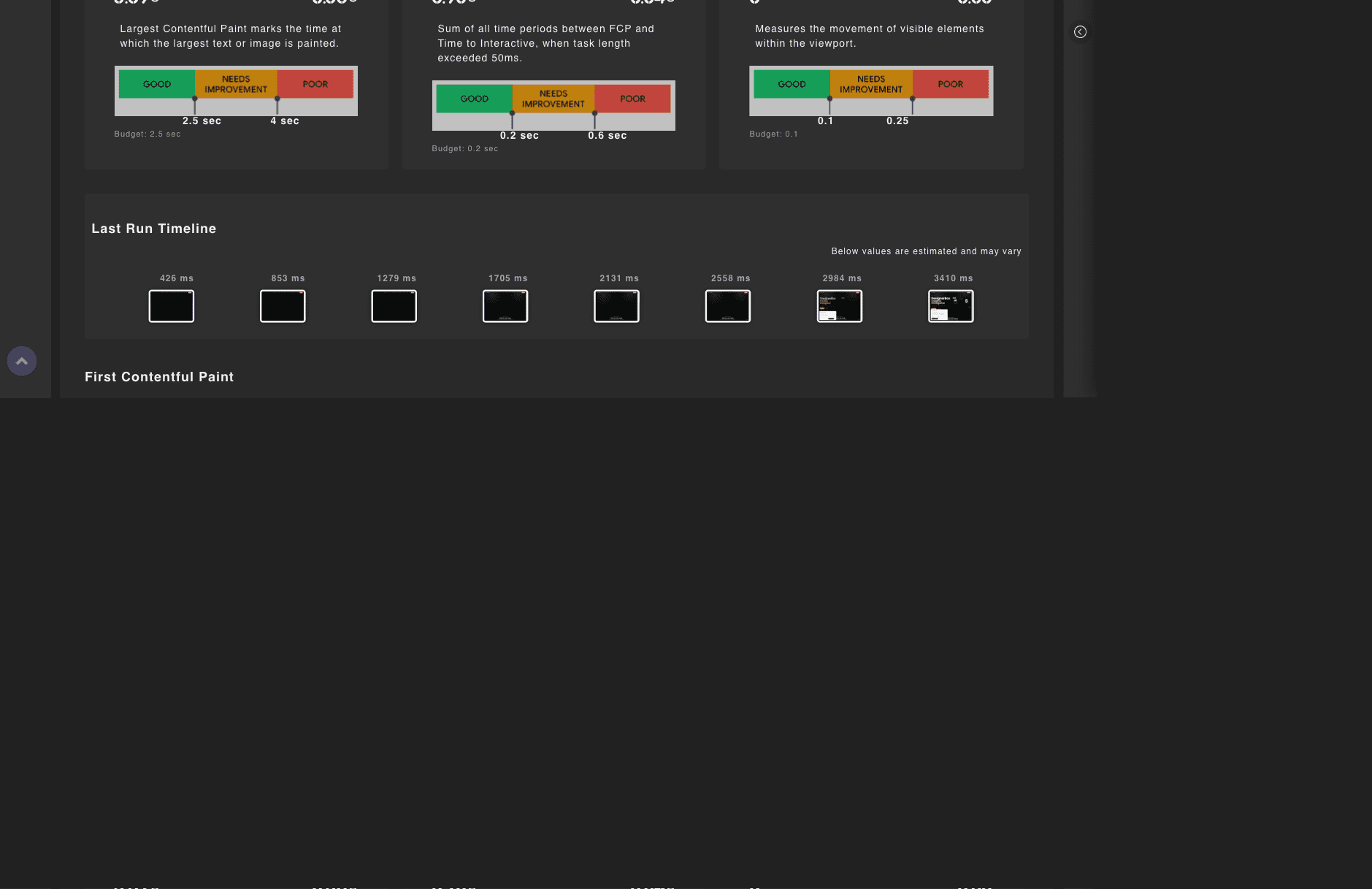
The LCP, TBT and CLS gauges show a "Budget: 2.5 s" target under the value, so you see the target right next to the measurement.
One-click Core Web Vitals budget alerts
From a monitor's alerts, the "Add Core Web Vitals budget alerts" button creates LCP, TBT and CLS alerts at the recommended budgets in one click, skipping any you already have.
How budget alerts fire
When you pick a lab metric in the alert form, the recommended threshold pre-fills, and you can change it. Budget alerts notify you on regression and again on recovery, not on every run, so they are not noisy.