Share Load Test Reports
Overview
Every finished load test can be shared with people outside your LoadFocus team. Clicking Share on a test run creates a public, read-only report page and a live SVG badge you can embed in a README or dashboard. This works for cloud, JMeter and k6 tests on every plan, including the free plan.
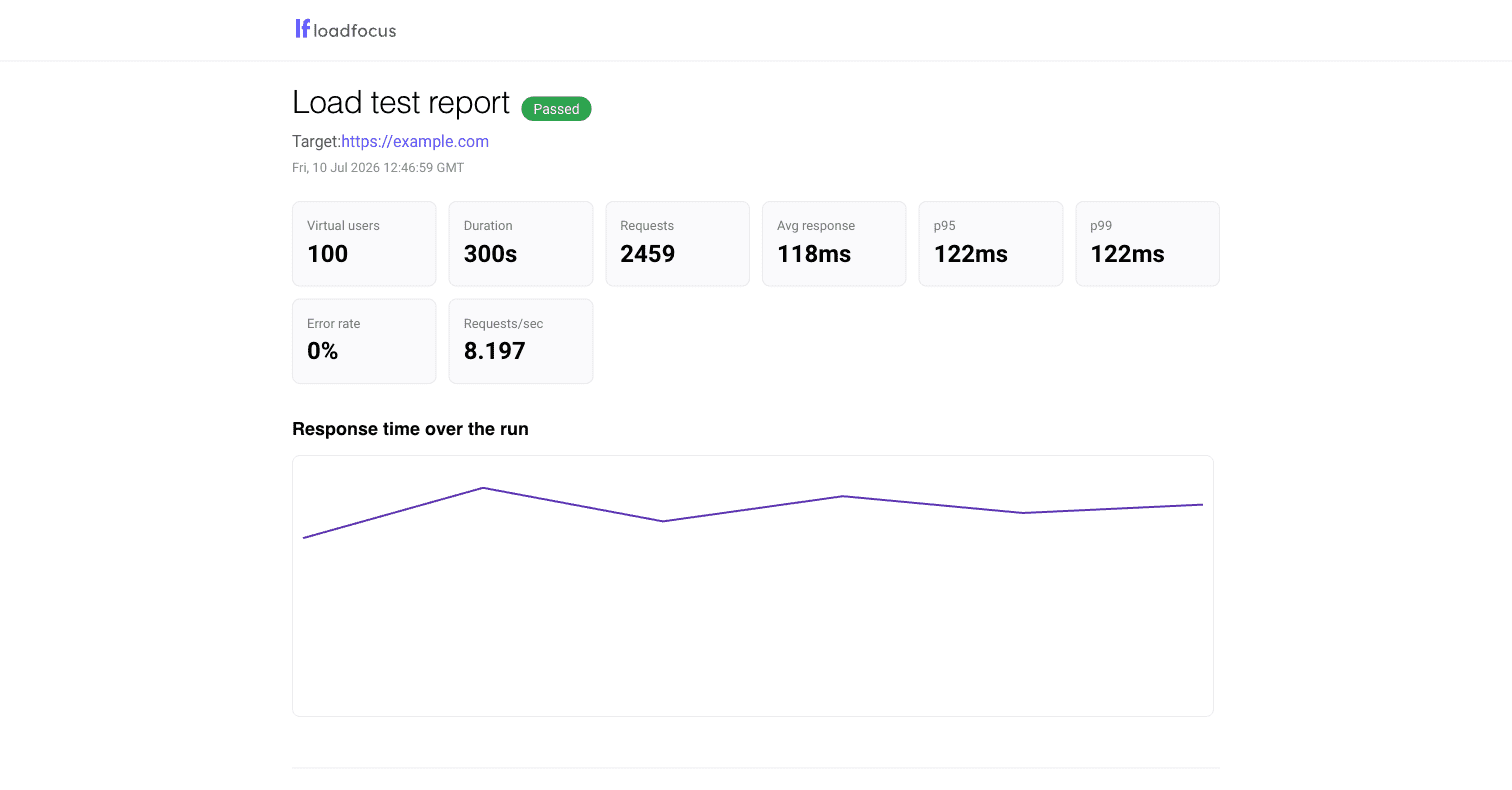
The shared page shows a snapshot of the run:
- the pass or fail verdict, when thresholds are configured
- virtual users, duration, total requests and requests per second
- average, p95 and p99 response times and the error rate
- the response time chart over the run
- Core Web Vitals under load, when the run collected them
Only this snapshot is public. Visitors never see your account, your team, your other tests or any live data, and the page carries a noindex tag so search engines skip it.
Create a share link
- Open a finished test run from Load Tests, JMeter Tests or k6 Tests.
- Click the Share button in the results toolbar.
- Copy the public link, or copy the badge snippet for your README. The dialog shows a live preview of your badge.
Sharing again for the same run refreshes the snapshot and keeps the same link, so badges you already embedded keep working. A new link is only issued after you revoke. Only finished runs can be shared. Each team can create up to 30 share links per day.
The README badge
The badge is a live SVG showing the verdict, the virtual user count and the p95 response time of the shared run:

The share dialog gives you a Markdown snippet like this:
[](https://loadfocus.com/share/YOUR_TOKEN)
Paste it near the top of your README. Anyone reading it sees the site was load tested and how it did, and a click opens the full shared report. The badge turns green with a check when the run passed its thresholds, red with a cross when it failed, and shows plain numbers when no thresholds were set.
Pair it with CI
The badge is most useful when the shared run is fresh. Two common setups:
- Run load tests on a schedule and re-share the latest run after reviewing it. The link stays stable, so the README badge updates without touching the README. See Scheduled Load Tests.
- Gate your pipeline with pass/fail thresholds and share the run your release was validated against. See Pass/fail thresholds for the CI verdict gate.
Revoke a share link
Open the same test run, click Share, then Revoke link. The public page stops resolving immediately and the badge switches to an unavailable state. Sharing the run again later creates a fresh link; the old one stays dead.
Good to know
- The target URL of the test is shown on the shared page. If you do not want to reveal it, revoke the link.
- Share links use long random tokens that cannot be guessed or enumerated.
- Read-only team members cannot create share links; you need write access to the load testing service.
- Building AI agents or automation? See the agent overview at loadfocus.com/agents.md.