Alert Metrics
When you create a new alert for a website performance monitor, you pick one metric from the test result to watch, along with when you want to get notified. Here is the full list of metrics you can choose from.
Full list of metrics used for alerts:
Score Metrics
- Performance Score
- PWA Score
- SEO Score
- Accessibility Score
- Best Practices Score
Performance Metrics
Core Web Vitals
- Largest Contentful Paint (LCP)
- First Input Delay (FID)
- Cumulative Layout Shift (CLS)
- First Contentful Pain
- Speed Index
- Time to Interactive
- Total Blocking Time
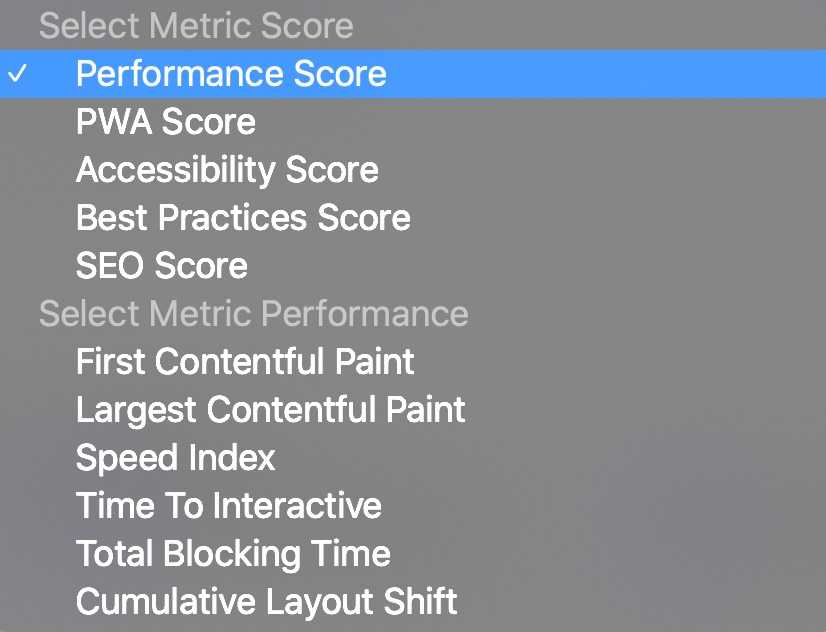
Score Metrics vs Performance Metrics
The Score Metrics are five Lighthouse-based scores, each on a 0-100 scale, that summarize a whole category of checks into a single number. They're the fastest way to catch a regression: if your Performance Score drops from 92 to 61 overnight, something changed, even before you know exactly what.
The Performance Metrics are the individual timing and stability numbers behind that Performance Score, including the three Core Web Vitals Google uses as part of its page experience signals. Alerting directly on one of these, rather than only on the overall score, lets you catch a narrower regression, for example a Cumulative Layout Shift spike from a new ad slot, even if the rest of the page stays fast enough to keep the Performance Score looking fine.
Choosing Which Metric to Alert On
- For a general early-warning signal, alert on Performance Score. It moves whenever LCP, Total Blocking Time, Speed Index, or the other inputs get noticeably worse.
- If you care about a specific ranking factor, alert on Largest Contentful Paint directly, since it is usually the Core Web Vital most likely to slip into "needs improvement" or "poor" first.
- If you ship marketing pages or blog content, watching SEO Score or Accessibility Score catches regressions, like missing alt text or broken meta tags, that the Performance Score won't reflect.
- If you're chasing a slow checkout flow or a heavy third-party script, Total Blocking Time and Time to Interactive tend to move before the overall score drops.
You can attach more than one alert to the same monitor, so a common setup is a Performance Score alert as a general tripwire, alongside one or two metric-specific alerts for whatever you're actively working on.