Key takeaways
- Continuous performance testing (CPT) means load tests run automatically as part of delivery, on every pull request, on a schedule and before release, instead of once before launch.
- Run a short smoke-level load test on each change and keep long stress and soak tests for nightly or pre-release runs.
- Make thresholds fail the build. A test that only produces a report gets ignored.
Continuous performance testing is the practice of running automated performance tests throughout development, so a regression shows up days after the commit that caused it rather than weeks later in production. It is an opinion piece in one sense: I think a single performance sign-off before release is too late for most teams. But the useful part is not the slogan, it is deciding which tests run when, and what makes a build fail. That is what this post covers.
What is continuous performance testing?
Continuous performance testing runs load tests from your CI/CD pipeline or a scheduler, compares the result with fixed limits or a previous baseline, and reports pass or fail without anyone launching a test by hand. A late-stage test still finds problems, but by then the change that caused one is buried under weeks of other commits, and a design flaw is expensive to undo. A test run on every merge points at a handful of commits.
It does not mean running every test on every commit. A 4-hour soak test on each pull request would make the pipeline unusable, and a pipeline people bypass is worse than none.
Which performance tests should run continuously?
Match the test to the trigger, based on how long it takes and how much environment it needs:
| Test | Trigger | Typical length | Why |
|---|---|---|---|
| Smoke / baseline load test on key endpoints | Every pull request or merge | 1 to 5 minutes | Catches an obvious slowdown or new errors fast |
| Load test at expected peak | Nightly, or on merge to main | 15 to 30 minutes | Compares p95 and error rate with the last good run |
| Spike test | Weekly, or before a launch or campaign | 10 to 20 minutes | Checks behaviour under a sudden surge, which can disturb a shared staging environment |
| Stress test | Before a major release | Up to an hour | Finds the breaking point, needs a production-like environment |
| Soak test | Weekly or before a release, in isolation | Hours | Exposes memory leaks and slow degradation |
The lengths are starting points to adjust, not rules. The principle is that the fast test earns the right to run on every change and the slow ones run on a clock.
How do you fail a build on performance?
Pick the pass criteria in advance, express them as thresholds, and let the test tool return a non-zero exit code when they are broken. In k6, thresholds live in the script’s options and are written as an aggregation, an operator and a value. If any threshold fails, k6 exits with a non-zero code, which fails a CI job (checks do not affect the exit status, so put the limit in a threshold, or add a threshold on the checks metric):
import http from 'k6/http';
import { check } from 'k6';

export const options = {
  vus: 10,
  duration: '1m',
  thresholds: {
    http_req_failed: ['rate<0.01'],   // under 1% errors
    http_req_duration: ['p(95)<500'], // 95% of requests under 500 ms
  },
};

export default function () {
  const res = http.get('https://staging.example.com/api/products');
  check(res, { 'status is 200': (r) => r.status === 200 });
}
The 500 ms figure is a placeholder: set yours from your own baseline or service level objective, using a percentile rather than the average (see why percentiles beat averages). Add abortOnFail in a long-format threshold if you want the run to stop as soon as a limit is broken.
Running it on every pull request with GitHub Actions uses Grafana’s setup and run actions:
name: performance-smoke
on:
  pull_request:
jobs:
  k6:
    runs-on: ubuntu-latest
    steps:
      - uses: actions/checkout@v4
      - uses: grafana/setup-k6-action@v1
      - uses: grafana/run-k6-action@v1
        with:
          path: ./tests/smoke.js
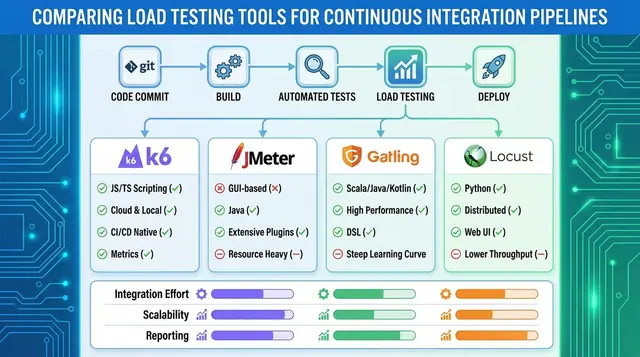
path takes a glob for one or more scripts, and a failed threshold fails the step. The action names and versions come from the setup-k6-action and run-k6-action READMEs; check them for current inputs such as flags and fail-fast. For JMeter, run it in non-GUI mode, jmeter -n -t plan.jmx -l results.jtl -e -o report (the report folder must not exist or be empty), and fail the job by parsing the results file with your own check, because JMeter’s exit code should not be relied on to report slow or failed samples. More on wiring this up is in CI/CD best practices and integrating performance testing into DevOps toolchains.
What makes continuous performance tests reliable?
Three things decide whether people trust the signal:
- A stable target. Compare like with like: the same staging size, the same data volume, no other test running at the same time. A 30% swing caused by a noisy neighbour trains the team to ignore failures.
- Realistic but small scenarios. Test the two or three flows that make or lose money (login, search, checkout), not the whole site, so the run stays short.
- Thresholds you can defend. Start loose, tighten as the numbers settle, and review them when the architecture changes. A gate that fires on every other build gets disabled.
A CI runner also generates load from one place and with limited CPU, so a heavy test belongs on cloud load generators rather than the build agent. Expect some run-to-run variance and compare against the median of recent runs, not one number.
Where does LoadFocus fit?
LoadFocus runs JMeter and k6 load tests from 25+ cloud regions, which keeps the load generation off your CI agent. Per its docs, you can set pass/fail thresholds on a test (max P95, max P99, max error rate, min throughput), read the PASS or FAIL verdict through an API, and use the documented GitHub Action or Jenkins plugin to fail a pipeline step when a threshold is breached. Paid plans can also schedule a test daily, weekly or monthly, with an email to the owner when a run fails its thresholds or does not complete. See the pass/fail thresholds guide, the scheduled load tests guide and the CI/CD integration docs.
Is continuous performance testing overkill for a small team?
For a small app with light traffic, a nightly 10-minute test and one smoke test per pull request is plenty, and costs little. The honest objection is maintenance: scripts break when the API changes, and someone has to own them. If nobody will, start with scheduled runs on two endpoints rather than a pipeline gate nobody maintains. The cost of the first slow release you did not catch is usually higher, but that is a judgement about your own risk, not a figure this post can supply.
How do you know it is working?
Track a few things you can measure yourself: how long it takes from a regression being merged to the pipeline flagging it, how many performance incidents reach production per quarter, how often the gate fails and how often it is a false alarm, and how long a test run takes (if it creeps past the point where developers wait for it, they will skip it). Review them after a quarter and adjust.
Frequently Asked Questions
What do I need to set up continuous performance testing in CI/CD?
A versioned test script, a stable test environment, a tool that can run from the command line or an API (k6, JMeter or a cloud service), thresholds that return a non-zero exit code, and a trigger such as a pull request or a schedule. Start with one script and one threshold.
Is continuous performance testing just running load tests more often?
Running them more often is part of it. The difference is that the result is automatic and compared with a limit, so a regression blocks or flags a change without anyone reading a dashboard.
Which tests can run on every commit?
Short smoke-level load tests on a few key endpoints, a minute or a few minutes long. Stress, spike and soak tests take longer and use more environment, so schedule them nightly, weekly or before a release.
How do I avoid false alarms?
Keep the environment stable, compare with the median of recent runs instead of a single number, use percentiles, and set thresholds from a measured baseline. Review failing gates promptly: a gate that is often red for no reason will be turned off.
Can I use JMeter instead of k6?
Yes. Run JMeter in non-GUI mode in the pipeline and fail the job by parsing the results file. k6’s built-in thresholds make the pass/fail step shorter, which is one reason the two are often compared in k6 vs JMeter.
Sources
- k6 thresholds and exit codes: Grafana k6 docs, Thresholds (October 2026)
- k6 GitHub Actions: grafana/setup-k6-action and grafana/run-k6-action READMEs (October 2026)
- JMeter non-GUI mode: JMeter user manual, Getting Started (October 2026)
- LoadFocus pass/fail thresholds, scheduling and CI/CD integration: loadfocus.com/docs guides and loadfocus.com/index.md (October 2026)
Published with PostNext