
AI performance testing tools today do two jobs reasonably well: they draft test scripts from a plain-language description or an API definition, and they summarise results into a list of likely bottlenecks. They do not decide what your users do, they do not replace a baseline, and what they draft still needs a human review before it runs. This page replaces an earlier “news analysis” version that carried no news and no sources; it now describes what named tools say about their own AI features, each checked against its own pages on 2026-10-23.
Key Takeaways
- The two proven uses are script drafting and result summarising. Both save time; neither removes the need to check the output.
- Claims of “predictive failure” or self-driving load tests are marketing until a vendor shows how they work. None of the tools below documents it.
- Ask where your scripts, results and credentials go: some assistants call an external model provider.
- Judge a tool by workflow fit: does it speak your script language (k6, JMeter, Gatling), run in your pipeline, and let you edit what the AI wrote?
What Does AI Do in Performance Testing Today?
Performance testing has four stages: design the scenario, write the script, run the load, and read the results. AI helps with the second and fourth. The first stays human, because only your team knows which journeys matter and what a good response time is. The third is infrastructure, not intelligence.
| Stage | What AI does today | What stays with you |
|---|---|---|
| Scenario design | Suggests common flows from an API spec or description | Which journeys matter, target load, pass criteria |
| Script writing | Drafts a k6, JMeter or Gatling script | Auth, test data, correlation, review before running |
| Running the load | Nothing special | Generators, regions, ramps |
| Reading results | Summarises bottlenecks and suggests next steps | Verifying the cause, deciding what to fix |
Which AI Performance Testing Tools Exist?
The list below only includes tools whose own pages describe the AI feature. Competitors and open-source projects are named as text, with what each does well; check each vendor’s page for current plans and limits.
Grafana k6. Grafana Assistant has a “k6 Script Authoring” mode in Grafana Cloud that generates k6 scripts from a plain-language description, from your observability data (it queries telemetry for real endpoints and traffic patterns), or from an existing script, including conversion of Postman collections and curl commands. Generated scripts include URL grouping, checks and thresholds. The docs tell you to treat the result as a draft: look for // TODO: markers and review before running. The mode needs Grafana Assistant enabled in a Grafana Cloud instance (grafana.com/docs/grafana-cloud/testing/k6/author-run/k6-script-authoring-mode/, 2026-10-23). The k6 docs also describe an MCP server with a generate_script prompt for your own AI tools, and its repository is described as experimental (grafana.com/docs/k6/latest/set-up/configure-ai-assistant/tools-prompts-resources/, via search result, 2026-10-23).
Gatling. Gatling describes an AI assistant that scaffolds or adapts simulations inside the IDE, generates a first baseline from API definitions or existing scripts, and helps explain results across runs. Its own wording on control is useful: “Engineers always own the final simulation”, and it “does not use AI to hide logic or auto-run tests autonomously” (gatling.io/blog/gatling-ai-performance-testing, 2026-10-23).
Azure Load Testing. Microsoft’s overview page describes a managed service that runs Apache JMeter and Locust tests, a quick test created from a URL for which the service generates a script automatically, CI/CD integration and pass/fail criteria. It does not describe AI features on that page, so claims that it uses AI to parameterise or correlate recorded journeys, which an earlier version of this post made, are not supported and were removed (learn.microsoft.com, What is Azure Load Testing, 2026-10-23).
LoadFocus. “Create with AI” turns a plain-English description into a k6 or JMeter script. You can read and edit it, check it for problems, run a single-user smoke test and have AI fix issues before the full load run. After a run, an AI performance summary describes bottlenecks, with allowances per 30 days of 3 analyses on Free, 5 on Starter and Basic, 10 on Essential, 50 on Pro and 100 on Enterprise (loadfocus.com/load-testing and loadfocus.com/ai-load-test-analysis, 2026-10-23). The main-site overview also lists an MCP server that lets AI assistants run load tests, check page speed and monitor APIs (loadfocus.com/index.md, 2026-10-23). See LoadFocus load testing and AI load test analysis.
How Reliable Is an AI-Written Load Test?
Reliable enough as a first draft, not as a finished test. Generated scripts tend to get the happy path right and miss the parts that depend on your system: login and token refresh, unique test data per user, dynamic values that must be extracted from one response and sent in the next, and think times that match real users. Each vendor above says to review the output, and the practical rule is the same as for any code: run one virtual user first, read the requests, and check that the responses are real successes and not 200-status error pages. Scripts also drift as the application changes; keeping AI-generated load test scripts maintained covers that.
What Should You Check Before Adopting One?
- Output format. Does it produce a script in a tool you already run (k6, JMeter, Gatling), or a proprietary format that locks you in?
- Editability. Can you read and change every request, assertion and data source?
- Data handling. Does the assistant send your scripts, URLs or results to a third-party model provider? Ask every vendor this question and get the answer in writing.
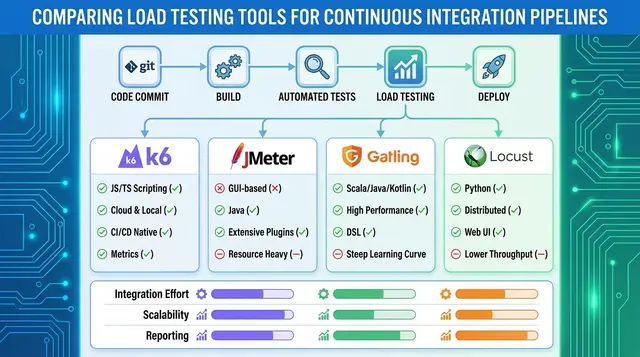
- Pipeline fit. Can the generated test run in CI and fail a build on a threshold? See load testing in CI/CD tools compared.
- Analysis you can verify. A summary that points at a metric you can open and check is useful; one that states a cause without evidence is a guess.
- Cost model. Note whether AI features have per-plan allowances, as LoadFocus lists, and whether they cost extra elsewhere.
Is AI Replacing Performance Test Engineers?
No evidence on the vendor pages above points that way. They position the AI as a drafting and explaining aid with the engineer in charge. The work that remains is the work that was always hard: realistic user behaviour (how to model it), a test environment that resembles production, and reading results critically. For how AI-written scripts compare with hand-written ones, see scripted vs AI-driven load testing, and for the broader picture, how AI is transforming automated load testing.
Frequently Asked Questions
What is AI performance testing?
It is performance testing where AI assists with parts of the work, mostly drafting scripts from descriptions or API definitions and summarising results. The load itself is still generated by ordinary load generators.
Which AI performance testing tools are there?
Examples whose own pages describe AI features are Grafana k6 (Script Authoring in Grafana Assistant), Gatling (an AI assistant for IDEs) and LoadFocus (Create with AI and an AI performance summary). Check each page for current availability, since these features change quickly.
Can AI predict performance failures before they happen?
None of the tool pages checked for this article documents a predictive feature. AI can summarise past results and suggest causes; predicting production failures needs production data and validation that the vendors checked here do not describe.
Do I still need to know JMeter or k6?
Yes. You will review and edit what the AI writes, so you need to read the script language. AI lowers the cost of a first draft, not the need to understand it.
Is it safe to give an AI assistant my API definition or scripts?
It depends on the tool. Ask whether data goes to an external model provider, whether it is retained, and whether you can choose the provider. Never paste real credentials into any assistant.
How do I start?
Pick one real journey, such as login and search. Have the tool draft the script, run it with one user, fix what it got wrong, then ramp up. Compare the AI summary with the raw percentiles before you trust it.
Sources
- Grafana Labs, k6 Script Authoring mode (grafana.com/docs/grafana-cloud/testing/k6/author-run/k6-script-authoring-mode/, read 2026-10-23).
- Gatling, how the Gatling AI assistant supports performance testing (gatling.io/blog/gatling-ai-performance-testing, read 2026-10-23).
- Microsoft Learn, What is Azure Load Testing (learn.microsoft.com/azure/app-testing/load-testing/overview-what-is-azure-load-testing, page updated 2026-06-11, read 2026-10-23).
- LoadFocus, load testing, AI load test analysis and overview pages (loadfocus.com, read 2026-10-23).