




Load testing for web applications
Built for developers.

Find the request that falls over before your users do. Point LoadFocus at your application, pick the regions your traffic comes from, and get percentile response times, error rates and throughput without standing up any infrastructure.


The bottleneck is never where you expect

A local benchmark tells you how fast one machine answers one request. It does not tell you which query serialises under 500 concurrent users, which connection pool exhausts first, or which third-party call times out only under load. Concurrency is what surfaces those, and concurrency is the one thing a laptop cannot fake.


How it fits your workflow

Start from what you already have

Import a cURL command, a HAR capture, a Postman collection or an OpenAPI spec. LoadFocus turns it into a runnable test instead of making you rebuild every request by hand.

Run it where your users are

Choose from 25 cloud regions and run the same test from several at once, so per-region latency is measured rather than assumed.

Compare against the last run

Every run is stored and comparable. A regression shows up as a difference against a baseline instead of a number you were supposed to remember.


Where to go next


Load testing for developers: FAQ

What is load testing for a web application?

Load testing sends concurrent simulated traffic at your application and measures how response times, error rates and throughput change as that concurrency rises. It answers how many users the system serves before it degrades, and what gives way first.

How many virtual users should I test with?

Start from your real peak concurrency rather than a round number, then push past it. The useful test is the one that finds where the system stops coping, so raise the load until something degrades.

Can I run a load test without writing a script?

Yes. Import a cURL command, HAR file, Postman collection or OpenAPI spec and LoadFocus builds the test from it. You can edit the generated test before you run it.

Where do the load generators run?

From 25 cloud regions, and a single test can run from several regions at once so you see what each region actually experiences.

How do I tell a real regression from noise?

Compare against a stored baseline run rather than a remembered number, and read percentiles rather than averages. An average hides the slow tail, which is exactly the part users notice.

Is there a free plan?

Yes. You can run a load test for free without a credit card. The pricing page lists what each plan includes.

Learn more. Read on our blog.

Outgrown your testing tools?

Load test websites and APIs from 25+ cloud regions, monitor page speed and uptime, and get AI analysis that explains your results in plain English.Start for free
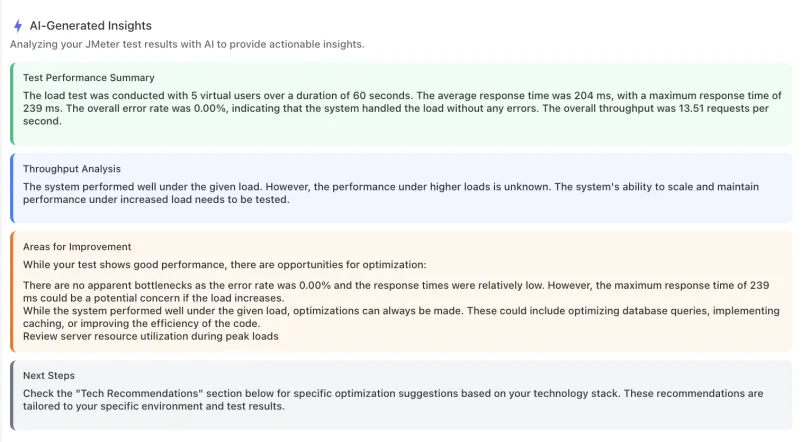
AI analysis of a load test result: performance summary, throughput analysis, and recommended improvements in plain English

We'll help you get started

Browse use cases, getting started videos, tutorials, and our showcase to find what you need to succeed with LoadFocus, and as a business.

Learn

Browse our documentation covering everything from use cases to getting started guided and videos.

Explore

Tools to make your testing development and overall experience much better.


A newsletter that sparks joy

Get notified about our upcoming features and articles.


×