




Testing for chat and realtime apps
Connections, not page views.

Realtime applications fail differently. The load is concurrent connections rather than requests, and the thing that breaks is often a port or a limit rather than a page. LoadFocus covers both halves.


Request-per-second is the wrong unit

A chat backend does not serve pages, it holds connections open. That shifts the pressure onto file descriptors, connection pools and the network layer, none of which a page-oriented test exercises. The result is a system that passes its load test and dies in production.


Covering both failure modes

Watch the port directly

TCP monitors confirm a port is open and accepting connections, which is a more honest signal for a realtime service than fetching an HTTP health page.

Load the API path

The parts around the socket, authentication, history, presence, are ordinary HTTP and can be loaded conventionally. They are also frequently what actually falls over.

Alert on the connection, not the symptom

Route port and API failures to your on-call channel, with retries so a momentary network fault does not page anyone.


Where to go next


Realtime app testing: FAQ

Can I monitor a WebSocket endpoint?

A TCP monitor confirms the port accepts connections, which catches the common failure of the service being unreachable. The HTTP endpoints around it can be checked conventionally.

What limits usually bite first?

File descriptor limits and connection pool sizes, because both are per-process ceilings that a request-oriented test never approaches.

How do I test authentication for a realtime service?

Multistep API checks chain requests, so a token can be obtained in one step and used in the next, mirroring how a client actually connects.

What does a TCP monitor report?

Whether the port accepted a connection and how long that took, from each region you selected.

Learn more. Read on our blog.

Outgrown your testing tools?

Load test websites and APIs from 25+ cloud regions, monitor page speed and uptime, and get AI analysis that explains your results in plain English.Start for free
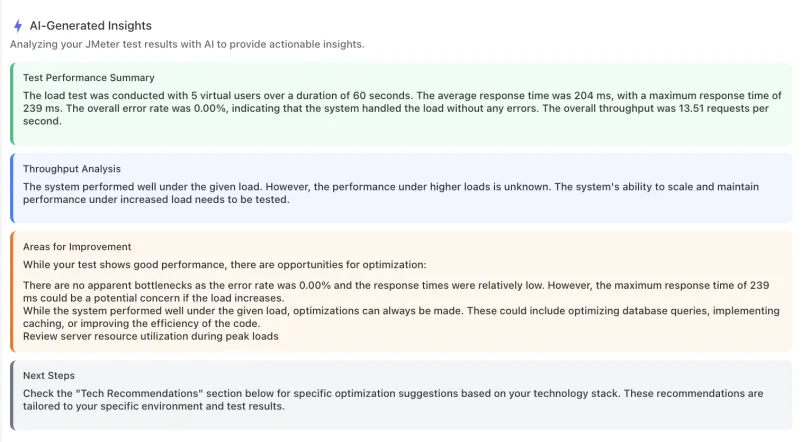
AI analysis of a load test result: performance summary, throughput analysis, and recommended improvements in plain English

We'll help you get started

Browse use cases, getting started videos, tutorials, and our showcase to find what you need to succeed with LoadFocus, and as a business.

Learn

Browse our documentation covering everything from use cases to getting started guided and videos.

Explore

Tools to make your testing development and overall experience much better.


A newsletter that sparks joy

Get notified about our upcoming features and articles.


×