
JMeter’s XPath Extractor is a post-processor that runs an XPath query against a response and saves the result in a variable, which later requests use as ${name}. Since JMeter 5.0 the manual recommends the XPath2 Extractor instead, for easier namespace handling, better performance and XPath 2.0. To add one, right-click the sampler, choose Add > Post Processors > XPath2 Extractor, and fill in the variable name, the query and a default value.
Key takeaways
- Use the XPath2 Extractor for XML, SOAP and RSS responses. The older XPath Extractor still exists, but the manual has pointed to XPath2 since JMeter 5.0.
- A namespaced response needs a
prefix=URIline in Namespaces aliases list, or alocal-name()query. Without either, the extractor returns your default value. - For HTML, use the CSS Selector Extractor. In our test, XPath2 could not parse an ordinary HTML5 page at all.
- An extractor that finds nothing does not fail the sample. Use a recognisable default such as
NOTFOUNDand assert on it.
Which JMeter extractor should you use?
| Response type | Extractor | Example query |
|---|---|---|
| XML, SOAP, RSS | XPath2 Extractor | //order/@id |
| XML with namespaces | XPath2 Extractor plus a namespace alias | //ns2:orderId with ns2=http://example.com/orders |
| HTML | CSS Selector Extractor | input[name=csrf_token], attribute value |
| HTML, if it must be XPath | XPath Extractor with Use Tidy ticked | //input[@name='csrf_token']/@value |
| JSON | JSON Extractor | $.order.id |
Every result in the table comes from the test described below, run with JMeter 5.6.3 on Java 17 against a local server in October 2026, except the JSON row, which is the JSON Extractor’s own syntax.
How to add an XPath2 Extractor in JMeter
Add the extractor as a child of the sampler whose response holds the value. JMeter runs post-processors after their sampler, so the variable exists from the next sampler on; the execution order of JMeter elements explains the rules when several are in scope.
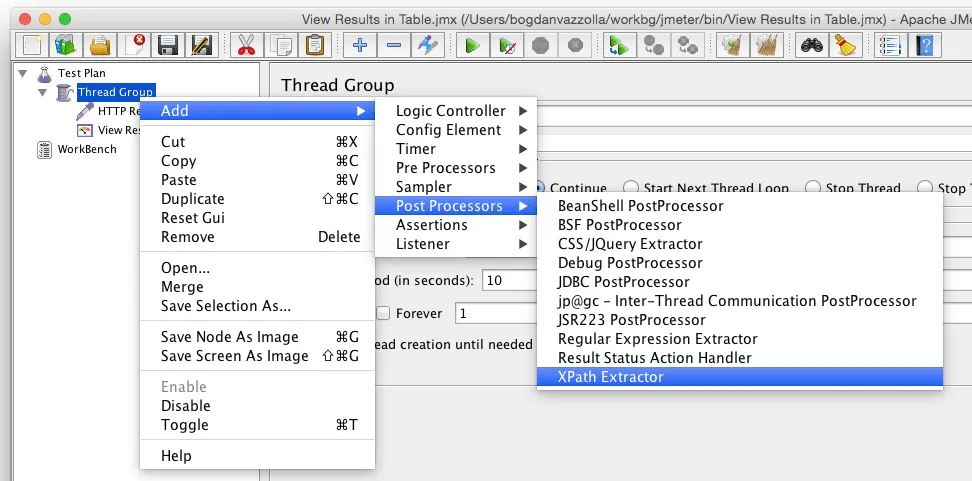
- Right-click the HTTP Request (or other sampler) in the tree.
- Choose Add > Post Processors > XPath2 Extractor. The screenshot below is from JMeter 2.11; in 5.6 the same submenu lists both XPath2 Extractor and XPath Extractor.
- Fill in the fields described next, then run the plan once with a View Results Tree to check the value.
The fields that matter, as the component reference defines them:
- Apply to: leave it on Main sample only unless the sampler downloads embedded resources and the value is in one of those.
- Name of created variable: the JMeter variable to fill, for example
orderId. Use it later as${orderId}. - XPath query: an XPath 2.0 expression. It can return more than one match.
- Match No.:
1for the first match,0for a random one (the field’s default),-1for all of them. - Default Value: what the variable holds when nothing matches. Pick a value you will notice, such as
NOTFOUND. - Return entire XPath fragment instead of text content?: ticked,
//titlereturns<title>...</title>instead of the text. - Namespaces aliases list: one
prefix=namespace-URIline per namespace the query uses.
Example: extract an order id from an XML response
Say a request returns this XML and the next request needs the order id:
<?xml version="1.0" encoding="UTF-8"?>
<orderResponse>
  <order id="A-1042" status="confirmed">
    <item sku="SKU-1" qty="2"/>
    <item sku="SKU-7" qty="1"/>
  </order>
  <token>9f8e7d6c</token>
</orderResponse>
Set the XPath2 Extractor to variable orderId, query //order/@id, Match No. 1, default NOTFOUND. In the next HTTP Request, put the variable in the Path field: /order/${orderId}. The Server Name or IP field takes only the host name. The first version of this post put www.example.com/${var1} in the server name, and that request failed.
What our run produced:
| Query | Match No. | Variables set |
|---|---|---|
//order/@id | 1 | orderId = A-1042 |
count(//item) | 1 | itemCount = 2 |
//item/@sku | -1 | allSkus_matchNr = 2, allSkus_1 = SKU-1, allSkus_2 = SKU-7 |
The next request went to /order/A-1042 and returned 200. The second row shows that XPath functions work too, not only paths to elements. The third shows the naming scheme for Match No. -1, which is what a ForEach Controller loops over. Values that change on every run, such as ids and tokens, are what extractors are for; extracting a login token from a response shows the same idea with a JSON or regular expression extractor.
How to use namespaces in the XPath2 Extractor
SOAP and many enterprise XML APIs put elements in a namespace. A query with a prefix the extractor does not know returns the default value:
<soap:Envelope xmlns:soap="http://schemas.xmlsoap.org/soap/envelope/">
  <soap:Body>
    <ns2:CreateOrderResponse xmlns:ns2="http://example.com/orders">
      <ns2:orderId>A-2077</ns2:orderId>
    </ns2:CreateOrderResponse>
  </soap:Body>
</soap:Envelope>//ns2:orderIdwith an empty aliases list gaveNOTFOUND, andjmeter.logshowedNamespace prefix 'ns2' has not been declared.- The same query with
ns2=http://example.com/ordersin Namespaces aliases list gaveA-2077. //*[local-name()='orderId']gaveA-2077with no alias at all. It is shorter to set up and matches the element in any namespace, which is a risk when two namespaces use the same element name.
The old XPath Extractor handles namespaces differently: a Use Namespaces checkbox that only recognises namespaces declared on the root element, plus a properties file for extra prefixes. That difference is one of the reasons the manual moved users to XPath2.
Can the JMeter XPath Extractor read HTML?
Only with help, and the manual advises against it: “For HTML, CSS Selector Extractor is the correct and performing solution. Don’t use XPath for HTML extractions.” XPath needs a well-formed XML document, and most HTML5 pages are not one: lowercase <!doctype html>, unquoted attributes and unclosed <meta> or <input> tags are all valid HTML and invalid XML.
We ran four extractors against the same small HTML5 checkout page to read the hidden csrf_token field:
| Extractor | Setting | Result |
|---|---|---|
| XPath2 Extractor | //input[@name='csrf_token']/@value | NOTFOUND (parse error in jmeter.log) |
| XPath Extractor | same query, Use Tidy off | NOTFOUND (parse error in jmeter.log) |
| XPath Extractor | same query, Use Tidy on | abc123 |
| CSS Selector Extractor | input[name=csrf_token], attribute value | abc123 |
The log line for the first two was The markup in the document preceding the root element must be well-formed. Use Tidy converts the HTML to XHTML before the query runs, which is why the old extractor got there. The CSS Selector Extractor parses HTML as HTML, needs no conversion and reads more naturally for forms and links. The screenshot below shows the XPath Extractor with Use Tidy ticked, as this post’s 2016 example used it.
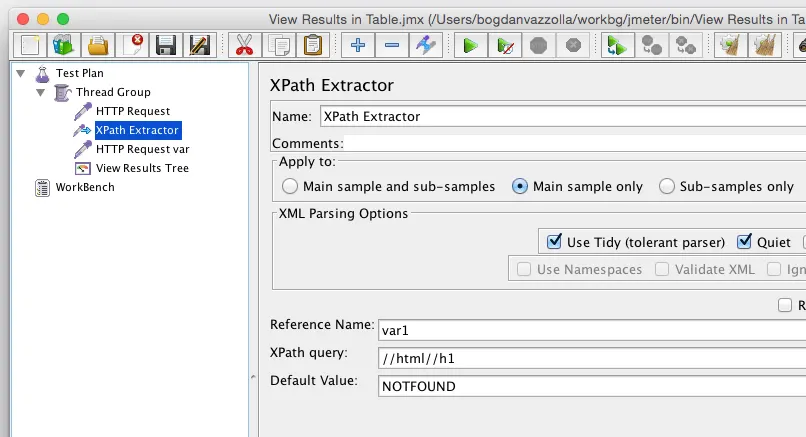
That 2016 example read the <h1> of example.com with //html//h1. The page has since changed: in October 2026 its HTML has no <h1> at all (the “Example Domain” text sits in <title>), and the page itself asks people not to rely on it for testing. A query like that one now returns the default value, which is the point of the next section.
Why your XPath Extractor returns the default value
Every failed extraction in our tests left the sample green: all four requests returned 200 and passed, while several variables held NOTFOUND. JMeter only logs a warning. The usual causes, in the order we would check them:
- The response is not well-formed XML (HTML, an error page, or JSON). Check the raw body in View Results Tree.
- A namespace prefix is missing from the aliases list.
- Apply to points at sub-samples while the value is in the main sample, or the reverse.
- Match No. is
0, so a query with several matches returns a random one each time. - The page changed, as example.com did.
To stop a missing value from flowing into later requests, add a Response Assertion that tests the variable (set Apply to to JMeter Variable Name to use) and fails when it equals NOTFOUND. Using assertions in JMeter tests covers the assertion types and their cost under load.
How to test an XPath query before running the plan
View Results Tree has an XPath Tester view: pick it in the renderer drop-down under the sample list, type the query and press Test to run it against the response you just got. That checks the query against exactly what the server sent.
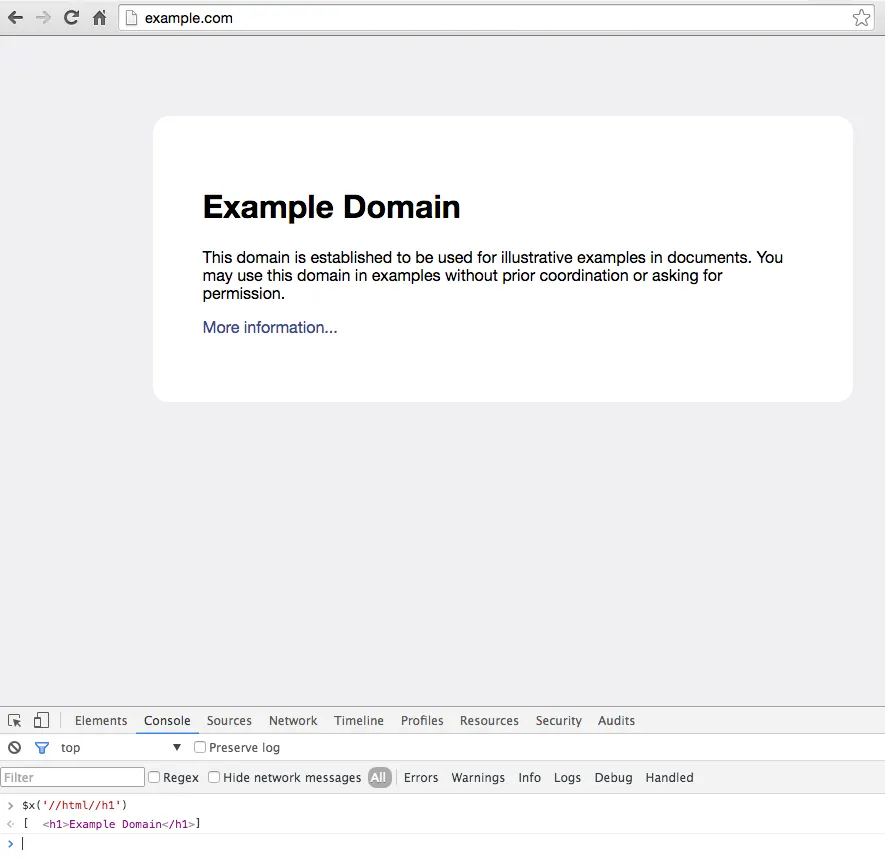
A browser’s console helps too. In Chrome DevTools, $x(path) returns the elements that match an XPath expression, for example $x('//h1'). The browser runs it against the DOM it built after repairing the HTML, though, so a query that works there can still fail in JMeter on the raw response. Confirm it in the XPath Tester. Finding an element’s XPath in Chrome shows the DevTools side in more detail.
Running the plan under load
Extractors run on every sample for every thread, so a plan with many of them costs the load generator CPU. Prefer CSS selectors for HTML and keep queries specific. For the rest of the workflow, from Thread Group settings to the HTML report, follow the JMeter load testing tutorial.
When the plan is ready, LoadFocus runs existing JMeter scripts unchanged in the cloud, from 25 regions, with the plan’s CSV data files uploaded alongside it (loadfocus.com, October 2026). Its free JMeter script validator checks a .jmx file for errors before you upload it.
Frequently Asked Questions
What is the difference between the XPath Extractor and the XPath2 Extractor in JMeter?
The XPath2 Extractor supports XPath 2.0 and its functions, takes namespaces as prefix=URI lines, and is the one the manual recommends since JMeter 5.0 for its performance. The older XPath Extractor supports XPath 1.0, has a Use Tidy option for HTML, and handles namespaces through a checkbox and a properties file.
Why does the JMeter XPath Extractor return NOTFOUND?
Usually the response is not well-formed XML, a namespace prefix is not declared in the aliases list, or the page no longer contains the element. The sample still passes, so check jmeter.log for a parse warning and look at the raw response in View Results Tree.
Can I use the XPath Extractor on JSON?
No. XPath works on XML documents. Use the JSON Extractor, which takes JSONPath expressions such as $.order.id, and test them with the JSON Path Tester view in View Results Tree.
How do I extract all matches with the XPath2 Extractor?
Set Match No. to -1. JMeter then creates name_1, name_2 and so on, plus name_matchNr with the number of matches. A ForEach Controller can loop over them.
Should I use XPath or CSS selectors for HTML in JMeter?
CSS selectors. The JMeter manual says the CSS Selector Extractor is the correct and better-performing choice for HTML, and in our test XPath2 could not parse an ordinary HTML5 page.
Sources
- XPath2 Extractor, JMeter component reference: fields, Match No. values, namespace aliases (jmeter.apache.org, October 2026).
- XPath Extractor, JMeter component reference: “Since JMeter 5.0, you should use XPath2 Extractor”, Use Tidy, “Don’t use XPath for HTML extractions” (jmeter.apache.org, October 2026).
- View Results Tree, JMeter component reference: XPath Tester and JSON Path Tester views (jmeter.apache.org, October 2026).
- Console Utilities API reference, Chrome DevTools:
$x(path)(developer.chrome.com, October 2026). - Extractor results: our own run of JMeter 5.6.3 on Java 17 against a local HTTPS server serving the XML, SOAP and HTML documents shown above, 24 October 2026.