Load Testing Tools: Swiss Army Knife or Precision Instrument?
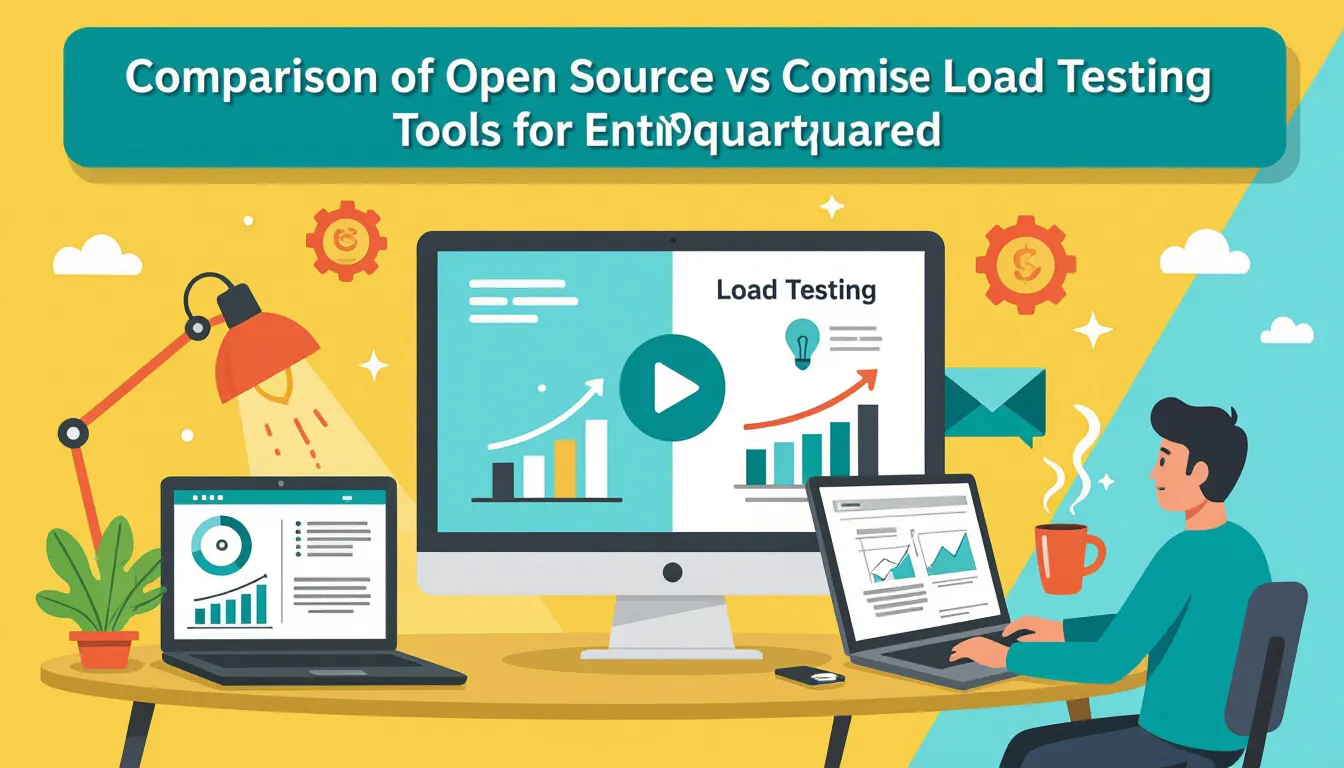
Selecting load testing tools is rarely a matter of picking the most feature-rich option. Instead, it’s about finding the right fit for your team’s skills, workflows, and performance goals. Open source solutions act like a Swiss Army knife: versatile, adaptable, and packed with options for those who know how to use them. Commercial platforms, by contrast, function more like a precision instrument: focused, reliable, and designed to deliver results with minimal friction.
The Stakes for Enterprise Teams
For large organizations, the decision goes far beyond a checklist of features. The right tool can mean reliable performance at scale, while the wrong choice risks missed bottlenecks and wasted engineering effort. When performance issues surface late, customer experience suffers and outages become costly.
Is Your Infrastructure Ready for Global Traffic Spikes?
Unexpected load surges can disrupt your services. With LoadFocus’s cutting-edge Load Testing solutions, simulate real-world traffic from multiple global locations in a single test. Our advanced engine dynamically upscales and downscales virtual users in real time, delivering comprehensive reports that empower you to identify and resolve performance bottlenecks before they affect your users.
Swiss Army Knife: The Open Source Approach
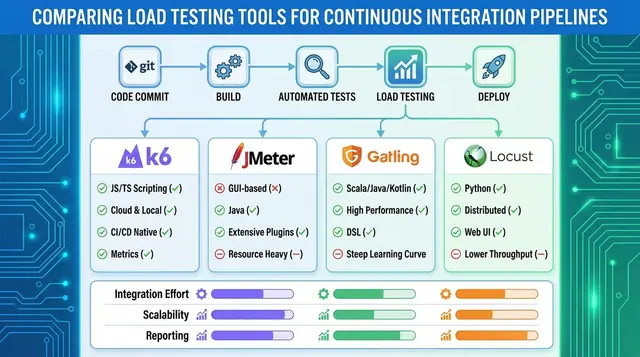
Open source load testing tools – such as Apache JMeter, k6, Gatling, and Locust – appeal to teams seeking flexibility and deep customization. With support for scripting in languages like Java, JavaScript, Python, Kotlin, and Scala, these tools can be tailored to your stack and integrated into CI/CD pipelines. However, this flexibility comes with a steeper learning curve and a heavier lift for teams without strong scripting or infrastructure skills.
The main advantage is the ability to simulate nearly any protocol or traffic pattern. The trade-off is the time and expertise required for setup, configuration, and maintenance.
Precision Instrument: The Commercial Advantage
Commercial platforms, including BlazeMeter and LoadNinja, emphasize streamlined workflows, advanced analytics, and dedicated support. Features like no-code test creation, distributed traffic generation, and AI-powered analysis help teams quickly identify bottlenecks and optimize systems. These tools are designed for speed and reliability, often at a higher price point – BlazeMeter starts at $99/month, while LoadNinja is around $250/month. The investment brings ease of use, actionable insights, and priority support.
Think your website can handle a traffic spike?
Fair enough, but why leave it to chance? Uncover your website’s true limits with LoadFocus’s cloud-based Load Testing for Web Apps, Websites, and APIs. Avoid the risk of costly downtimes and missed opportunities—find out before your users do!
Strategic Impact at Scale
Choosing between open source and commercial tools shapes your approach to system reliability, scalability, and operational efficiency. Open source options excel when you need fine control and integration with developer workflows. Commercial tools deliver when rapid results, comprehensive analytics, and support are essential.
Many enterprises blend both approaches – combining open source flexibility with commercial polish to cover a wider range of testing scenarios. The most effective teams weigh technical fit, internal skills, project demands, and the realities of maintaining performance under pressure.
Side-by-Side Comparison: Open Source vs Commercial Load Testing Tools
Key Decision Dimensions
Selecting load testing tools means balancing priorities: technical depth, cost, ease of use, integration, and support. The table below compares open source and commercial options across six critical areas, based on current industry trends and practitioner experience in 2026.
| Dimension | Open Source Tools | Commercial Tools |
|---|---|---|
| Feature Set | Highly flexible and scriptable. Tools like Apache JMeter, k6, Locust, and Gatling support custom protocols, scripting in Python, Java, or JavaScript, and plugin ecosystems. Real-browser testing and advanced analytics often require add-ons or community extensions. | Rich out of the box: built-in real-browser testing (e.g., LoadNinja), AI-driven analytics, multi-protocol support, and graphical test design. Generally less customizable but packed with turnkey features for speed and breadth. |
| Scalability | Can scale horizontally with custom infrastructure or containers. Distributed test execution is possible but requires setup, networking, and cloud cost management skills. | Cloud scaling with global traffic simulation. Providers like BlazeMeter offer distributed load generation, region selection, and usage-based scaling – ideal for simulating usage spikes across geographies. |
| Integration / CI-CD | Strong support for CI/CD, especially for teams ready to invest in scripting. Native integrations are available for Jenkins, GitHub Actions, and GitLab, but setup can be manual and may require maintaining test infrastructure. | Integration with major CI/CD and observability platforms. Commercial tools like LoadFocus and LoadNinja offer one-click setup, API access, and auto-generated dashboards, saving time for DevOps teams. |
| Support & Updates | Community-driven with active forums and open source updates. Response time and documentation quality vary. Security patches and major releases depend on volunteer contributors. | Vendor support, SLAs, and regular updates. Commercial solutions typically offer knowledge bases, onboarding resources, and direct channels for bug fixes or feature requests. |
| Cost | Free to use, with optional paid cloud tiers (e.g., k6 from $19/month). Costs arise from infrastructure, engineering time, and scaling for large tests. | Subscription or usage-based pricing. Entry-level plans (BlazeMeter at $99/month, LoadNinja at $250/month) scale with feature set and user volume. Higher upfront cost, but lower operational burden for large or mission-critical tests. |
| Learning Curve | Steep for non-developers. Mastery requires scripting and infrastructure skills. Ideal for teams that value control and flexibility. | User-friendly UIs, visual test builders, and guided workflows. Designed for fast onboarding by QA engineers and developers alike, with less initial setup. |
Summary of Differences
Open source load testing tools stand out for flexibility, custom protocol support, and the ability to fine-tune every aspect of your tests. They’re a solid fit for developer-heavy teams managing their own CI/CD and infrastructure, but require more setup and internal support.
LoadFocus is an all-in-one Cloud Testing Platform for Websites and APIs for Load Testing, Apache JMeter Load Testing, Page Speed Monitoring and API Monitoring!
Commercial tools excel in ease of use, built-in analytics, and strong customer support. These platforms handle scaling, security, and maintenance, reducing barriers for teams and accelerating feedback cycles. The tradeoff is a higher recurring cost and sometimes less customizability.
The best choice depends on your team’s expertise, the scale of testing required, and your willingness to maintain internal tools. Many organizations combine both open source and commercial solutions to balance cost, coverage, and speed.
Deep Dive: Strengths of Open Source Load Testing Tools
Open source load testing tools remain essential for enterprises that need control and adaptability. Whether you’re running Apache JMeter with a complex plugin stack, scripting in Gatling’s Scala-based DSL, or using Locust’s Python classes, the defining strength is flexibility. You aren’t limited by vendor roadmaps or licensing tiers, and can adapt testing workflows to your stack and users.
Custom scripting is central to this flexibility. JMeter’s plugin ecosystem allows support for protocols like MQTT or AMQP, or the creation of custom samplers for proprietary APIs. Gatling enables developer-centric teams to describe user journeys in code, supporting granular control over requests and assertions. Locust is favored in Python environments, letting you write load scenarios as regular Python classes and integrate external libraries as needed. Whatever your protocol or language, open source tools can usually be made to fit.
Cost-effectiveness is another key advantage, especially for frequent, large-scale tests. Commercial tools like BlazeMeter and LoadNinja can become expensive as usage grows. Open source tools eliminate most licensing costs, making them attractive for continuous load testing across multiple environments or regions.
Community-driven innovation is also a strength. Active user bases contribute plugins, bug fixes, and scripts, often addressing edge cases quickly. If you encounter a roadblock, you’ll often find solutions on GitHub, Stack Overflow, or official forums. This support network helps teams iterate and troubleshoot without waiting for vendor responses.
Integration with Developer Workflows
Open source tools fit naturally into developer-centric workflows. Load testing is no longer a late-stage QA activity; it’s now integrated upstream. Teams use tools like Gatling and k6 to define “test-as-code” scripts that live in the same repositories as application code. These scripts are versioned, peer-reviewed, and evolve alongside features.
Command-line interfaces and API hooks allow direct integration into CI/CD pipelines. For example, Jenkins or GitHub Actions can trigger load tests automatically with every commit or deployment, catching performance regressions early. Version control enables teams to track how load scenarios evolve with application changes.
Integration isn’t just about automation. Many teams combine load testing with observability platforms (like Prometheus or Grafana), correlating performance metrics with infrastructure data for end-to-end visibility. Because open source tools are open and scriptable, they fit into whatever stack you already use – no need for proprietary connectors.
Customization for Unique Protocols & Traffic Patterns
In enterprise environments, applications often require simulation of WebSockets, custom binary protocols, or hybrid architectures. Commercial tools focus on common cases, but open source load testing tools allow you to craft scenarios for less-common protocols.
JMeter’s plugin model lets you add support for protocols not natively included. Locust’s Python approach enables use of any networking library, making it suitable for simulating IoT device traffic or custom handshake flows. Gatling’s DSL supports advanced logic for user think times, branching, and authentication flows, which is invaluable for realistic, production-like patterns.
The ability to adapt load scripts to specific business scenarios is crucial in sectors like fintech, telecom, or IoT. For example, a payment processor may need to validate peak load on both RESTful APIs and ISO 8583-based messaging. With open source tools, you’re limited only by your scripting skills.
Deep Dive: Strengths of Commercial Load Testing Tools
For enterprises balancing performance demands with diverse team skills, commercial load testing tools offer strengths that open source solutions rarely match out of the box. The emphasis is on accessibility, scalability, and actionable insights – all designed to help teams test production-grade applications without deep scripting expertise.
User-Friendly Interfaces and No-Code/Low-Code Test Creation
Commercial platforms like LoadFocus are known for their user-centric design. Instead of complex scripting, these tools offer drag-and-drop workflows, intuitive dashboards, and no-code or low-code test creation. QA engineers, product managers, and business analysts can build and execute sophisticated tests without programming knowledge. For instance, LoadNinja’s browser-based recorder allows users to construct real-browser tests by interacting with the UI, reducing onboarding time and expanding participation in testing.
Integrated Reporting, Analytics, and Insights
Modern commercial load testing tools stand out with real-time dashboards, automated anomaly detection, and advanced analytics. Platforms like LoadFocus provide integrated reporting that highlights bottlenecks, latency spikes, and error rates as tests run. Automated analysis surfaces trends and next steps – no manual log parsing required. This quick feedback loop enables teams to prioritize fixes that directly impact user experience and business outcomes.
Global Cloud Infrastructure and Distributed Load Generation
Scalability and realism matter, especially for organizations with users across multiple regions. Commercial load testing tools typically operate from a global cloud infrastructure, letting you simulate concurrent users from distributed locations. This helps identify latency disparities and regional issues that local-only tests would miss. The infrastructure-as-a-service model lets you focus on test design and insights, not system administration.
Security, Compliance, and Enterprise Integrations
Security and compliance are critical for enterprises. Commercial load testing tools often offer private cloud deployment options, keeping sensitive data and test traffic within your environment. Features like Single Sign-On (SSO) and audit logging support governance and regulatory requirements. Integrations with tools like JIRA, Slack, or Datadog streamline workflows and ensure performance insights flow into existing DevOps toolchains.
Reducing Time-to-Value for Non-Technical Teams
Commercial tools reduce the learning curve for teams without programming backgrounds. Visual editors and guided wizards allow rapid test creation and execution. Product managers can validate new features, customer support can reproduce slowdowns, and QA can run regression tests as part of every sprint. This approach enables more people to contribute to reliability and shortens the time from test to actionable insight.
Scalability and Performance: Real-World Load Testing Scenarios
Scaling load tests from a handful of virtual users to enterprise-level global simulations is where load testing tools prove their value. Whether running tests locally or orchestrating distributed traffic across continents, your tool choice influences not just performance insights, but also operational efficiency and cost. The difference between open source and commercial tools is most apparent when simulating cloud-native or hybrid architectures that reflect real-world complexity.
Distributed Testing: Setup and Scaling in Practice
Open source tools like JMeter, Gatling, k6, and Locust are popular with technical teams who want flexibility. Setting up distributed tests means managing your own infrastructure – spinning up VMs or containers, configuring networks, and synchronizing scripts. You gain control, but also take on maintenance. Commercial cloud-managed solutions abstract most of this: you define your scenario and regions, and the platform provisions resources automatically.
For example, scaling from a single-region test to a multi-region, 10,000-user simulation with JMeter requires scripting, cloud VM provisioning, and data management. With a commercial tool like LoadFocus or BlazeMeter, you select regions, set user counts, and initiate the test via a dashboard or API – monitoring and analytics are built in.
| Before (Open Source, Self-Managed) | After (Commercial, Cloud-Managed) |
|---|---|
|
|
The “before” workflow requires strong infrastructure and scripting skills, as well as troubleshooting. The “after” flow, while more expensive, streamlines the process for any team member, saving time when deadlines are tight and resources limited.
Handling Geo-Distributed Test Traffic: Pros and Cons
Open source tools excel at customizability. You can route traffic through specific proxies, integrate with private cloud infrastructure, or simulate advanced protocols. But simulating geo-distributed user traffic at scale means managing latency simulation, result aggregation, and cross-region coordination. This is ideal for organizations with strict security or unique test needs.
Commercial solutions like LoadFocus and BlazeMeter are best when you need to simulate global user patterns without managing infrastructure in every region. These platforms offer built-in support for multi-region load generation and integrated reporting. The tradeoff is less granular control and higher recurring costs, but the reduction in operational complexity is significant for high-scale scenarios.
- Small team, limited regions: A Python-centric startup uses Locust on local machines, scaling to a few hundred users and one or two regions for API validation. Customizable, but requires hands-on setup for each scenario.
- Enterprise-scale, global reach: A SaaS provider runs monthly simulations mimicking peak global demand. They use a commercial cloud tool to spin up 50,000 virtual users across continents. The test is defined in minutes, results are visualized instantly, and bottlenecks are traced to specific geographies without infrastructure wrangling.
- Hybrid approach: Some organizations combine both – using JMeter for protocol-heavy edge cases, while leveraging LoadFocus for routine, high-scale, multi-region testing integrated with CI/CD workflows.
As load testing tools evolve, the best choice depends on your appetite for operational complexity, team skills, and the realism your tests require. Cloud-native and hybrid architectures demand both flexibility and ease of scaling.
Cost Considerations: Total Cost of Ownership and ROI
What Goes Into the Cost of Load Testing Tools?
Choosing load testing tools is as much a financial decision as a technical one. Open source options like JMeter, k6, Gatling, and Locust appear budget-friendly, while commercial solutions such as BlazeMeter and LoadNinja present a recurring subscription fee. However, the real cost picture includes setup complexity, operational expenses, and how quickly you can act on insights.
The Hidden Costs Behind Open Source
Open source tools offer flexibility and zero licensing fees, but often require a larger up-front investment in infrastructure setup, tuning, and maintenance. Hosting distributed load agents, ensuring test data security, and scaling infrastructure can drive up operational costs. Teams may also need to dedicate time to script development, troubleshooting, and keeping the toolchain up to date.
For example, running JMeter at scale often requires provisioning and maintaining cloud VMs or containers across regions. Without deep DevOps expertise, this overhead can quickly outweigh the “free” advantage.
Commercial Tools: Subscription Costs, Less Operational Pain
Commercial cloud-based platforms, like LoadFocus or BlazeMeter, charge a monthly or annual fee – k6 cloud starts at $19/month, BlazeMeter at $99/month, LoadNinja at $250/month. In return, you get managed infrastructure, automated updates, built-in analytics, and integrations with CI/CD and observability platforms. These tools can significantly reduce the time your team spends on setup and support, letting you focus on test design and rapid feedback.
However, subscription models may not be cost-effective for organizations with only occasional testing needs.
ROI: It’s More Than Just the Price Tag
When it comes to ROI, speed to actionable insight is critical. Commercial tools tend to offer faster time-to-value, especially for teams without deep scripting or infrastructure expertise. Features like AI-powered analysis and real-time reporting help you identify bottlenecks and optimize performance efficiently. Open source tools provide more control and extensibility, which can pay off for specialized protocols or unique testing needs.
| Cost Factor | Open Source Tools | Commercial Tools |
|---|---|---|
| Licensing/Subscription | No direct cost; free to use and modify | Recurring fee (e.g., BlazeMeter starts at $99/month, LoadNinja at $250/month) |
| Infrastructure | Self-hosted servers, cloud VM/container costs, manual scaling | Managed cloud infrastructure included in fee |
| Training & Ramp-Up | Steep learning curve, especially for distributed testing and scripting | Guided onboarding, support, often no-code or low-code test creation |
| Maintenance | Updates, patching, and troubleshooting handled by internal team | Automatic updates, vendor support covers most issues |
| Opportunity Cost | Potential slowdowns if team lacks expertise; more time spent on setup/maintenance | Faster test cycles, speedier insights, less time diverted from development |
| Scalability | Manual configuration for distributed/global testing; risk of bottlenecks | Auto-scaling, geographic distribution handled by vendor |
| Advanced Analytics | Basic reporting, advanced features may require plugins or custom code | Real-time dashboards, AI-powered analysis, exportable reports |
Striking the Right Balance
The total cost of ownership for load testing tools depends on your team’s expertise, scenario complexity, and how much you value speed and support. Some teams combine open source flexibility with commercial ease of use, using JMeter for deep protocol testing and a commercial cloud platform for fast, scalable regression checks. Weigh both visible and hidden costs to ensure your load testing investment delivers the reliability and insights your business needs.
Integration, Analytics, and Observability: Beyond Raw Load Testing
Modern load testing tools are expected to integrate with automation and observability platforms – not just run scripts and return pass/fail reports. The difference between a tool that “runs a test” and one that delivers actionable performance insights is in how well it fits into your CI/CD pipeline, monitoring stack, and analytics platforms.
CI/CD Integration and Test-as-Code
Teams want load testing as part of continuous delivery, not a separate phase. Open source tools like k6 and Locust support code-driven test definitions that live alongside application code, running as part of every pull request or deployment. Commercial platforms such as BlazeMeter and LoadNinja offer dedicated CI/CD plugins and API endpoints, enabling automated tests after each build and out-of-the-box integrations for popular services.
Real-Time Analytics, Dashboards, and Alerting
The value of load testing multiplies with real-time, visual feedback. Commercial tools often provide rich dashboards that update as tests run, surfacing error rates, response times, and system saturation points. Integrated alerting enables faster incident response. Open source solutions can deliver similar insights, but usually require more manual setup – pushing metrics into a time-series database and building dashboards.
Correlation with Infrastructure and APM Data
Actionable insights come from correlating load test results with infrastructure telemetry and application performance monitoring (APM) data. Commercial platforms like LoadFocus and BlazeMeter integrate natively with APM tools, letting you trace response time spikes directly to infrastructure bottlenecks. Open source tools can achieve this, but require manual integration with your monitoring stack.
API Monitoring and Website Performance Correlation
A recent advancement is connecting load testing outcomes with ongoing API monitoring and website performance data. When a load test pushes your application, it’s vital to see how real users would experience latency, error rates, and degraded functionality. Platforms such as LoadFocus combine load test metrics with live monitoring feeds for end-to-end visibility. Open source stacks can provide similar insight, but require exporting and integrating metrics into your monitoring dashboards.
Limitations and Challenges: What to Watch Out For
Open Source Load Testing Tools: Power Meets Complexity
Open source load testing tools like JMeter, k6, and Gatling are valued for flexibility and cost-effectiveness. However, they come with a steep learning curve. Teams often invest significant time to get scripts running, especially for complex user journeys or CI/CD integration. Formal support is limited – troubleshooting relies on community forums or GitHub issues. Scaling tests and managing distributed infrastructure can become a separate engineering project, particularly for advanced protocols.
Commercial Tools: Convenience with Caveats
Commercial solutions like BlazeMeter and LoadNinja address many pain points with user-friendly interfaces, automation, and analytics. Support is included, and integration with CI/CD and observability tools is straightforward. However, these advantages come at a price: recurring costs start around $99/month for BlazeMeter and can reach $250/month for real-browser testing. There’s also a risk of vendor lock-in, and less flexibility for edge case protocols or advanced customizations.
Shared Challenges: Scaling and Realism
Simulating production-like traffic for SaaS apps remains challenging. Distributed cloud-based load generation is now standard, but accurately mimicking real user behavior – such as unpredictable spikes or global journeys – can be complex and expensive. Coverage for modern protocols and authentication flows is another challenge. Even with advanced analytics, load testing remains an iterative, resource-intensive discipline that rewards experience and careful planning.
When Open Source Load Testing Tools Are the Better Choice
1. Custom Protocols and Unique Traffic Simulations
Enterprises often need to test proprietary protocols, rare authentication flows, or specific network behaviors. Commercial tools may not support these edge cases without expensive customization. Open source tools like Apache JMeter, Gatling, and Locust offer deep extensibility, allowing custom plugins or scripts in Java, Python, or Scala. This is especially useful for IoT protocols, legacy middleware, or proprietary APIs.
2. Maximum Flexibility for DevOps-Driven Teams
If your organization has strong scripting and automation expertise, open source tools are a natural fit. They can be version-controlled alongside application code, tightly integrated with CI/CD, and orchestrated through infrastructure-as-code. This approach provides full control over test logic, data, and reporting outputs.
3. Budget Constraints and Open Standards Mandates
For teams under strict budget controls or pursuing open standards, open source tools are pragmatic. They are free at the point of use and support “test as code” best practices, enabling versioning and auditability. This aligns with modern DevOps and compliance requirements.
4. Deep Integration and Test Versioning
When continuous integration and deployment are core, open source tools make it easier to implement repeatable, automated performance checks at every pipeline stage. You can trigger load tests automatically, use environment variables for configuration, and compare historical results – all without vendor lock-in.
Ultimately, open source gives technical teams the ability to move fast, customize deeply, and retain ownership of performance data. For organizations valuing flexibility and autonomy, open source load testing tools often deliver a better long-term return.
Decision Framework: How to Choose the Right Load Testing Tool
Selecting load testing tools in 2026 is about finding the best fit for your team, architecture, and business goals. The choice between open source and commercial platforms depends on technical priorities, team composition, regulatory needs, and workflows. Many organizations now combine both approaches for optimal results.
| Criteria | Open Source | Commercial |
|---|---|---|
| Budget Constraints | Best for teams with limited budgets or those needing to scale without recurring license fees. Tools like JMeter, k6, Gatling, and Locust can be deployed cost-effectively. | Costs range widely – BlazeMeter starts at $99/month, LoadNinja at $250/month – but often justified for enterprises needing efficiency, support, or advanced features. |
| Team Skill Set | Ideal if your team is comfortable with scripting and infrastructure management. Allows deep customization and protocol-level testing. | Suited for teams seeking low-code/no-code interfaces, or when scripting skills are limited. Rapid onboarding for QA and DevOps teams with varied technical backgrounds. |
| Customization & Flexibility | Enables complex test scenarios, integration with internal tools, and protocol-heavy use cases. Full control over test logic and environment. | Best for out-of-the-box analytics, reporting, and integrations. Some tools allow custom scripts but often within the tool’s constraints. |
| Integration & Automation | Open source tools can be tightly integrated into CI/CD with effort. Supports test-as-code workflows but may require custom setup. | Many commercial options provide built-in CI/CD connectors, API access, and integrations with observability platforms for end-to-end visibility. |
| Geo-Distributed Testing | Possible with open source but needs manual setup of distributed agents, often across cloud VMs or containers. | Most commercial tools offer distributed cloud execution and global traffic simulation as core features. |
| Support & Compliance | Community-based support, with documentation and forums. Compliance and SLAs are your responsibility. | Vendor support, SLAs, and options for private cloud deployments. Suitable for regulated industries or mission-critical applications. |
| Speed to Value | Longer setup times but more customizable. Best for teams ready to invest in initial configuration. | Quick start, minimal configuration, and guided workflows. Enables fast feedback cycles for agile and DevOps teams. |
Choose Open Source If…
- Your team has strong technical skills and wants full control over the testing stack, scripting, and environment. Open source shines when you need to simulate complex protocols or run tests that aren’t well-supported by commercial products.
- Cost is a major constraint and you’re willing to invest time in setup and maintenance. Open source removes licensing fees, making it ideal for startups or budget-conscious teams scaling up testing volumes.
- Customization and extensibility matter most. If your workflows require deep integration with internal tools, custom plugins, or unique reporting, open source gives you that freedom – at the price of more hands-on work.
- Your organization prioritizes open standards, transparency, or has compliance restrictions on third-party SaaS platforms.
Choose Commercial If…
- Speed and ease of use are critical. Commercial tools deliver ready-to-use cloud platforms, user-friendly dashboards, and advanced analytics. This supports agile teams that need actionable insights fast.
- You need advanced features like real browser testing, global traffic simulation, or AI-powered analytics out of the box. Commercial platforms typically lead in reporting, visualization, and integration with enterprise observability suites.
- Support, reliability, and SLAs are non-negotiable. If downtime or failed tests have business impact, commercial vendors provide dedicated support and guaranteed uptime.
- Compliance, security, or data residency requirements demand private cloud options, audit trails, and contractual guarantees.
Neither approach is inherently superior. The best load testing tool is the one that fits your current context, not just the one with the most features or lowest sticker price.
Hybrid and Multi-Tool Strategies: When and How to Combine Both Types
A growing number of organizations are moving beyond the binary choice of open source or commercial. Instead, they design hybrid strategies to meet different testing needs, project phases, and team skills.
- Prototype and customize with open source. Start with tools like JMeter or Locust to build out protocol-heavy or nonstandard test cases, leveraging your engineers’ scripting and infrastructure skills.
- Scale and automate with commercial platforms. For global, high-volume tests or distributed teams, commercial solutions like LoadFocus provide integrated analytics, cloud-based traffic generation, and rapid reporting.
- Combine for coverage. Some teams run open source tests in CI/CD pipelines for fast developer feedback, then use commercial platforms for final pre-production checks or client-facing reports. This ensures deep validation of edge cases and efficient, repeatable large-scale testing.
- Address skill gaps and resource limits. Hybrid strategies allow you to use open source where expertise exists, and commercial tools where you need to minimize ramp-up time or manual configuration.
As enterprise systems become more complex, using multiple load testing tools – each in its ideal scenario – sets high-performing teams apart. The right mix depends on your workload, compliance needs, and appetite for hands-on engineering versus managed service.
Case Study Snapshots: Enterprise Load Testing in Practice
Manual Open Source Setup vs Automated Cloud Solution
| Before | After |
|---|---|
| A large e-commerce retailer managed performance checks with a manually configured JMeter cluster. Each test cycle required engineers to provision VMs, install dependencies, write scripts, and manually gather results. Running a full suite took several days, and reporting delays left bottlenecks undiscovered until late in the release cycle. | By moving to a commercial cloud-based load testing tool, the retailer automated environment setup and test execution. Engineers now trigger tests with a single API call, distribute traffic globally, and receive real-time analytics – cutting time-to-insight from days to under an hour. Detailed dashboards pinpoint slow endpoints, enabling teams to address issues in sprint, not post-mortem. |
The shift from manual open source orchestration to a managed cloud platform didn’t just save engineering hours. It also increased test coverage by enabling more frequent, varied test runs as part of every release candidate.
DevOps Integration: Open Source Toolchain vs SaaS Platform
| Before | After |
|---|---|
| An enterprise SaaS provider relied on a patchwork of open source load testing tools – Locust for Python-based APIs and JMeter for web flows. Integrating these into CI/CD required custom scripts, version control juggling, and manual artifact collection. Developers struggled to maintain test scripts as APIs evolved, and the process was error-prone. | The team adopted a fully managed SaaS load testing platform that connects directly to their CI/CD pipeline. Versioned tests live alongside code, and performance checks run with every pull request. Automated reports highlight regressions, and standardized test results keep all stakeholders in sync. The streamlined workflow lets developers own performance, not just QA. |
This integration improved reliability across environments and made performance testing part of the team’s daily rhythm. By removing manual steps, the provider caught breaking changes before they reached production, avoiding costly outages.
Hybrid Approach: Combining Open Source and Commercial Tools
One fintech company paired open source flexibility with commercial analytics. They use JMeter for complex protocol simulations but route results through a cloud-based platform for advanced analysis. This hybrid setup delivers the best of both: cost-effective scripting and scalable, actionable insights. Teams now identify performance trends in minutes and justify infrastructure investments with clear, visual data.
Across these cases, the common thread is clear: modern load testing tools can shorten feedback loops, increase test coverage, and embed reliability into the release process. When workflows are streamlined and insights are fast, teams spend less time firefighting and more time building for the future.
Frequently Asked Questions
How much do enterprise load testing tools cost?
Load testing tools for enterprises range from free open source options like JMeter and Gatling to commercial platforms with tiered pricing. For example, k6 cloud plans start at $19/month, BlazeMeter at $99/month, and LoadNinja’s real-browser solution is around $250/month. When budgeting, consider not just license fees, but also the time and expertise needed for setup and maintenance.
How do load testing tools integrate with DevOps workflows?
Modern load testing tools are designed to fit into CI/CD pipelines and broader DevOps toolchains. Popular choices like k6, JMeter, and LoadFocus offer native integrations or APIs for automated test runs during builds and deployments. Many tools can export results to observability platforms, feeding data into monitoring dashboards for easier troubleshooting.
Is there a steep learning curve with enterprise load testing tools?
It depends on the tool. Open source load testing tools like JMeter and Gatling are powerful but can be challenging for newcomers, especially with scripting or distributed test setup. Commercial platforms, including LoadFocus and LoadNinja, emphasize ease of use with graphical interfaces and guided test creation. Teams with skills in Java, JavaScript, Python, or Scala will find it easier to write custom scenarios.
How do these tools handle scalability for large or global tests?
Scalability is central to enterprise-grade load testing. Leading tools support distributed load generation across multiple regions, simulating real users worldwide. Cloud-based solutions allow you to spin up traffic generators on demand, eliminating the need for complex infrastructure. Hybrid approaches – combining open source flexibility with commercial cloud scalability – are increasingly popular for large-scale scenarios.
What are best practices for enterprise load testing?
- Align tool choice with team expertise and protocols. Pick platforms that support your preferred languages and protocols.
- Integrate with CI/CD to make performance checks routine.
- Monitor and observe during tests. Pair load testing with infrastructure monitoring to spot bottlenecks.
- Test critical user flows first. Prioritize high-traffic or revenue-driving journeys before expanding coverage.
- Document and version control tests to keep scenarios up-to-date with application changes.
What common pitfalls should teams avoid?
Common missteps include relying on default settings that don’t reflect real traffic, neglecting to synchronize load tests with production-like environments, or underestimating the skill required for scripting complex scenarios. Teams sometimes invest in feature-rich commercial tools but underutilize their capabilities. Focus on realistic scenarios and don’t overlook the importance of alerting and observability during high-traffic tests.
Can I combine open source and commercial tools?
Yes. Many organizations mix and match to meet diverse requirements. For example, use JMeter for protocol-heavy, complex scripting, and k6 for fast CI/CD integration. Hybrid strategies optimize cost, flexibility, and coverage, especially when scaling tests or addressing different types of user journeys.
With the right mix of load testing tools, realistic test design, and ongoing observability, enterprises can confidently validate application performance and adapt as their needs evolve.
Drafted using PostNext planner