
JMeter testing tools fall into two groups: platforms that run the .jmx files you already have (LoadFocus, BlazeMeter, Microsoft’s Azure Load Testing, OctoPerf, Loadium, RedLine13, NeoLoad Web, OpenText’s LoadRunner successor, Apica’s ZebraTester and the open-source Taurus), and tools that replace JMeter with their own scripting (Gatling, k6, Locust, Artillery, WebLOAD, StresStimulus). This guide sorts 15 of them, plus 3 open-source options, by that line, with every vendor fact checked on the vendor’s own site in October 2026.
Key takeaways
- Decide first whether you are keeping your JMeter scripts. That one choice removes half the list.
- Hosted .jmx runners solve JMeter’s two weak spots: generating load from many regions and turning a JTL file into a readable report.
- Not every “JMeter support” is equal: some tools run the plan as-is, others ignore its thread groups or only convert it.
JMeter testing tools compared at a glance
| Tool | Runs your .jmx as-is? | How tests are written | Where load comes from |
|---|---|---|---|
| LoadFocus | Yes, plus k6 scripts | JMeter .jmx, k6, or a browser form | LoadFocus cloud, 25+ regions |
| BlazeMeter (Perforce) | Yes | JMeter scripts | 56+ cloud locations |
| Tricentis NeoLoad | Yes, from NeoLoad Web (JMeter 5.6.3) | Codeless or as-code NeoLoad tests | Your static or dynamic zones for .jmx |
| Gatling | No, offers an AI JMeter converter | Java, JavaScript or TypeScript | Local (Community) or Gatling Enterprise |
| Grafana k6 | No | JavaScript | Local or Grafana Cloud k6 |
| Locust | No | Python | Your own machines |
| OpenText Professional Performance Engineering (LoadRunner Professional) | Partly: Controller overrides thread group settings | VuGen scripts, 180+ protocols | Your load generators |
| Artillery | No | Artillery scenarios, Playwright tests | Your own AWS or Azure account |
| StresStimulus | No | Recorded sessions | On-premise generators, AWS or Azure |
| RedLine13 | Yes | JMeter, Gatling, Selenium | Your own AWS account |
| WebLOAD (RadView) | No | JavaScript and Java | Cloud, on-premise or hybrid |
| Apica | Partly, via ZebraTester | ZebraTester scripts | Apica Load Test Portal |
| Azure Load Testing (Microsoft) | Yes (JMeter 5.6.3); total users = script threads x engines | JMeter .jmx, Locust, or a URL-based quick test | Azure regions, up to 5 per test |
| OctoPerf | Imports it: requests kept, load set in OctoPerf scenarios | OctoPerf’s JMeter-based editor, exports back to .jmx | AWS, DigitalOcean and Azure regions, or your own agents |
| Loadium (Testinium) | Yes, with an option to override its load settings | JMeter, Gatling, Selenium, no-code builder | 50+ locations or private Docker locations |
How to choose a JMeter testing tool
Start with your existing scripts. If your team has months of work in .jmx files, with CSV data sets, extractors and JSR223 samplers, a tool that runs those files unchanged saves a rewrite. If you are starting fresh, or the JMeter GUI has become the bottleneck, a code-first tool may suit you better, and our k6 vs JMeter vs Gatling vs Locust comparison goes deeper on that choice.
Then check how a tool treats a plan. LoadRunner’s Controller, for example, ignores the thread group settings in your .jmx and applies its own user count and ramp-up. NeoLoad Web runs JMeter tests on a single controller with no multi-node runs. Neither is wrong, but your test will not behave exactly as it did on your laptop.
Last, decide who maintains the load generators. Running JMeter’s own distributed mode in the cloud works, but someone has to patch, size and pay for those machines. Hosted platforms take that job away; tools that run in your own AWS account leave you the bill but give you full control.
Best JMeter Testing Tools in 2026
1. LoadFocus: run your .jmx in the cloud from 25+ regions
LoadFocus is a cloud testing platform that runs JMeter and k6 scripts from 25+ cloud regions. You upload a .jmx file and any CSV files it uses, pick regions and run it. The JMeter cloud load testing page lists thread groups, CSV data, JSR223 samplers and plugins as preserved, so most plans run unchanged.
- Scale: the free plan runs 10 virtual users for 60 seconds; paid plans go from 250 to 20,000 concurrent virtual users per test.
- Results: live results while the test runs, with response time percentiles, throughput and error rate broken down by location, and every run kept for a year so you can compare it with earlier ones.
- AI analysis: a plain-language summary of a finished run that names the endpoints that regressed and the errors that appeared.
- Automation: a REST API and webhooks for CI/CD pipelines.
JMeter Cloud Load Testing for Websites and APIs
On the Enterprise plan you can also change a test while it runs: add or remove virtual users, adjust ramp-up and modify test steps without restarting.
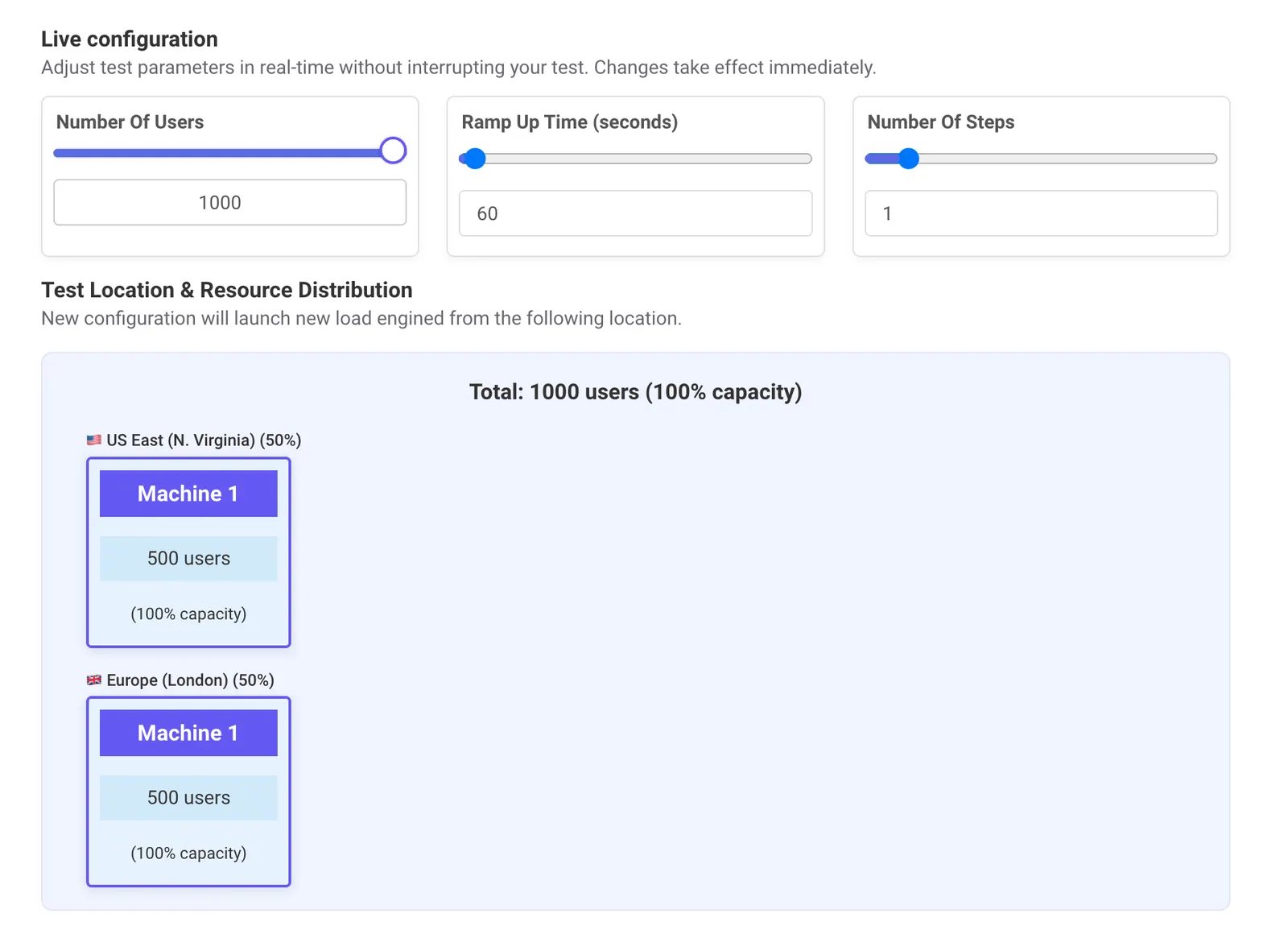
Adjust load test parameters in real time without interrupting your test.
2. BlazeMeter: JMeter-compatible testing from Perforce
BlazeMeter, now part of Perforce, describes its performance testing as “100% compatible with JMeter” and says it contributes to the JMeter open-source project. Tests run from 56+ cloud locations (blazemeter.com/product/performance-testing, October 2026). BlazeMeter also maintains Taurus, the open-source runner covered below, which is useful if you want the same YAML configuration locally and in the cloud.
- Good fit: teams that want a long-established hosted JMeter runner with a wide choice of locations.
- Pricing: the product page offers a demo and a sign-up; check blazemeter.com/pricing for current plans.
3. Tricentis NeoLoad: enterprise coverage, with JMeter support in NeoLoad Web
NeoLoad covers enterprise stacks that most tools do not, including SAP (SAP GUI, Fiori, RFC, IDoc and S/4HANA), and offers both codeless and as-code test design plus RealBrowser for front-end measurements (tricentis.com, October 2026).
For JMeter users the detail matters: NeoLoad Web runs JMeter 5.6.3 tests on static and dynamic zones, not on NeoLoad Cloud zones, does not support multi-node JMeter runs, and needs no active license for them (docs.tricentis.com, NeoLoad Web “Create and run JMeter tests”, October 2026).
4. Gatling: tests as code, with a JMeter converter
Gatling writes tests as code in Java, JavaScript or TypeScript, and its documentation covers WebSocket, gRPC, MQTT, server-sent events and Kafka. The Community edition is for local use; Gatling Enterprise adds dashboards, run comparison and AI analysis of results (gatling.io, October 2026).
Gatling does not run .jmx files. It offers an AI-assisted JMeter-to-Gatling converter instead, which is the route if you are moving off JMeter rather than scaling it. Our JMeter vs Gatling comparison runs the same test in both tools.
5. Grafana k6: JavaScript load testing
k6 is an open-source (AGPL-3.0) load testing tool from Grafana Labs. Scripts use the k6 JavaScript API, and the tool supports HTTP/1.1, HTTP/2, WebSockets and gRPC out of the box, with a browser module for front-end tests. Grafana Cloud k6 is the hosted version (grafana.com/docs/k6, October 2026); the options for running k6 at scale are compared separately.
k6 does not read .jmx files, so adopting it means rewriting your plans. LoadFocus runs k6 scripts too, on the k6 load testing page, if you want both formats in one place.
6. Locust: load tests in plain Python
Locust defines user behaviour in Python code, runs distributed across multiple machines and ships a web UI. It is MIT-licensed. Locust.cloud sells commercial support, and the project says a hosted cloud version is in development (locust.io, October 2026), although the docs now point to Azure Load Testing for hosted runs and their 2.43.0 changelog says locust.cloud is shutting down (docs.locust.io, October 2026). Locust’s site says it has been used to simulate millions of simultaneous users.
Like k6 and Gatling, it replaces JMeter rather than running it. Our Locust vs JMeter comparison runs the same test in both and measures the trade-offs.
7. OpenText Professional Performance Engineering (LoadRunner Professional)
LoadRunner Professional is now called OpenText Professional Performance Engineering. It claims support for 180+ protocols and technologies, with scripts built in VuGen (opentext.com, October 2026).
It can run JMeter: Controller lets you add .jmx scripts to a scenario and run them side by side with other protocol scripts. Controller sets the number of virtual users and the ramp-up itself and ignores the thread group values in the .jmx; a script with several thread groups must be split into one script per group (admhelp.microfocus.com, LoadRunner Professional 24.1 help, “JMeter tests”, October 2026). For the wider choice between the two tools, see JMeter vs LoadRunner.
8. Artillery: Playwright and API load from your own cloud account
Artillery load tests HTTP APIs, GraphQL services and Socket.IO apps, and it can reuse existing Playwright tests for browser-based load. Distributed testing is built in and runs from your own AWS or Azure account on pay-as-you-go serverless infrastructure (artillery.io, October 2026). The core project is open source under MPL-2.0. It has no JMeter support.
To see what an Artillery test looks like before choosing it, our Artillery tutorial runs a YAML script against a test API and explains the output.
9. StresStimulus: record, replay and diagnose
StresStimulus records browser or application activity and replays it with hundreds or thousands of concurrent users, with a wizard that walks through recording, configuring and running the test. Load can come from a single machine, on-premise load generators or public clouds such as AWS and Azure (stresstimulus.com, October 2026). It is an alternative to JMeter, not a runner for it.
10. RedLine13: JMeter in your own AWS account
RedLine13 runs JMeter, Gatling and Selenium tests on load agents in your own AWS environment, which keeps cloud costs on your own bill. Its site positions the service as “Almost Free”, offers a free trial and integrates with Jenkins (redline13.com, October 2026). The RedLine13 alternative page compares the two side by side.
11. WebLOAD
RadView’s WebLOAD has been on the market since 1993. Its correlation engine handles session data such as IDs and tokens during script creation, scripts are extended in JavaScript and Java, and it supports HTTP/S and WebSockets. Tests run in the cloud, on-premise or in a hybrid setup (radview.com/webload, October 2026). We found no .jmx import on RadView’s site; moving from JMeter means re-recording.
12. Apica
Apica’s load testing runs through the Apica Load Test Portal and ZebraTester. ZebraTester can execute an uploaded .jmx file and produce a CSV report, but Apica’s own documentation warns that this feature “has not proceeded with recent development and thus might not work to your expectation at times” (docs.apica.io, “Execute a JMeter Test Plan in ZebraTester”, October 2026). Apica’s website now leads with telemetry and observability products, so check the load testing roadmap with them before a large JMeter migration. The Apica alternative page compares the two side by side.
13. Azure Load Testing: Microsoft’s managed JMeter and Locust service
Azure Load Testing is Microsoft’s fully managed load testing service. You upload an existing JMeter or Locust script and the service provisions the test engines; a URL-based quick test covers a single endpoint with no script at all. It runs Apache JMeter 5.6.3, supports all samplers and configuration elements, including CSV data sets, and takes plugins from jmeter-plugins.org or your own JAR (learn.microsoft.com, Azure Load Testing documentation, October 2026).
Its strongest point is the Azure tie-in. For apps hosted on Azure, the dashboard shows server-side metrics from Azure Monitor next to response times and errors, and tests run from Azure Pipelines, GitHub Actions or the Azure CLI, with fail criteria on response time or error count.
Scale works by engine count: the threads in your .jmx set the users per engine, and total users equal threads times engine instances. Microsoft recommends keeping a script below 250 threads per engine. By default, load comes from the region of your Azure Load Testing resource, and you can add up to 5 regions for tests against public endpoints. Listeners such as View Results Tree are ignored; results go to the Azure dashboard instead. Billing is per virtual user hour; check azure.microsoft.com/pricing/details/load-testing for the current rate.
14. OctoPerf: JMeter-based SaaS or on-premise
OctoPerf is built on JMeter. Its site calls it “100% compliant with JMeter and the standard plugins”, lets you import custom plugins, and exports any script built in OctoPerf back to .jmx (octoperf.com, October 2026). Load generators come from its cloud locations or from agents you run in Docker on your own machines, and a fully on-premise installation is offered too. Its location documentation lists 26 AWS, 8 DigitalOcean and 33 Azure regions (api.octoperf.com/doc, October 2026).
Importing a .jmx works differently from a plain runner. By default OctoPerf imports the design part (requests, controllers, variables) and leaves runtime settings such as user count and duration to its own scenarios; an “Import scenario” option creates one user profile per thread group. CSV files are uploaded separately through the Files menu.
Pricing (octoperf.com/pricing, October 2026): a free tier with up to 50 virtual users and 20-minute tests, pay-per-test from $99 for a one-hour test of 1,000 virtual users, and an Unlimited Performance plan from $999 per month. The OctoPerf alternative page compares the two side by side.
15. Loadium: hosted JMeter from Testinium
Loadium, from Testinium, runs uploaded JMeter scripts in its cloud. You add the .jmx with its CSV files and any third-party JARs, choose the JMeter version the script was written in, and set users, ramp-up, iterations and duration in Loadium, or tick a box per parameter to keep the values from your script. Users per engine and engine count can be set by hand (wiki.loadium.com, “JMeter Test”, October 2026).
Beyond JMeter, Loadium runs Gatling and Selenium WebDriver tests, converts Postman, HAR and PCAP files into load test scripts, and has a no-code script builder with a Chrome recorder whose output exports as JMeter. Its site says load can come from 50+ geographic locations, and private locations run on your own servers through Docker. The docs cover Jenkins and Azure DevOps pipelines. Plans are subscriptions billed monthly or annually (loadium.com, October 2026); the plan prices load from Loadium’s account system, so check loadium.com/pricing for current figures.
If what you actually want is to replace JMeter, the Apache JMeter alternatives page compares seven tools by language, licence and distributed load.
Top 3 Open-Source JMeter Testing Tools
1. Apache JMeter
Apache JMeter is the original open-source tool, currently at version 5.6.3 and compatible with Java 8 or higher. Out of the box it tests web (HTTP/HTTPS), FTP, JDBC, LDAP, Java and JUnit, and plugins extend it further. For real load, run it headless: our guide to JMeter’s non-GUI command line covers the flags.
2. Taurus
Taurus (bzt) is an open-source, Apache-2.0 automation wrapper maintained by BlazeMeter. It runs JMeter, Gatling, Locust and Selenium tests from a YAML file, so the same test definition works on a laptop and in CI. Install it with pip install bzt; version 1.17.1 shipped on 31 August 2026 (pypi.org/project/bzt, October 2026).
3. The Grinder
The Grinder is a Java load testing framework built for distributed tests. Treat it as legacy: the most active fork on GitHub (cossme/grinder) has had no commits since July 2022. It is listed here because it still comes up in JMeter comparisons, not as a recommendation for new projects.
Frequently Asked Questions
What is a JMeter testing tool?
Apache JMeter is an open-source Java application for load and performance testing of web applications, APIs, databases and other services. “JMeter testing tools” also covers the platforms and wrappers built around it: hosted runners that execute .jmx files from the cloud, and automation tools such as Taurus that run JMeter in CI.
Is JMeter an API testing tool?
Yes. JMeter sends HTTP and HTTPS requests, checks responses with assertions and extracts values for later requests, so it handles both functional checks and load tests on REST and SOAP APIs. Its strength is the load side: many threads hitting the API at once.
Is JMeter a stress testing tool?
Yes. Raising the thread count past expected traffic in a thread group turns a load test into a stress test, and JMeter reports where errors and response times start to climb. The limit is your own machine, which is why large stress tests run headless or on several generators.
Is JMeter still used in 2026?
Yes. Version 5.6.3 is the current release, and the hosted platforms in this list, including LoadFocus, BlazeMeter, Azure Load Testing, NeoLoad Web, RedLine13 and OpenText’s Controller, still accept .jmx files, which tells you how many teams keep their tests in JMeter.
Is JMeter hard to learn?
Building a first test in the GUI takes an afternoon; our JMeter tutorial for load testing a web server walks through one. The harder parts come later: correlation of dynamic values, parameterization with CSV data and reading the results correctly. The official user manual and a few focused guides cover those well.
Which is better, Selenium or JMeter?
They do different jobs. Selenium automates a real browser for functional testing; JMeter generates protocol-level load against a server. Many teams use both: Selenium to check the user journey works, JMeter to check it still works with thousands of users.
Does JMeter require coding?
No, not for most tests. You build plans in the GUI from samplers, controllers and assertions. Code comes in when you need custom logic, usually Groovy in a JSR223 sampler or pre/post-processor.
Which is better, JMeter or Postman?
Postman is built for designing and checking APIs, and it now has a performance testing mode where virtual users run a collection in a loop, locally on all plans or from Postman’s cloud on paid plans. JMeter gives you more control over load shape, protocols and correlation, so it remains the stronger choice for serious load tests.
Sources
Every vendor page below was read on 23 October 2026. Vendor sites are named as plain text, not linked.
- Apache JMeter: download page (version 5.6.3, Java 8+) and Getting Started.
- LoadFocus: JMeter cloud load testing and pricing.
- BlazeMeter: blazemeter.com/product/performance-testing.
- Tricentis NeoLoad: tricentis.com/products/performance-testing-neoload and docs.tricentis.com, NeoLoad Web “Create and run JMeter tests”.
- Gatling: gatling.io and docs.gatling.io.
- Grafana k6: grafana.com/docs/k6 (overview and protocols pages) and the grafana/k6 GitHub repository (licence).
- Locust: locust.io and the locustio/locust GitHub repository (licence).
- OpenText Professional Performance Engineering: opentext.com/products/professional-performance-engineering and admhelp.microfocus.com, LoadRunner Professional 24.1 help, “JMeter tests”.
- Artillery: artillery.io and the artilleryio/artillery GitHub repository (licence).
- StresStimulus: stresstimulus.com.
- RedLine13: redline13.com.
- WebLOAD: radview.com/webload.
- Apica: apica.io and docs.apica.io, “Execute a JMeter Test Plan in ZebraTester”.
- Azure Load Testing (read 24 October 2026): learn.microsoft.com, Azure Load Testing documentation (“What is Azure Load Testing?”, “Supported Apache JMeter features”, “Configure high-scale load tests”, “Generate load from multiple regions”) and azure.microsoft.com/pricing/details/load-testing.
- OctoPerf (read 24 October 2026): octoperf.com, octoperf.com/product/jmeter-on-steroids, octoperf.com/pricing and api.octoperf.com/doc (“JMeter JMX import”, “Location”).
- Loadium (read 24 October 2026): loadium.com, loadium.com/pricing and wiki.loadium.com (“JMeter Test”, “Features”).
- Taurus: gettaurus.org and pypi.org/project/bzt.
- The Grinder: github.com/cossme/grinder (commit history).
- Postman: learning.postman.com, performance testing documentation.