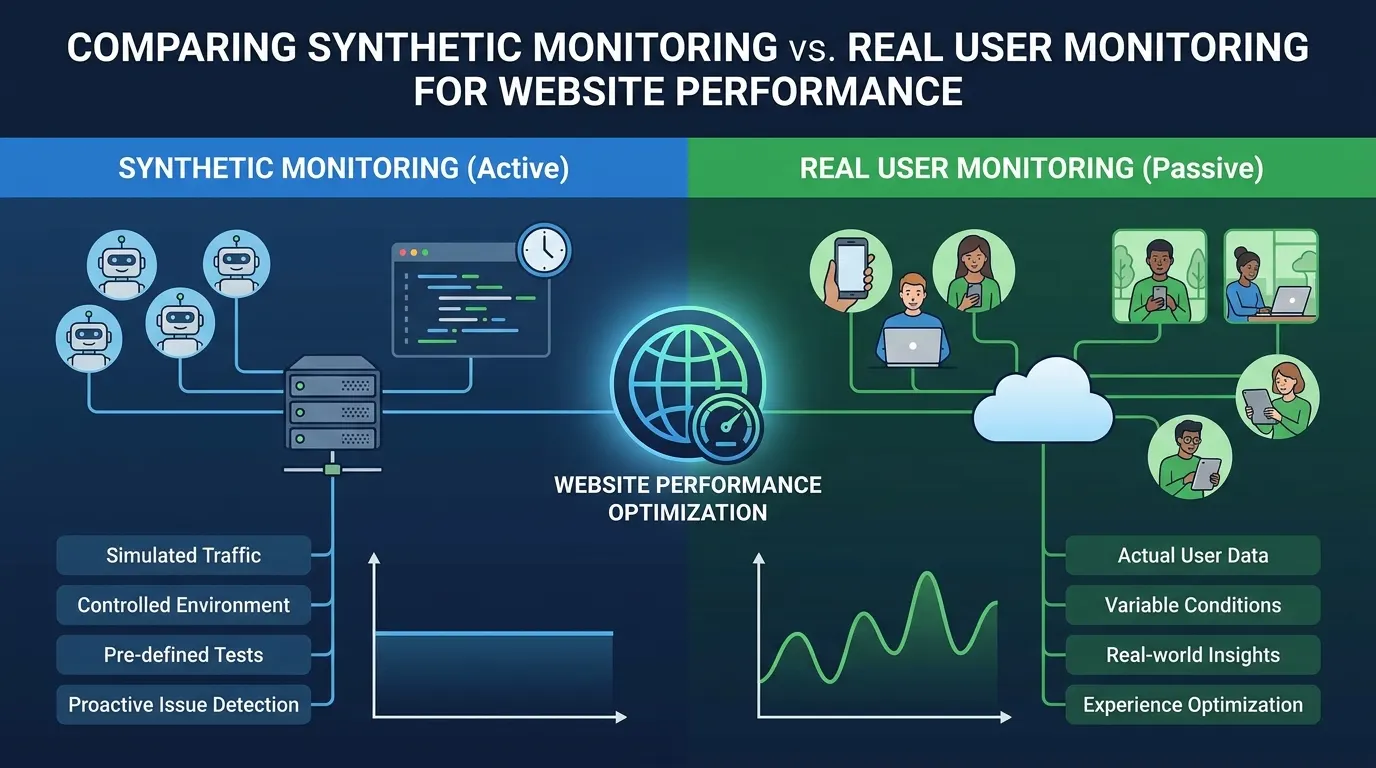
Synthetic monitoring runs scripted checks against your site on a schedule from fixed locations, so you find out about a broken page or a slow API before anyone complains. Real user monitoring (RUM) records what actual visitors experience in their own browsers, so you see how fast the site really is for them. You need the first to catch outages at 3 AM and the second to know how a real phone on a poor network feels. Most teams that care about performance end up running both.
Key takeaways
- Synthetic monitoring is active and scripted: the same check, from the same places, on a timer. RUM is passive: it measures real visits, so it only exists where there is traffic.
- Synthetic answers “is it up, and is it fast under controlled conditions?”. RUM answers “how fast is it for the people who actually use it?”.
- Core Web Vitals scoring uses real-user (field) data, so RUM or Google’s CrUX report is where you see your score. Synthetic runs are lab data that help you find and fix the cause.
- Start with synthetic checks if you have little traffic or a launch coming. Add RUM once enough real visits arrive to slice by device and region.
Synthetic monitoring vs real user monitoring: side by side
| Synthetic monitoring | Real user monitoring | |
|---|---|---|
| Where the data comes from | Scripted checks run by a monitoring service | Code or a browser API in the page, running in each visitor’s browser |
| Needs traffic? | No, it runs on a schedule even at 3 AM | Yes, no visitors means no data |
| Environment | You choose location, browser, device profile and network | Whatever your visitors have |
| Best at | Uptime, outages, regressions after a deploy, pre-launch checks, API and journey checks | Real-world speed, device and network spread, who is affected and how many |
| Weak at | Cannot see devices, networks and behaviour you did not script | Cannot tell you about a page nobody has visited yet, and says little about the cause |
| Alerting | Fails fast and predictably: a check either passes or fails | Alerts on trends and percentiles, which need enough sessions to be stable |
A simple way to remember it: synthetic is a flight simulator you run on a schedule, RUM is the flight recorder from real flights.
How does synthetic monitoring work?
A synthetic monitor is a script that visits a page or calls an API the way a user or client would, on a fixed interval, from one or more locations. It records timings, checks that the response or the page content is what you expect, and raises an alert when it is not. Browser checks drive a real browser through a journey such as login, search and checkout. API checks send requests and assert on the status code, the body and the response time.
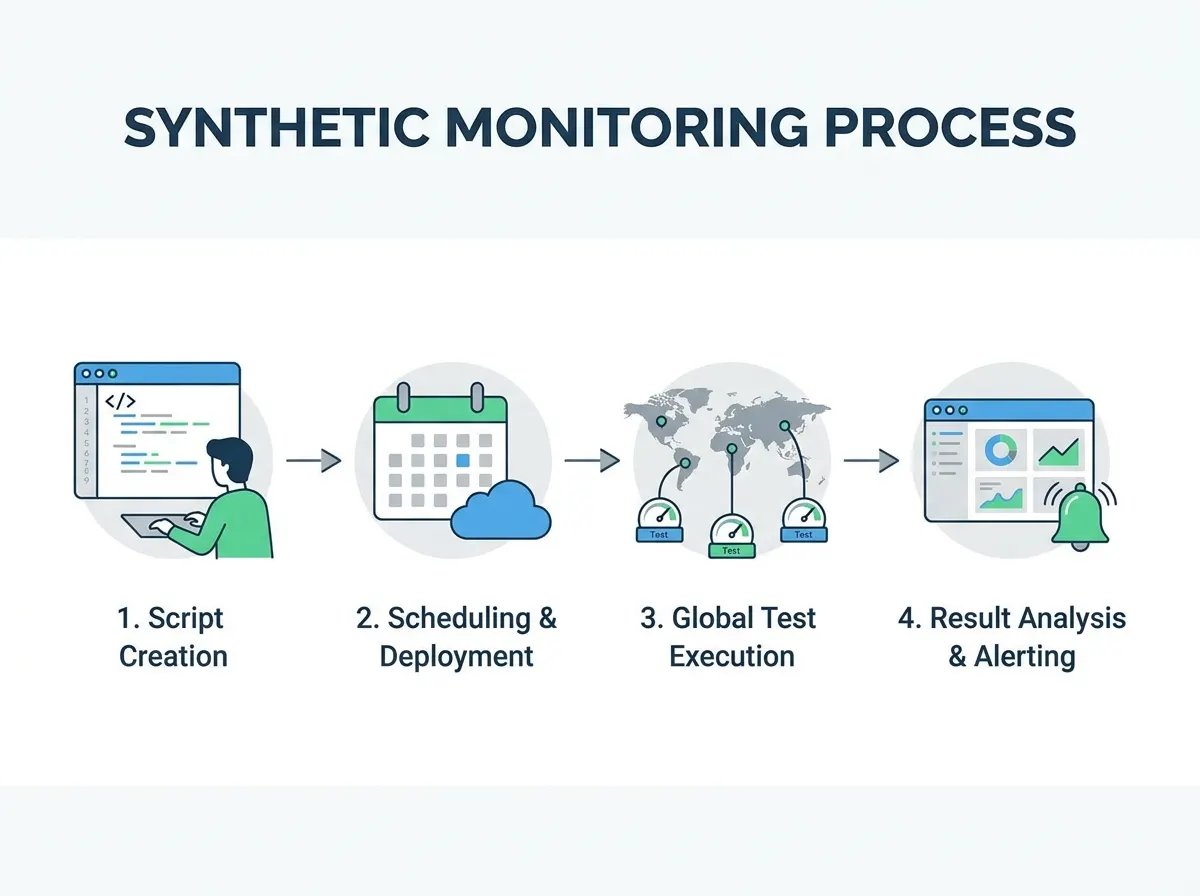
Because every run is the same, a change in the numbers points at your site or the network path, not at who happened to visit. That makes synthetic monitoring the right tool for:
- Uptime and outages. A failed check at night is an alert, with no visitors needed to notice it.
- Regression after a deploy. Run the same journey before and after and compare.
- Regional differences. Checking from several regions shows a site that is quick in Frankfurt and slow in Singapore, which often points at CDN or routing.
- Pre-launch and pre-event checks. You can test a page that has no real traffic yet. For load itself, use a load test rather than a monitor, since a monitor sends one request at a time.
- APIs. Nobody sits in a browser for an API call, so there is no real-user view of a failing endpoint until another system complains.
The limit is that a script only covers what you wrote. It uses a few browsers and locations, so it cannot show the long tail of old phones, extensions and congested networks.
How does real user monitoring work?
RUM collects timings from the visitor’s own browser, usually through a small script on the page that reads browser performance APIs and sends the numbers to a backend. Every session contributes a data point, so you can slice by device, browser, country, connection or page.
Google’s web.dev guidance is to judge Core Web Vitals at the 75th percentile of page loads, split by mobile and desktop, with these targets (web.dev/articles/vitals, read October 2026):
| Metric | Good |
|---|---|
| Largest Contentful Paint (LCP) | 2.5 seconds or less |
| Interaction to Next Paint (INP) | 200 milliseconds or less |
| Cumulative Layout Shift (CLS) | 0.1 or less |
Those numbers come from field data, which is why a synthetic test cannot say whether you “pass”. It can still show you what to fix. RUM is the better tool when you want to know:
- how many users a slowdown affects, and which devices or countries they are in;
- how third-party scripts behave in production;
- whether a fix that looked good in a lab made a difference for real visitors.
Its weak spots are the flip side. A site with little traffic gives sparse, noisy numbers. RUM only reports after a user has had the slow experience. Privacy rules and consent banners can reduce what you are allowed to collect. And the data tells you where it hurts more than why.
Which one should you use?
Pick by the question you are trying to answer.
- You have a new site, low traffic, or a launch next week: start with synthetic monitoring. There is not enough real traffic for RUM to say much yet.
- You carry an SLA or must know about outages fast: synthetic monitoring, from more than one region, with alerts.
- You want your Core Web Vitals as Google sees them: field data, from RUM or the CrUX report. Use synthetic runs to find the cause of a bad score.
- Users complain about slowness you cannot reproduce: RUM, filtered by device, browser and country.
- You ship often: synthetic checks on your key journeys after every deploy, plus RUM to see the effect on real visitors.
Do I need both?
Most production sites do, once there is meaningful traffic. The two cover each other’s blind spots: the synthetic check tells you at once that something broke and where, and RUM tells you how many people it touched and what their devices have in common. In practice the workflow is: an alert fires from a synthetic check, you open RUM to see the real impact and the affected segment, then you reproduce the problem with a synthetic run under the same conditions and verify the fix with both.
The cost of running both is real. You maintain scripts, tune alert thresholds, and read two sets of data that do not always line up, because they measure different things. A synthetic run on a fast data-center connection will usually look better than the 75th percentile of real mobile visits, and that gap is normal, not a bug.
Where LoadFocus fits
LoadFocus covers the synthetic side. Synthetic monitoring runs scripted API and browser checks from 25 regions, with browser checks driven by Playwright in real Chromium and screenshots, a trace and a video captured on failure (loadfocus.com/synthetic-monitoring, October 2026). API monitoring checks status codes, response bodies and latency on a schedule and alerts you, and page speed monitoring runs scheduled Lighthouse audits and Core Web Vitals checks from 25 cloud regions. Those pages describe synthetic and lab monitoring, so if you want field data from your own visitors, pair them with a RUM tool or Google’s CrUX report.
For related reading on the synthetic side, see how to improve user experience using synthetic monitoring, synthetic traffic in performance testing, monitoring Core Web Vitals with alerts and reports and cloud vs on-premise website monitoring.
Frequently Asked Questions
What is the difference between synthetic monitoring and real user monitoring?
Synthetic monitoring runs scripted tests on a schedule from chosen locations, so the conditions are the same every time. Real user monitoring measures the actual sessions of your visitors, so the conditions vary with their devices and networks. The first tells you something is broken or slow in a controlled setup, the second tells you how it feels for real people.
Is synthetic monitoring or RUM better?
Neither is better in general. Synthetic monitoring is better for uptime, outages, regressions and sites without much traffic. RUM is better for real-world speed, Core Web Vitals as users experience them, and finding which devices or regions suffer. Which one you need first depends on your traffic and on the question you are asking.
Can synthetic monitoring replace RUM?
No. A script can only cover the browsers, devices and locations you chose, so it will miss problems that appear only on certain phones, networks or after certain user actions. It also cannot say how many real visitors a problem affects.
Can RUM replace synthetic monitoring?
No. RUM only has data when someone visits, so it cannot warn you about an outage at 3 AM when nobody is online, or about an API that clients call only occasionally. It also reports after a user had the bad experience.
Does synthetic monitoring measure Core Web Vitals?
A synthetic run can measure the same metrics in a lab setting, for example with Lighthouse, which helps you find what slows a page down. Google judges the Core Web Vitals of your site from field data from real users, so a lab result is a diagnostic, not your official score.
How often should synthetic checks run?
It depends on how fast you need to hear about a failure. Revenue-critical pages and APIs justify frequent checks, every minute or every few minutes. Less critical pages can run hourly or daily. More frequent checks mean faster alerts and more data to store, so match the interval to what a missed outage costs you.
Should synthetic monitoring cover APIs too?
Yes. APIs have no page for a real user monitor to sit on, so a scheduled check of status code, body and latency is often the only early warning. Apply the same idea to the third-party APIs your checkout depends on.
Published with PostNext