





What is DebugBear?
DebugBear is a dedicated page-speed monitoring service built around Google Lighthouse synthetic tests, with custom configuration and Real User Monitoring (RUM). It schedules automated Lighthouse runs from multiple geographic locations, tracks Core Web Vitals over time, and surfaces regressions through GitHub pull request comments and email alerts. The product is focused: it does page-speed monitoring well, and does only that.
DebugBear was founded in 2018 by Matt Zeunert and has built a following among performance-focused frontend teams who want a single-purpose tool. It supports custom Puppeteer scripts for testing user journeys, integrates well with developer workflows through PR commenting, and competes mainly on depth of Lighthouse drilldown.
When DebugBear is the right choice
DebugBear is the right call when page speed is the only thing you need to monitor:
- Page-speed-only focus. If your team's mandate is Core Web Vitals on production and nothing else, DebugBear's specialty depth is genuinely useful.
- Real User Monitoring (RUM). DebugBear's RUM data complements synthetic tests, giving you a fuller picture across real browsers and devices.
- Custom Puppeteer scripting. Complex authenticated user journeys with full scripting flexibility — DebugBear's Puppeteer integration is more open-ended than most.
- Lighthouse drilldown. Individual audit scores, opportunity ranking, and rendering waterfalls surfaced cleanly.
If page speed is your sole performance concern and you don't need load testing or API checks, DebugBear's focus is a feature, not a limit.
Where DebugBear leaves gaps
The flip side of being a single-product tool is that teams running modern web applications usually need more than one signal:
- No load testing. DebugBear measures page speed under normal conditions but can't simulate concurrent users to test traffic spikes.
- No API monitoring. If your application has backend APIs (login, checkout, integrations), DebugBear can't validate their availability or latency.
- Limited test regions on entry plans. Standard tiers cover 4–5 geographic locations; broader coverage is a paid upgrade.
- No permanent free tier. A 14-day trial, then everything is paid — there's no free path for occasional audits or solo developers.
- One product, multiple bills. Page speed + load + API + uptime is four vendors, four dashboards, four invoices. DebugBear covers one of those four.
LoadFocus vs DebugBear — feature comparison
The table below compares LoadFocus against DebugBear's entry-tier plan. Pricing accurate as of April 2026.
| Feature | LoadFocus | DebugBear |
|---|---|---|
| Cost | Free tier; page speed from $29/mo | Paid only; from ~$15/mo (Solo) |
| Free tier | Yes (single test, basic metrics) | Trial only (14 days) |
| Page speed monitoring | Yes | Yes (specialty) |
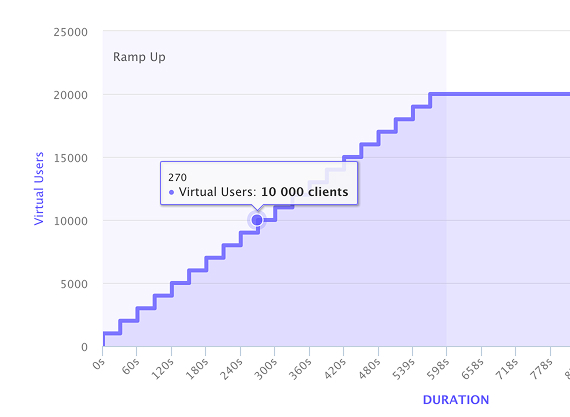
| Load testing | Yes (up to 12,500 VUs) | No |
| API monitoring | Yes | No |
| Lighthouse-based scoring | Yes | Yes |
| Real User Monitoring (RUM) | No (synthetic only) | Yes |
| Test locations | 25+ globally | 4–5 on standard plans |
| Real Chromium browser | Yes | Yes |
| Custom Puppeteer scripts | Limited (templates) | Yes (full scripting) |
| GitHub PR comments | Yes | Yes |
| Budget alerts on Web Vitals | Yes | Yes |
| AI-generated analysis | Yes (all plans) | No |
| Combined platform (load + speed + API) | Yes (single bill) | No (page speed only) |
When LoadFocus is the right upgrade from DebugBear
The decision usually comes down to scope. If page speed is your only need, DebugBear is fine. If you need anything beyond it, LoadFocus consolidates the toolchain.
You need load testing alongside page speed
Modern SLO management combines page speed (under normal conditions) with load testing (under traffic spikes). LoadFocus does both in one platform; DebugBear handles only the first half. One bill, one dashboard, consistent metric definitions across both test types.
You want geographic coverage beyond Europe and North America
DebugBear's standard plans cover ~4 locations centered in Europe and the US. LoadFocus runs from 25+ regions including São Paulo, Sydney, Mumbai, Tokyo, and Cape Town. If your users are global, your monitoring should be too.
You need API monitoring on top of page speed
Backend APIs (login, checkout, third-party integrations) need separate monitoring from page rendering. LoadFocus handles HTTP/REST API monitoring with assertions, scheduled checks, and alerting. DebugBear does not.
You want a free tier for proof-of-concept or occasional audits
LoadFocus's free tier supports one running test with basic metrics — enough for occasional audits, quick PoC checks, or evaluating before buying. DebugBear's trial expires after 14 days, then it's paid only.
You want AI-generated test analysis
LoadFocus's AI analysis explains what the metrics mean in plain English — useful for product managers and stakeholders who don't read percentile waterfalls daily. DebugBear keeps the data raw.
Migration from DebugBear
If you're swapping page-speed monitoring:
- Sign up at loadfocus.com/signup.
- Add your existing monitored URLs to LoadFocus's page speed monitoring section.
- Replicate your DebugBear schedule (daily, hourly, etc.) — LoadFocus offers similar frequency options.
- Set budget alerts on the same Core Web Vitals you currently track.
- Add load testing or API monitoring only if you need them — they're orthogonal capabilities.
Run both tools in parallel for a few weeks to verify metric agreement before fully cutting over.
FAQ: LoadFocus vs DebugBear
Does LoadFocus have Real User Monitoring (RUM)?
Not currently. LoadFocus's page speed monitoring is synthetic-only (scheduled Lighthouse and browser tests). If RUM is a hard requirement, DebugBear is stronger on that single dimension. For many teams, synthetic monitoring at sufficient frequency provides equivalent regression-detection signal.
Can LoadFocus replace DebugBear's Lighthouse scoring?
Yes. LoadFocus uses real Chromium running Google Lighthouse — same engine as DebugBear and Google's PageSpeed Insights. Score parity should be within typical run-to-run variance.
How do test region counts compare?
LoadFocus offers 25+ regions on standard plans. DebugBear offers 4–5 on entry plans, more on higher tiers. If geographic coverage matters, LoadFocus is broader by default.
Does LoadFocus support custom Puppeteer scripts like DebugBear?
LoadFocus uses template-based page-speed configuration plus k6 and JMeter for load test scripting. DebugBear's Puppeteer integration is more open-ended for arbitrary user-flow scripting on page speed tests. If complex authenticated journeys for page speed are central to your work, this is one area where DebugBear has the edge.
Does LoadFocus integrate with GitHub PRs?
Yes — LoadFocus comments on pull requests with test results, similar to DebugBear's PR integration. Set up the GitHub Action and it runs tests on each push.
Why combine load testing and page speed in one platform?
Two reasons. The same engineers usually own both, so a single dashboard saves time. And the questions overlap: "how does my site feel" (page speed) and "how does my site behave under load" (load testing) need joint analysis when investigating regressions. Splitting them across vendors fragments the signal.
How does pricing compare?
DebugBear's entry tier starts around $15/month for a single user; team plans go higher. LoadFocus starts at $29/month for page speed monitoring with a free tier underneath. The fairer comparison is total spend across page speed + load testing + API monitoring: DebugBear handles only the first, so a full toolchain typically means multiple vendor bills.
Try LoadFocus free
If you're using DebugBear today and considering whether to consolidate your monitoring stack, LoadFocus gives you a free tier to try alongside without disrupting your current setup. Sign up at loadfocus.com/signup — no credit card required — and run page-speed tests on your URLs to compare metric parity. Then decide whether the combined platform is worth the switch.