Key takeaways
- A scheduled test only helps if it alerts, since nobody reads a passing report.
- Set the failure condition first: what result would genuinely warrant a message.
- Match frequency to deploy cadence rather than running nightly by default.
Performance rarely breaks on the day you run a load test. It breaks three deploys later, on a Tuesday, when nobody is looking. LoadFocus can now run your load tests for you on a recurring schedule, and email you only when a run actually starts failing. Set it once, and let it watch your app.
Most teams run a load test right before a big launch, see green, and move on. Then the code keeps changing: a new query here, an extra API call there, a caching change that looked harmless in review. By the time someone runs the next manual test, the regression has already shipped. Scheduled load tests close that gap. You attach a schedule to a test you have already saved, pick how often it should run, set your pass and fail thresholds, and LoadFocus takes it from there.
Is Your Infrastructure Ready for Global Traffic Spikes?
Unexpected load surges can disrupt your services. With LoadFocus’s cutting-edge Load Testing solutions, simulate real-world traffic from multiple global locations in a single test. Our advanced engine dynamically upscales and downscales virtual users in real time, delivering comprehensive reports that empower you to identify and resolve performance bottlenecks before they affect your users.
Pick how often your test runs
You are no longer limited to a single cadence. A scheduled load test can run on any of these frequencies, in the time and timezone you choose:
Hourly for critical paths you never want to regress
Every few hours from every 2 up to every 12
Think your website can handle a traffic spike?
Fair enough, but why leave it to chance? Uncover your website’s true limits with LoadFocus’s cloud-based Load Testing for Web Apps, Websites, and APIs. Avoid the risk of costly downtimes and missed opportunities—find out before your users do!
Daily the classic overnight smoke test
Chosen weekdays for example Mon, Wed and Fri
Weekly on the day and time you pick
Monthly for slower moving systems
LoadFocus is an all-in-one Cloud Testing Platform for Websites and APIs for Load Testing, Apache JMeter Load Testing, Page Speed Monitoring and API Monitoring!
Higher frequencies are checked against your plan’s daily run limit before the schedule is saved, so you never set up something your plan cannot actually run. If a cadence would exceed your limit, LoadFocus tells you up front instead of silently skipping runs later.
Alerts only when it matters
A monitor that emails you after every run trains you to ignore it. Scheduled load tests do the opposite. The alerting is transition based, which means you hear about the change, not the routine:
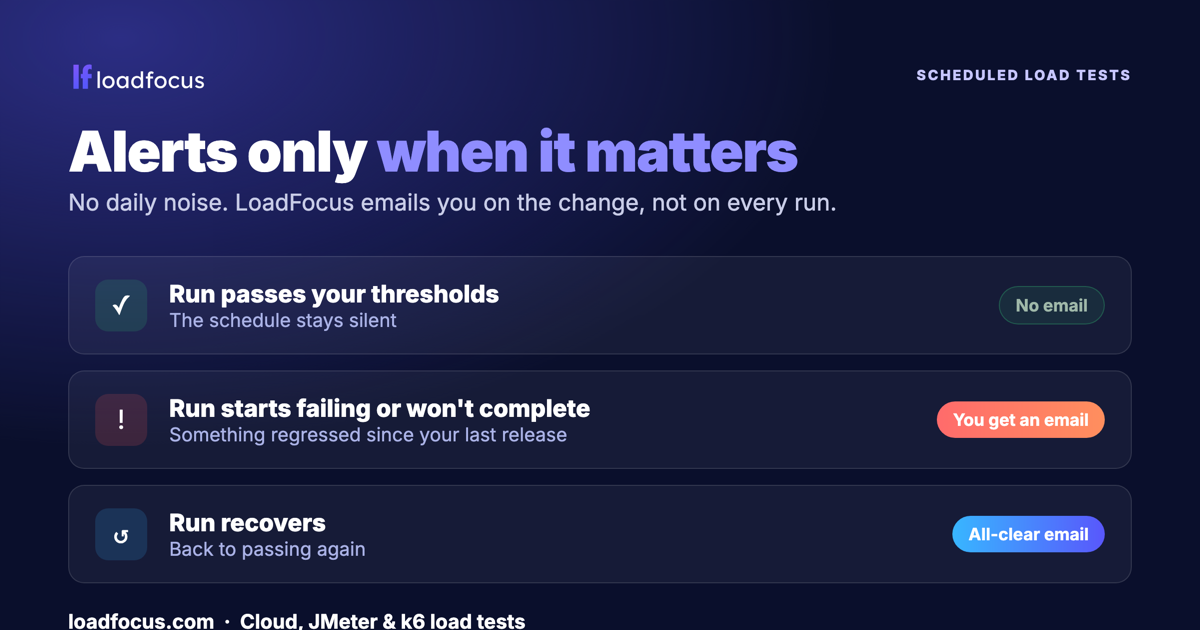
- While a run passes your thresholds, the schedule stays silent. No daily noise.
- When a run starts failing its thresholds, or stops completing, you get an email straight away. A daily failing test alerts you once, not every single day.
- When it recovers, you get an all-clear email so you know the fix landed.
That is the difference between a schedule you actually keep on, and one you mute after a week.
What counts as a failing run
You decide. Each load test can carry pass and fail thresholds on the metrics that matter to you, for example response time percentiles, throughput, and error rate. After every scheduled run, LoadFocus compares the results against those thresholds and produces a clear pass or fail verdict. A run that does not complete at all is treated as a failure too, because a test that cannot finish is its own kind of red flag.
Pairs perfectly with AI analysis. On paid plans, every run can also be explained in plain English by AI load test analysis, so when a scheduled run fails you are not just told that it failed, you get a readable summary of the likely bottleneck and what to look at next.
Works with the tests you already have
Scheduling is built into all three LoadFocus load testing engines. Whatever you use today, you can schedule it:
- Cloud load tests, configured in the browser from 25+ cloud regions.
- JMeter load tests, running your existing
.jmxplans in the cloud. - k6 load tests, running your JavaScript scripts unchanged.
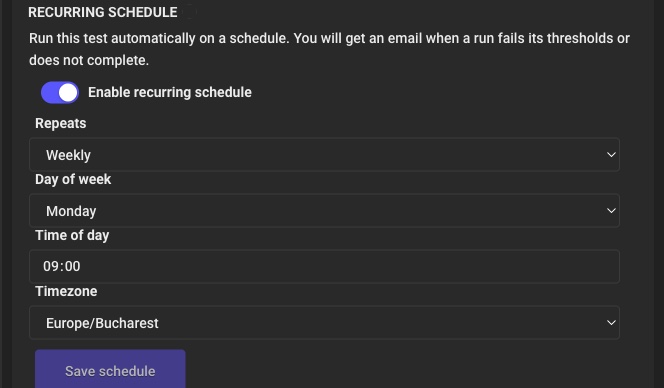
Setting up a schedule
- Open a saved load testCloud, JMeter or k6, on a paid Load Testing plan.
- Turn on the Recurring Schedule panelFlip the toggle to reveal the schedule fields.
- Choose your frequency, time and timezoneHourly through monthly, plus specific weekdays, in the timezone you select.
- Confirm your pass and fail thresholdsThese decide when a run is considered a failure and triggers an alert.
- Save, and you are doneLoadFocus runs the test on your schedule and emails you only when the result changes.
You can also start a schedule straight from the row menu in your test list, without opening the test first.
See the status at a glance
Once a test is scheduled, you can see it everywhere it matters:
- A SCHEDULED badge appears next to the test in your list, and SCHEDULE PAUSED if it has been paused.
- The result page shows the schedule in plain language under the test name, for example Every 6 hours, Europe/Bucharest or Weekly on Monday at 09:00.
- You can see the last outcome and the next run time, so there is never any doubt about what happened or what is coming.
Where scheduled load tests shine
- Catch regressions between releases, by running a nightly or hourly test against staging or production.
- Protect a critical user journey, checkout, login, search, on its own tight schedule.
- Prove an SLA over time, with a weekly run that documents performance week after week.
- Warm up before a launch, by scheduling ramped tests in the days leading up to a release.
Testing APIs and uptime too? Scheduled load tests focus on performance under load. For continuous uptime, latency and correctness checks between load tests, pair them with API monitoring for round-the-clock coverage.
Availability
Scheduled recurring load tests are available on paid Load Testing plans, for cloud, JMeter and k6 tests. You can see what each plan includes on the pricing page, and the full walkthrough lives in the Scheduled Load Tests guide.
Put your load tests on autopilot
Schedule your first recurring test in minutes, and only hear from us when something needs your attention.Start for freeRead the guide
Frequently asked questions
How often can a load test run?
Hourly, every few hours (from every 2 up to every 12), daily, on specific weekdays, weekly, or monthly, at the time and timezone you choose. Higher frequencies are checked against your plan’s daily run limit before the schedule is saved.
Will I get an email after every run?
No. Alerts are transition based. You get an email when a run starts failing its thresholds or stops completing, a follow up when it recovers, and nothing while it keeps passing. A daily failing test alerts you once, not every day.
Which load testing tools support scheduling?
All three LoadFocus engines: cloud load tests, JMeter and k6. Your existing JMeter .jmx files and k6 scripts run unchanged.
What decides whether a run passed or failed?
The pass and fail thresholds you set on the test, for example response time percentiles, throughput and error rate. A run that does not complete is treated as a failure.
Do I need a paid plan?
Yes. Scheduled load tests are available on paid Load Testing plans. See the pricing page for details.
More on LoadFocus load testing: