Key takeaways
- The common mistakes are testing too late, testing an unrepresentative environment, and measuring averages.
- Unrealistic data is the quiet one: it makes everything look faster than production.
- Decide pass criteria before the run, or you will interpret the result to suit the deadline.
Is Your Infrastructure Ready for Global Traffic Spikes?
Unexpected load surges can disrupt your services. With LoadFocus’s cutting-edge Load Testing solutions, simulate real-world traffic from multiple global locations in a single test. Our advanced engine dynamically upscales and downscales virtual users in real time, delivering comprehensive reports that empower you to identify and resolve performance bottlenecks before they affect your users.
Are You Falling for These Performance Testing Mistakes? Here’s How to Spot and Fix Them
Performance testing is a critical safeguard for any software team, but even experienced practitioners can fall into familiar traps. Overlooked bottlenecks, missing test scenarios, or environments that don’t reflect production realities can all lead to slowdowns, user frustration, and lost business. The most damaging mistakes are often the ones that become invisible through routine or assumption.
Performance Testing: The Gatekeeper for Product Reliability
Performance testing acts as the final checkpoint before your application faces real users. If your process skips key scenarios, uses unrealistic environments, or ignores essential metrics, users will notice before you do. For example, skipping backend integration tests may mean API latency issues only surface after a major launch – when the stakes are highest. Even small delays can prompt users to abandon a transaction or try a competitor.
Common Mistakes Are Closer Than You Think
Many performance testing mistakes stem from well-intentioned shortcuts. Rushing through planning, focusing only on ideal user paths, or skipping baseline metrics are all frequent missteps. As performance testing expert Scott Barber notes, too many testers focus on bug-hunting rather than ensuring reliability under real-world conditions. The goal should be to measure and improve system resilience, not just catch rare code defects.
Think your website can handle a traffic spike?
Fair enough, but why leave it to chance? Uncover your website’s true limits with LoadFocus’s cloud-based Load Testing for Web Apps, Websites, and APIs. Avoid the risk of costly downtimes and missed opportunities—find out before your users do!
- Inadequate test planning leads to blind spots and missed failure modes.
- Testing in unrealistic environments produces results that don’t reflect live traffic conditions.
- Neglecting baseline metrics means you can’t tell if you’re improving or regressing.
- Ignoring parts of the stack – from third-party APIs to backend queues – leaves performance risks unaddressed.
How to Counter the Most Damaging Errors
Begin with a thorough test plan that uses realistic data sets and production-like environments. Make baseline assessments a standard part of your process. Use automated analysis tools to sift through results and highlight subtle issues. Most importantly, treat performance testing as an ongoing discipline, integrating it into your CI/CD pipeline to catch regressions before they reach production.
While perfect coverage is unattainable, focusing on the highest-impact areas yields the best results. By addressing these common mistakes with clear strategies, teams can significantly improve reliability and protect both user experience and business outcomes.
Quick Comparison: The 7 Most Common Performance Testing Mistakes
No matter your team’s experience, performance testing mistakes can undermine your results. The table below offers a practical comparison of seven widespread pitfalls, highlighting the benefits of avoiding each, the risks of missing them, and where attention is most critical.
| Mistake | Key Strength When Avoided | Limitation/Risk | Best For | Relevant Tool(s) |
|---|---|---|---|---|
| Inadequate Test Planning | Comprehensive coverage of system behaviors and edge cases | Critical scenarios missed, leading to blind spots in performance | Complex applications with multiple dependencies | Load testing and monitoring tools |
| Ignoring Real-World Conditions | Accurate simulation of production loads and user patterns | False sense of security, issues surface after deployment | Services with global user bases or unpredictable traffic | Load testing and traffic simulation platforms |
| Overlooking Baseline Metrics | Clear reference point for performance regressions and improvements | Hard to measure progress or diagnose slowdowns | Ongoing projects or frequent release cycles | Performance monitoring and benchmarking tools |
| Neglecting to Test All Components | Comprehensive view of system health, including APIs and integrations | Bottlenecks in backend or third-party systems go undetected | Microservices, integrated platforms | API testing and integration tools |
| Failure to Analyze Test Results Thoroughly | Actionable insights and root cause identification | Superficial fixes, recurring or hidden performance issues | Mission-critical applications where downtime is costly | Analytics and monitoring platforms |
| Infrequent Testing | Early detection of issues as code and environments evolve | Performance problems accumulate, making them harder to fix | Agile teams and CI/CD pipelines | Continuous integration and testing tools |
| Underestimating Load Testing | Confidence that systems can handle peak demand | Unexpected outages or degraded experience under traffic spikes | High-traffic events, product launches | Load testing and cloud simulation platforms |
Use this reference to identify which performance testing mistakes may be holding your team back. Each misstep has a tradeoff, and the right tools and practices can help you catch issues before users are affected.
LoadFocus is an all-in-one Cloud Testing Platform for Websites and APIs for Load Testing, Apache JMeter Load Testing, Page Speed Monitoring and API Monitoring!
Mistake #1: Inadequate Test Planning
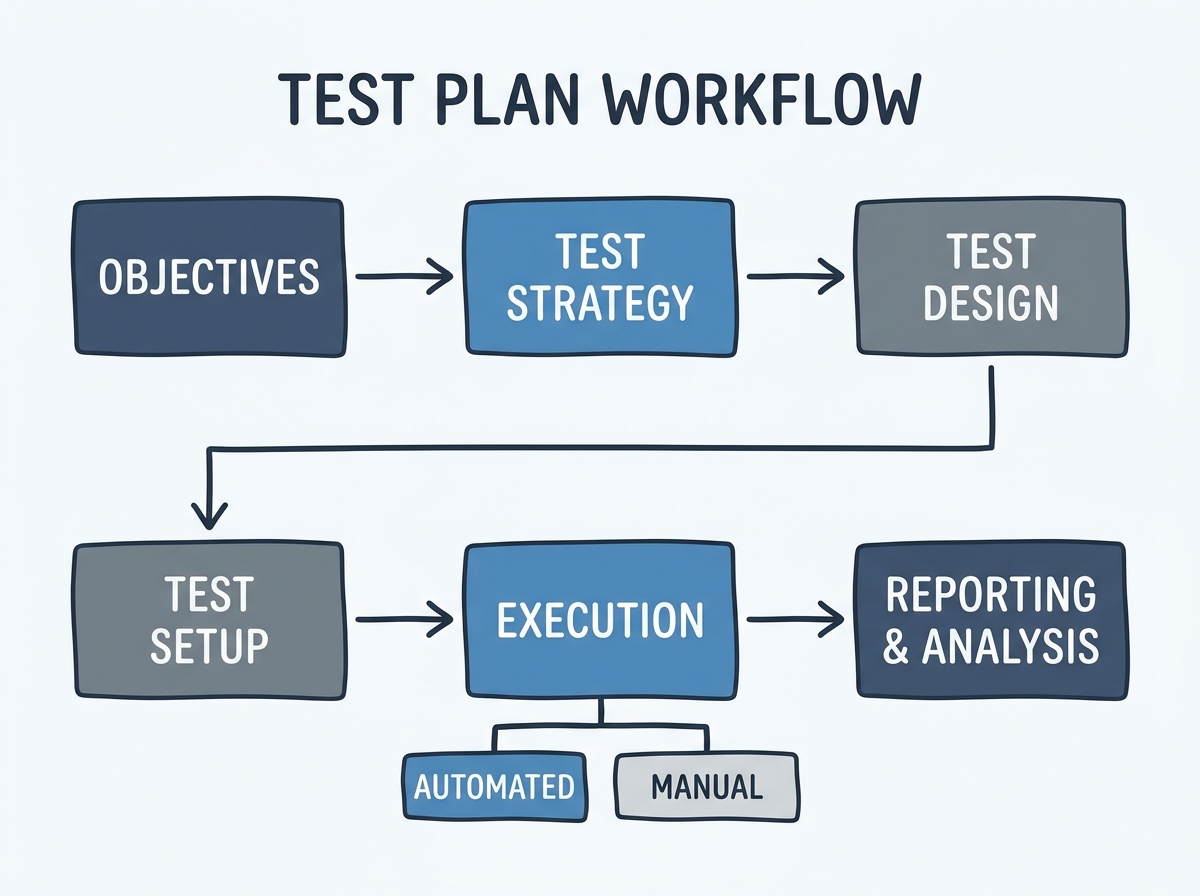
Poor planning is one of the most common performance testing mistakes. Rushing into load testing without a defined plan often leads to overlooked scenarios, unclear objectives, and results that are incomplete or misleading. Without clarity on what you’re testing and why, it’s easy to miss the issues that matter most in production.
Key Insight: Incomplete test planning almost always results in missed bottlenecks and wasted effort – careful planning is the difference between actionable findings and guesswork.
Teams that skip this step often fail to simulate real-world conditions or test only the most obvious user paths. Without clear objectives, interpreting results becomes guesswork. The outcome: test plans that lack specificity produce results that lack value.
Building a Test Plan That Works: Actionable Checklist for Effective Test Planning
Effective test planning requires discipline and attention to detail. Use this checklist to set your next round of performance testing up for success:
- Define clear objectives: Are you validating throughput, latency, resource consumption, or something else?
- Set the scope: Which parts of the application will you test? Front end, back end, APIs, or all three?
- List key scenarios: Map out typical and edge-case user journeys. For example, test both a regular login and a “forgot password” flow.
- Prepare realistic data: Use production-like datasets wherever possible. Synthetic data can mask issues that only surface under genuine loads.
- Establish baseline metrics: Record current response times, error rates, and system resources before you begin. These benchmarks help you measure improvement or regression after tuning.
- Define success criteria: Decide in advance what constitutes a pass or fail for each scenario. Be specific: “API responds in under 500ms for most requests at expected user loads.”
- Document assumptions and risks: Note any known limitations, such as unavailable integrations, so test results are interpreted in context.
With a comprehensive plan, teams avoid running generic tests that provide little actionable insight. Modern cloud testing platforms can help by offering templates and automated documentation, but it’s up to your team to set clear objectives and coverage from the start.
How Cloud Testing Platforms Streamline and Document Planning
Modern platforms reduce the manual work of test planning. Testers can define scenarios, manage test data, and track metrics directly in the cloud, eliminating version control headaches. Real-time dashboards help you check if your plan covers all required flows or if gaps exist. Centralized documentation ensures everyone refers to the latest plan, not an outdated file.
Some platforms also provide automated analysis to highlight overlooked edge cases or suggest missing scenarios based on previous test runs. This adds a second layer of defense against omissions, especially for fast-moving teams.
Limitations: When Over-Planning Backfires
Overly meticulous planning can lead to analysis paralysis. Trying to account for every possible permutation slows delivery and distracts from critical paths. The most effective plans balance thoroughness with pragmatism: cover key flows and known risk areas, but avoid designing tests for scenarios that rarely occur in production.
Excessive documentation can also become a burden. If your plan is too complex to update or understand, it won’t be followed. Use automation and templates to keep things current, but focus on actionable insight, not exhaustive detail. The best plans are specific, focused, and easy to adapt as your application evolves.
Mistake #2: Ignoring Real-World Testing Conditions
Testing in a staging environment that doesn’t reflect production is a persistent performance testing mistake. Teams often assume that “close enough” is sufficient, but even minor mismatches in hardware, network latency, or data volumes can hide issues until users encounter them.
The gap between test and production environments creates blind spots that undermine your results. A system might pass every test in staging, only to fail under production’s concurrency or unexpected load spikes. This is preventable with careful environment replication.
Blind Spots from Poor Environment Replication
- Staging databases are much smaller than production, masking slow queries and inefficient indexing.
- Background jobs and third-party integrations are often disabled or mocked, hiding critical bottlenecks.
- User behavior is predictable and “clean,” rather than unpredictable and messy as in real-world usage.
While mirroring production can seem costly, the price of a missed outage or degraded user experience is higher.
Before/After: The Impact of Proper Environment Replication
| Before | After |
|---|---|
|
The QA team tests their API endpoints against a staging database with only a small subset of records. Load is applied using a single script simulating a limited number of users, all performing the same simple query.
Tests pass with average response times under a certain threshold. The team greenlights the deployment. |
The team creates a staging database closely matching production in size and complexity. They simulate a larger number of users with varying access levels and workflows, including background jobs and occasional invalid requests.
Under this load, response times spike, and several endpoints time out. The team uncovers a slow database join and a memory leak under high concurrency – issues invisible in the earlier scenario. |
The “after” scenario surfaces bottlenecks early, allowing the team to address them before users are impacted. Replicating production scale and complexity pays off in reliability.
Simulating Real User Activity: Best Practices for Realistic Load and Data Simulation
Effective performance testing requires authenticity, not just volume. Here’s how to get closer to real-world conditions:
- Use production-like data sets. Mask sensitive information, but preserve data size and complexity.
- Simulate diverse user behaviors. Include edge cases, abandoned sessions, and invalid input.
- Reflect actual traffic patterns. Vary your load: short bursts, sudden spikes, and periods of low activity all matter. Use tools to model these patterns and analyze results in real time.
- Include background processes. Schedule batch jobs, emails, and third-party API calls to coincide with peak load testing.
Authentic testing scenarios reduce surprises post-launch. With cloud testing platforms, you can achieve realism while maintaining efficiency.
The credibility of your performance testing depends on how faithfully your environment and simulations reflect production. Realistic conditions are essential to catching issues early.
Mistake #3: Overlooking Baseline Metrics
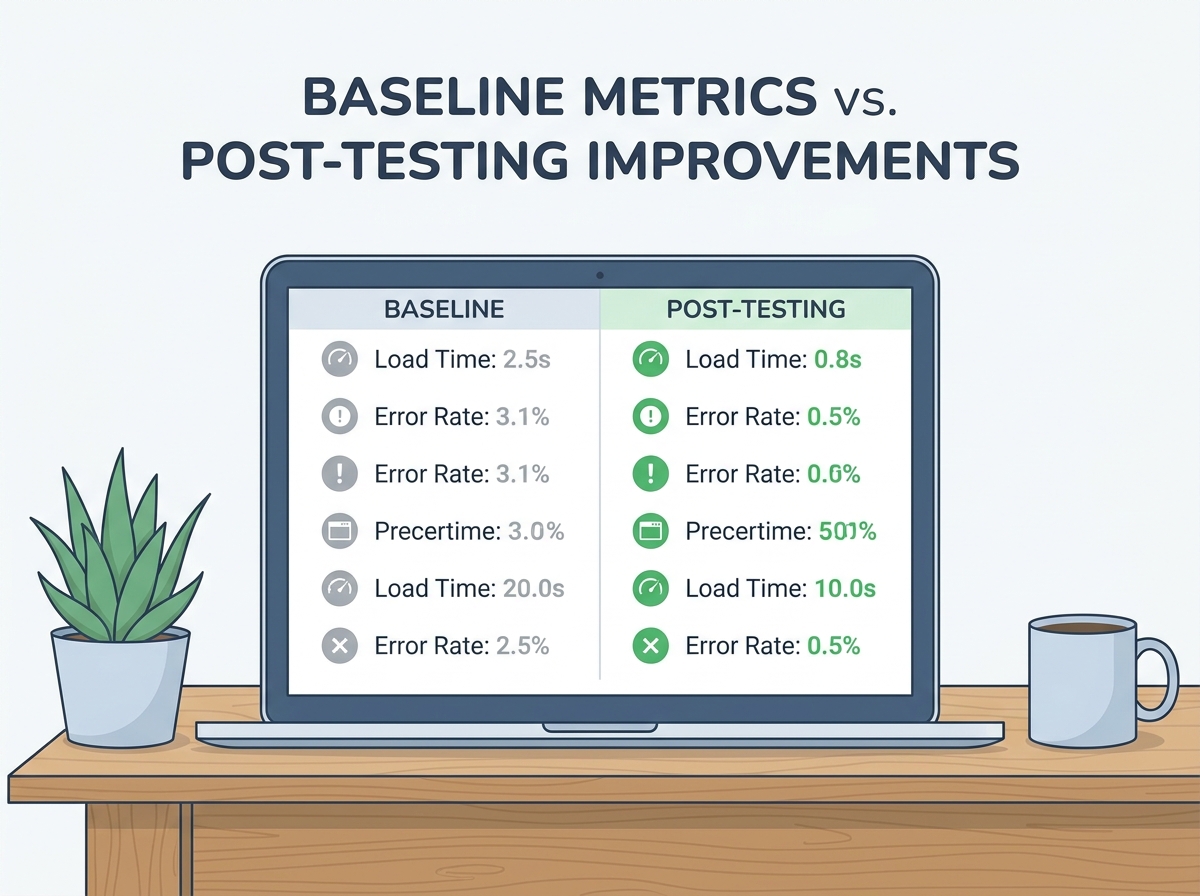
Skipping baseline metrics is a frequent performance testing mistake. Without initial benchmarks, you can’t determine if changes improve or degrade performance.
Baselines serve as your reference point. If you deploy an update and see response times change, the baseline tells you if that’s an improvement or a new problem. Without it, teams rely on impressions or scattered data, leading to missed regressions and overestimated gains.
It’s not enough to run a test and save the results once. You need to gather, document, and maintain baseline data methodically. Start by defining the most critical scenarios – such as peak traffic on your homepage, high-volume API requests, or checkout flows. Use load testing tools to simulate realistic loads and record current performance under these conditions. Document the exact test configuration, environment, user concurrency, and data volumes. This allows for apples-to-apples comparisons, instead of confusing context shifts.
- Gather: Run initial tests on production-like environments using realistic data and traffic shapes.
- Document: Record key metrics (response time, throughput, error rate) along with test parameters and system state.
- Maintain: Update baselines regularly as the system evolves, especially after infrastructure changes or major feature releases.
One common pitfall is treating baseline setup as a “set it and forget it” process. That approach quickly leads to outdated benchmarks. Application stacks, user patterns, and infrastructure all shift over time. A baseline from months ago may have little to do with today’s reality.
What Makes a Good Baseline?
An effective baseline is more than just a snapshot of numbers – it’s a meaningful, actionable reference for future comparison. Select metrics that reflect user experience and business outcomes. Response times for key transactions, error rates under load, and peak throughput are usually more relevant than obscure system counters.
Ensure your baselines are repeatable. Tests should be run in consistent environments, with the same data sets and load patterns. Otherwise, “improved” numbers may simply reflect easier test conditions.
Finally, baselines should be visible and accessible to everyone involved in development, QA, and operations. Shared dashboards or documentation hubs prevent knowledge silos and keep everyone aligned.
Even the best baseline loses value if it isn’t refreshed regularly. As your stack changes, so should your performance reference points. Make baseline maintenance an ongoing discipline.
Mistake #4: Neglecting to Test All Application Components
Focusing only on the front end is a common performance testing mistake. Many bottlenecks hide in back-end systems, APIs, or external integrations. Slow database queries, overloaded APIs, or lagging third-party services can degrade even the best-designed interfaces.
Comprehensive testing means evaluating every layer of your application stack. Leaving out APIs, databases, or external services risks missing the issues most likely to surface under peak loads. Outages are often traced to these overlooked components, not to front-end code.
| Application Component | Potential Issues Detected | Testing Approach | Limitation |
|---|---|---|---|
| Front-End (Web/Mobile) | Rendering delays, resource loading lag, JavaScript errors | Browser-based load testing, synthetic monitoring | Does not reveal server or network bottlenecks |
| APIs (REST/GraphQL) | High response times, timeout errors, inconsistent data returns | API load testing, concurrent request simulation | May miss issues tied to specific client usage patterns |
| Database | Slow queries, connection pool exhaustion, deadlocks | Query profiling, simulated concurrent transactions | Requires production-like data volumes for accuracy |
| Third-Party Integrations | Latency spikes, rate limiting, external service outages | Mocking, service virtualization, direct integration stress tests | Mocks may not match real-world production behavior |
| Network Layer | Packet loss, high latency, bandwidth constraints | Network throttling, latency injection | Physical network conditions are hard to replicate perfectly |
| Authentication/Authorization Services | Token expiry, authentication delays, scaling failures | Simulated multi-user logins, token refresh tests | Security restrictions may prevent full test coverage |
Each component brings its own risks and requires a tailored testing approach. Browser-based tests catch UI issues, but won’t reveal API or database bottlenecks. Only by coordinating tests across all key components can you uncover the most elusive performance issues.
Testing APIs and Integrations: The Overlooked Backbone
APIs and third-party integrations are the backbone of most modern applications. If performance testing focuses only on visual elements, teams miss under-the-radar issues that can cripple user experience at scale. For example, an API may respond quickly in functional tests but slow down or time out under heavy load. Similarly, a cloud storage integration could introduce delays if rate limits or geographic latency aren’t tested.
Comprehensive testing here means including realistic loads and concurrency. Use tools to generate high volumes of parallel API calls, simulate failures in downstream dependencies, and monitor how your system recovers under stress. For third-party services, use service virtualization or mock servers to mimic slow responses or outages. This helps you see whether your application degrades gracefully or fails when its partners falter.
Monitor not just response times, but also the ripple effects on connected systems. Does a slow API request lead to a backlog in your message queue? Does a laggy database query drag down multiple endpoints? Only by testing the full stack can you build software that performs reliably under real-world conditions.
Mistake #5: Failure to Analyze Test Results Thoroughly
Running performance tests is only half the job. Many teams collect data without understanding what it means. If you don’t dig into the results, you risk missing the root causes of slowdowns and recurring issues. The real value comes from turning numbers into action.
Key Insight: The biggest performance gains come not from running more tests, but from asking better questions about the results you already have.
Surface-level analysis is a common blind spot. It’s easy to spot a spike in response times or error rates, but what caused it? Was it a database lock, network hiccup, inefficient code, or an overloaded third-party service? Without structured analysis, teams often chase symptoms rather than solutions.
From Data to Decisions: Turning Results Into Actions
To move from raw metrics to real improvements, use a disciplined process:
- Baseline Comparison: Compare new results against established baselines. Are you seeing regressions, improvements, or anomalies?
- Bottleneck Identification: Look for classic choke points – network latency, bandwidth, server CPU, or database contention. Drill down to see if specific components are at fault.
- Trend Analysis Over Time: Compare results across multiple test runs to identify patterns. Is performance degrading at certain times of day? Are there slow leaks tied to memory or connection pool exhaustion?
- Root Cause Investigation: Use stack traces, logs, and transaction traces to pinpoint the origin of issues. Automated analytics can highlight suspicious trends or anomalies.
- Actionable Recommendations: Synthesize findings into clear, prioritized actions. For example, “Optimize query X on endpoint Y,” or “Increase autoscaling thresholds for service Z.”
Some platforms streamline this workflow by flagging inconsistent results and suggesting likely causes based on previous tests. Instead of sifting through endless logs, you get targeted alerts – making it easier to focus your optimization efforts where they’ll matter most.
Here’s a simple comparison framework you can apply to every test run:
| Test Metric | Baseline Value | Current Value | Change | Root Cause? | Action Needed |
|---|---|---|---|---|---|
| API Response Time (ms) | Previous benchmark | Current measurement | Increase or decrease | Identified bottleneck | Suggested fix |
This approach moves you from raw data to a prioritized list of fixes, ensuring your performance testing mistakes don’t keep cropping up with each release.
Limitations: When Analytics Overwhelm
With so many metrics and dashboards, it’s easy to slip into analysis paralysis. Teams may get bogged down comparing every spike and dip, losing sight of what actually affects end users. To avoid this, focus on actionable insights. Prioritize issues that impact user experience or business KPIs – not just technical anomalies. Set clear thresholds for when an issue warrants investigation, and use tools that filter noise to surface the most important findings.
The goal is not to produce the prettiest charts, but to drive meaningful performance gains in production. Sometimes, the best analytics are those you act on quickly, not the ones that explain every detail.
Mistake #6: Infrequent or Siloed Performance Testing
Treating performance testing as a one-off task late in the release cycle is a classic mistake. Many teams still schedule a single round of tests before launch, then move on. This approach leaves blind spots, especially in agile and DevOps workflows where changes happen rapidly.
Continuous, integrated testing is now the standard for high-performing teams. Embedding performance checks throughout the development lifecycle helps catch issues early and resolve them with less disruption. Integrating testing into the CI/CD pipeline ensures every code change, infrastructure tweak, or dependency update is evaluated for its impact on speed and scalability.
Key Insight: Teams that adopt continuous performance testing as part of their CI/CD workflow consistently deliver faster, more resilient applications – and gain a clear edge over competitors still relying on one-off checks.
DevOps and Performance Testing: A Natural Fit
Performance testing and DevOps both aim to shorten feedback loops and improve software quality through automation and collaboration. Embedding performance tests into the CI/CD process brings these benefits directly to application reliability.
Cloud testing platforms can automatically run load or stress tests whenever a new feature branch is merged. This means regressions are caught within minutes, not weeks. Real-time alerts flag any increase in response times, helping teams investigate and fix issues before they affect users. This approach also supports collaboration across teams – developers, QA, and operations all have access to the same performance dashboards and can triage problems together.
- Automated triggers ensure performance tests run after each deployment.
- Realistic traffic simulations help catch scaling issues before they hit production.
- Continuous monitoring closes the loop by tracking metrics even after release.
Continuous testing does require investment in tooling, and teams must prioritize which scenarios to automate to avoid alert fatigue. The payoff: by treating performance as a shared, ongoing responsibility, organizations can spot and resolve problems while they’re still small.
Mistake #7: Underestimating the Importance of Load Testing
Skipping load testing leaves your application vulnerable. Performance testing mistakes rarely have as much real-world impact as launching an app that fails under traffic. Many teams still consider load testing optional, especially with the shift to cloud-native and distributed apps. But without it, minor inefficiencies can become outages during spikes.
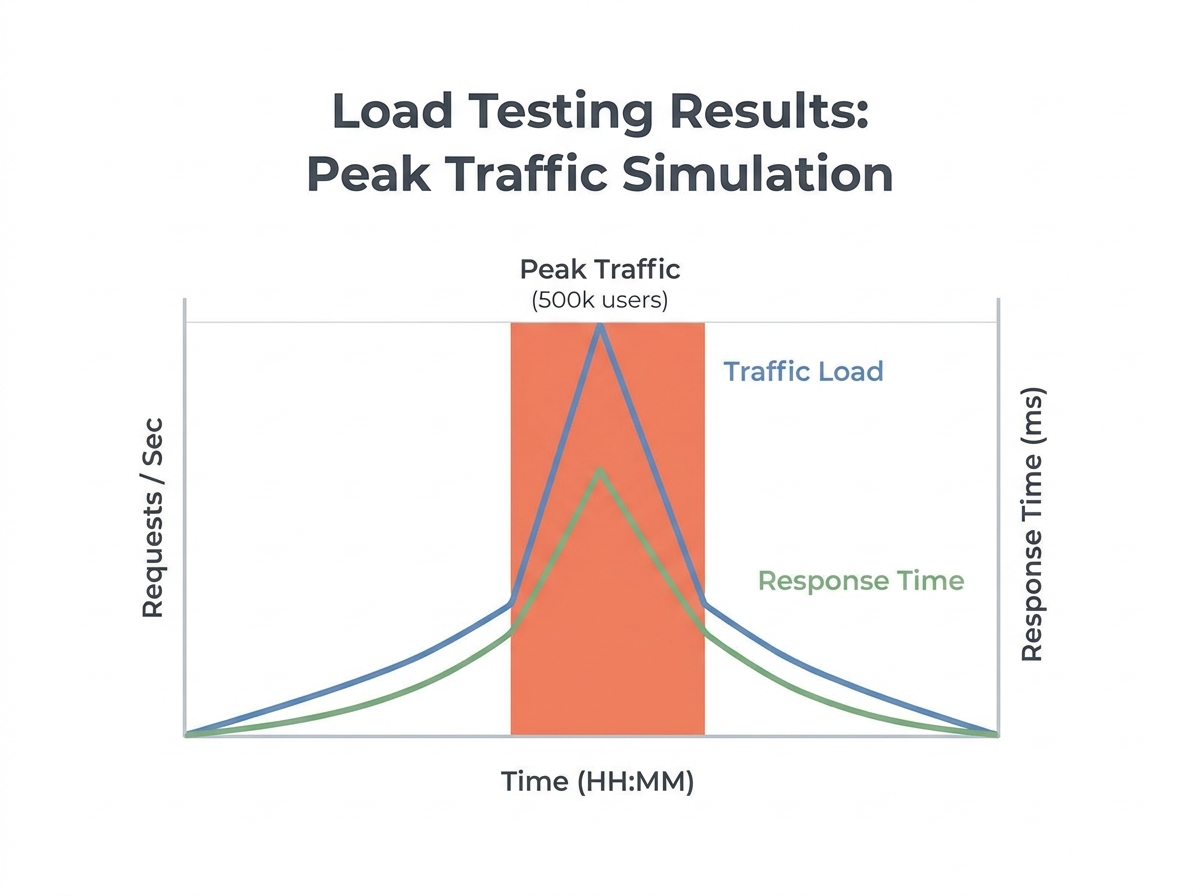
Load testing reveals how your system performs under stress. It’s not about breaking things for its own sake – it’s about knowing where things will break, so you can prevent it in production. Even well-architected systems can reveal issues under concurrent users, API bursts, or complex data flows. Skipping this step is risky.
Why Traditional Load Testing Often Falls Short
Legacy methods – like running scripts from a single server or simulating a handful of users – don’t match today’s distributed, cloud-based architectures. Modern applications use dynamic scaling and depend on third-party services. Testing from one location won’t reveal how your CDN or API gateway holds up under real-world conditions.
Cloud-native systems add complexity: autoscaling, ephemeral infrastructure, and intricate dependencies. You can’t just “throw traffic” at your app from a laptop and call it a day. Meaningful results require replicating the complexity and unpredictability of production.
Before/After Example: Stability Without and With Proper Load Testing
| Before | After |
|---|---|
|
Generic Load Testing Team tests the API using a local script, simulating a limited number of users for a short duration. All responses are within acceptable limits. App launches. Under real-world traffic spikes, the API crashes, order processing stalls, and revenue is impacted. |
Modern Cloud-Based Load Testing Team uses a cloud platform to simulate thousands of users from multiple regions, testing peak loads and network variability. They discover a bottleneck in their database sharding logic and a misconfigured CDN edge case. These are fixed pre-launch. Under peak traffic, the API holds steady with stable response times and zero downtime. |
Why the second approach works: It uncovers failures that only show up under real-world stress, across multiple infrastructure layers. Generic testing gives false confidence, while comprehensive load testing prevents public failures and lost revenue.
Simulating Realistic Loads: Modern Strategies for Cloud-Based Load Testing
With cloud testing platforms, teams can replicate real-world scenarios that go far beyond what a single on-prem agent can achieve. Here’s how to approach this challenge:
- Geo-distributed traffic simulation: Launch virtual users from several global regions to mirror actual customer patterns. This reveals CDN misconfigurations and edge-case latency spikes.
- Dynamic scaling scenarios: Test how your system handles sudden surges and drops, simulating events like product launches or viral campaigns. Capture how well autoscaling triggers and recovers.
- API and service dependency chaining: Load test not just the front end, but also downstream APIs, databases, and third-party integrations. This exposes slow points in your service mesh or external dependencies.
- Real-time analytics and automated insights: Platforms now provide immediate feedback on bottlenecks and suggest targeted optimizations, so you’re not left sifting through raw logs after every test.
By embracing these strategies, you’re not just ticking a compliance box – you’re engineering for resilience under pressure.
Honest Limitation: Cost and Complexity at Scale
Large-scale load testing is resource intensive. Renting cloud infrastructure to simulate tens of thousands of virtual users can be costly. Orchestrating complex test plans with realistic data and region targeting takes expertise. For smaller teams, this means tough trade-offs between coverage and budget.
To mitigate these challenges, prioritize critical user journeys and peak scenarios first. Use cloud platforms with flexible pricing, and accept that designing effective load tests at scale requires collaboration and a learning curve. The investment pays for itself the first time your system survives a traffic spike unscathed.
Underestimating load testing is one of the most costly performance testing mistakes. The difference between “it works in staging” and “it works in production” is a disciplined, realistic approach to simulating real traffic at scale. That’s how you earn genuine user trust when it matters most.
How to Choose the Right Performance Testing Approach for Your Team
Context Matters: Not Every Mistake Is a Crisis
Performance testing mistakes don’t carry the same weight for every team or project. The impact of a misstep depends on your team’s maturity, the type of application you’re building, and your business goals. For example, a startup working on a new SaaS product might focus on baseline metrics and realistic load scenarios. An established enterprise integrating third-party APIs at scale faces different performance testing priorities.
A Simple Framework for Prioritizing Efforts
Before choosing tools or automating tests, assess your team’s experience and the risk profile of your application. Teams new to performance testing often struggle with inadequate planning and missing baseline metrics. Mature engineering groups may automate basic checks, but can overlook the complexities of distributed systems or fail to test all service integrations regularly.
Business context matters, too. If your product is customer-facing and downtime means lost revenue, the cost of missing a bottleneck is much higher than for an internal tool. This framework helps you focus your resources where they reduce risk the most.
Decision Matrix: Team Maturity vs. Testing Priorities
| Team Maturity | Application Type | Top Priority Mistakes | Recommended Tools/Practices |
|---|---|---|---|
| Beginner | Single-page web app | Inadequate test planning, Overlooking baseline metrics | Develop a detailed test plan, establish baseline with simple load tests, use real user flows |
| Intermediate | API-driven SaaS platform | Ignoring real-world conditions, Neglecting back-end integrations | Test in production-like environments, monitor all endpoints, use cloud testing to simulate distributed traffic |
| Advanced | Distributed enterprise system | Failure to analyze results thoroughly, Infrequent testing | Integrate performance testing into CI/CD, use automated analytics tools for root cause analysis, schedule regular load tests |
| Any | High-traffic e-commerce site | Underestimating load testing, Slow response to bottlenecks | Use peak traffic simulations, real-time monitoring, automated analysis |
Choosing the right approach to performance testing mistakes is about aligning your strategy with your team’s strengths and your product’s real-world needs. By identifying your team’s maturity and the business criticality of your application, you can focus on fixing the mistakes that actually move the needle for your users and stakeholders.
Frequently Asked Questions about Performance Testing Mistakes
What are the most common performance testing mistakes?
Performance testing mistakes often stem from poor planning, ignoring production-like conditions, neglecting baseline metrics, and failing to analyze results thoroughly. Teams may also focus only on the front end, skip testing third-party integrations, or rely on infrequent, one-off tests. These oversights lead to unreliable results and unexpected issues after deployment. For example, testing only the UI of an e-commerce platform without simulating real backend traffic may hide bottlenecks that surface during major sales events.
How can I make my performance tests more realistic?
Use production-like data sets, simulate diverse user behaviors, and reflect actual traffic patterns. Incorporate background processes and ensure your test environment mirrors production as closely as possible. This approach helps uncover issues that only appear under real-world conditions.
Why are baseline metrics important in performance testing?
Baseline performance metrics provide a reference point for measuring improvements or regressions. Without them, you can’t confidently answer whether changes made the system faster or slower. Start every project by recording current response times, throughput, and error rates to avoid guesswork and catch subtle degradations over time.
How frequently should performance testing be performed?
Continuous performance testing is now standard for most high-performing teams. Running tests only before major releases often misses regressions introduced by daily changes. Integrate performance checks into your CI/CD pipeline so every code change gets evaluated for potential impact on speed and stability.
What is the difference between performance and load testing?
Load testing measures how your application handles expected and peak user volumes. Other types, like stress testing (pushing the system to failure) and soak testing (evaluating behavior over time), answer different questions. Neglecting load testing leaves you blind to how your app performs during real traffic spikes.
Which tools are best for cloud-based performance testing?
Cloud-based platforms offer load testing and real-time performance insights that highlight bottlenecks under peak loads. Automated tools streamline test execution, collect consistent metrics, and provide actionable analysis. The key is to choose a tool that allows you to run tests at scale, integrate with your CI/CD pipeline, and generate reports you can act on – not just raw data.
How do I analyze performance testing results effectively?
Compare new results against established baselines, identify bottlenecks, analyze trends over time, investigate root causes, and turn findings into actionable recommendations. Use tools that provide automated analytics to quickly flag inconsistencies and suggest likely causes.
- Plan thoroughly before you test – don’t leave scenarios to chance.
- Always test in environments that reflect production as much as possible.
- Capture baseline metrics early, then measure against them.
- Use automation and integrated tools for efficient, repeatable testing.
- Adopt a continuous testing mindset – performance is never “done.”
Learning from these common performance testing mistakes can make the difference between a smooth rollout and a stressful post-launch scramble. Prioritize smart planning, realistic environments, and actionable insights to keep your applications running reliably – no matter the traffic.
Created with PostNext tool