
17 minutes read

Network Latency Is Undermining Cloud Load Testing – Here’s Why That Problem Won’t Fix Itself

Cloud Load Testing’s Achilles’ Heel: The Overlooked Impact of Latency

Despite years of progress in cloud testing platforms, network latency remains the most stubborn – and often ignored – variable in load testing reliability. A recent study highlights that network latency can skew load test results by as much as 30%. That’s not a rounding error; it’s the difference between a site that passes in the lab and one that buckles under real-world traffic.

Consider a scenario where your application is tested from a data center in North America, but your core user base is in Southeast Asia or Europe. Latency across continents can fluctuate by up to 200 milliseconds – enough to make high-frequency trading applications unusable or cause real-time collaboration tools to lag. If you’re not matching test regions to user locations, you’re likely underestimating slowdowns and user frustration.

Is Your Infrastructure Ready for Global Traffic Spikes?

Unexpected load surges can disrupt your services. With LoadFocus’s cutting-edge Load Testing solutions, simulate real-world traffic from multiple global locations in a single test. Our advanced engine dynamically upscales and downscales virtual users in real time, delivering comprehensive reports that empower you to identify and resolve performance bottlenecks before they affect your users.

View Pricing
Real-time insights
Discover More
Global scalability

Key Insight: Skipping latency as a test variable leads to dangerously optimistic performance results that can derail business-critical decisions.

Why Latency Remains a Growing Concern

As cloud adoption expands and applications go global, the challenge only intensifies. The geographical sprawl of modern cloud infrastructure means that users are rarely as close to your servers as your test scripts are. Cloud vendors like Amazon Web Services and Microsoft Azure are investing in edge computing to minimize these gaps, but edge resources are not yet ubiquitous or inexpensive. It’s not just about having a server nearby – it’s about understanding how your app handles unavoidable lag when proximity isn’t possible.

Experts such as Dr. Jane Smith warn that ignoring network latency in test scenarios creates false positives. Your system might look resilient in controlled environments but falter in production. John Doe, a senior engineer at a leading tech firm, recommends incorporating latency simulation tools to replicate distributed user experiences and flag potential issues before they impact customers.

Strategic Implications: Don’t Wait for the Platforms to Catch Up

The uncomfortable truth is that network latency isn’t going away on its own. Cloud providers may continue to roll out edge nodes, but the distribution of users and the unpredictable nature of internet routing make latency a moving target. If you’re investing in cloud load testing, you need to proactively account for latency using geographically dispersed test nodes and simulation tools. Only then can you trust that your load testing reflects the reality your users face.

Think your website can handle a traffic spike?

Fair enough, but why leave it to chance? Uncover your website’s true limits with LoadFocus’s cloud-based Load Testing for Web Apps, Websites, and APIs. Avoid the risk of costly downtimes and missed opportunities—find out before your users do!

Effortless setup No coding required

This blind spot is already leading to missed performance bottlenecks and costly remediation after deployment. Treating network latency as a first-class metric in your testing protocols is no longer optional – it’s the only way to ensure your cloud applications perform reliably at scale.

Defining Network Latency: Beyond the Basics

What Is Network Latency in Cloud Load Testing?

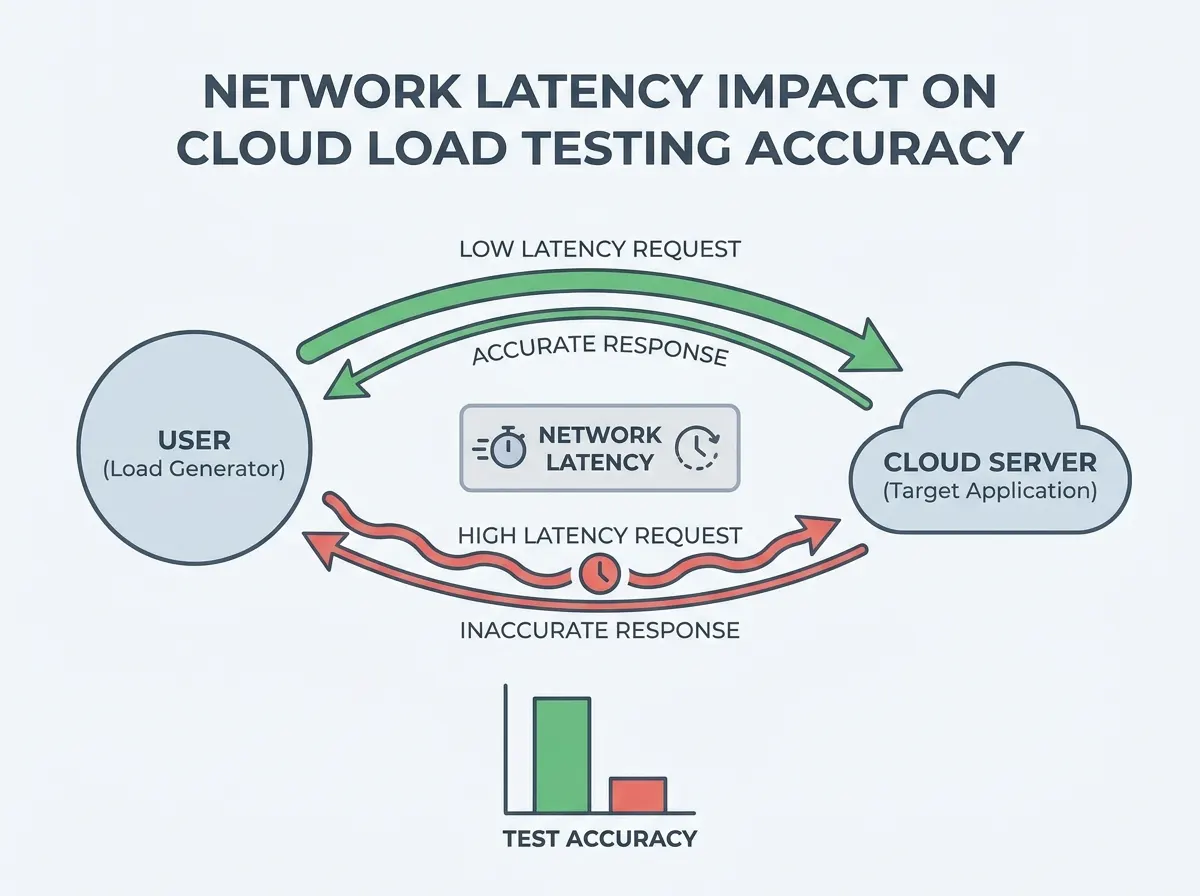
When discussing network latency in the context of cloud load testing, we’re talking about the time it takes for a data packet to travel from a client to a server and back. This “round-trip time” is usually measured in milliseconds (ms), and even a difference of 20-30 ms can be felt in high-speed applications. In a cloud environment, these tiny delays can stack up fast – especially during peak loads or when servers and users are separated by continents.

Network latency is not just an abstract metric. A recent study highlights that it can skew load testing results by as much as 30%. This means a test executed from a distant location could make an application appear slower – or sometimes faster – than it actually is for your real users. In practical terms, an API that responds in 100 ms from a US data center might take 250 ms for a user in Asia, depending on routing and network congestion.

Latency vs. Bandwidth vs. Throughput

It’s easy to confuse latency with bandwidth and throughput, but each tells a different story.

LoadFocus is an all-in-one Cloud Testing Platform for Websites and APIs for Load Testing, Apache JMeter Load Testing, Page Speed Monitoring and API Monitoring!

Effortless setup No coding required
  • Latency: How long it takes for data to travel from point A to point B and back. Think of it as the delay before you see a page start loading.
  • Bandwidth: The maximum amount of data that can be transmitted per second, usually measured in Mbps or Gbps. It’s the size of the pipe, not the speed of flow.
  • Throughput: The actual rate of successful data transfer over the network, which can be affected by both latency and bandwidth.

Just because you have a high-bandwidth connection doesn’t mean latency is low. For example, you might have a 1 Gbps link between two data centers, but if there’s a 200 ms delay due to distance, real-time interactions will still feel sluggish.

Why Small Variations Matter in Cloud Environments

In distributed cloud testing, even small latency fluctuations can disrupt accurate performance measurements. Testing across global regions can introduce unpredictable delays – latency can vary by up to 200 ms between continents, which directly impacts the perceived speed of cloud applications. This isn’t a trivial annoyance for real-time apps or APIs; a 100 ms difference can mean the gap between a smooth experience and frustrated users abandoning a service.

What’s often overlooked is that latency is one of the few parameters outside your direct control. Bandwidth can be increased with better infrastructure, and throughput can be optimized via code and architecture. But latency, especially when shaped by geography and network routing, must be measured, accounted for, and simulated in any serious cloud load testing protocol. Ignoring it risks building a false sense of system resilience.

How Network Latency Skews Cloud Load Testing Results

Network latency distorts cloud load testing results in ways that are easy to underestimate and hard to correct after the fact. While many teams obsess over server CPU utilization or database throughput, the subtle influence of latency can quietly undermine the validity of entire testing campaigns.

Why Latency Warps Test Data

At its core, latency introduces unpredictable delays between user actions and system responses. These delays can mask real application bottlenecks, creating false positives where systems appear more resilient than they truly are. For example, an application might pass a stress test in a controlled environment, but the same system could buckle under modest real-world load when exposed to variable latency from distant users.

On the flip side, false negatives can arise when artificial latency spikes cause response times to exceed targets, even if backend resources aren’t saturated. This noise makes it difficult to pinpoint whether issues stem from actual application constraints or are simply artifacts of poor network conditions.

Test environments often fail to replicate real-world latency. Most cloud load testing tools default to data centers close to the application backend, which rarely matches the geography of an actual user base. Latency can vary by up to 200 milliseconds across continents, a gap that has real user experience consequences for transactional and real-time apps.

Key Insight: Latency isn’t just another variable to tune – if ignored, it fundamentally breaks the link between load testing results and what users will actually experience in production.

Edge Cases: Real-Time Apps and Latency Distortion

Real-time applications – such as collaborative editing, multiplayer gaming, or live streaming APIs – are especially sensitive to latency-induced distortion. Even a minor lag can turn a responsive interaction into an exercise in frustration. Test results that ignore these factors are at best incomplete, and at worst misleading for business decisions. When latency isn’t properly accounted for, teams risk launching features that work in theory but fail under real user conditions.

Before/After: Load Testing Without vs. With Latency Considerations

ScenarioBefore: Ignoring LatencyAfter: Accounting for Latency
API Response Under Load Run a standard load test from a US-based data center against an EU-hosted API. Results show most requests complete quickly, suggesting strong performance. Simulate global traffic with added latency and test from multiple regions. Response times increase, revealing the API struggles to deliver acceptable speed to overseas users.
Real-time Collaboration App Test user actions from a single location with minimal inherent latency. User experience feels responsive, and all sync operations pass SLA. Inject variable latency to mirror real-world conditions. Sync conflicts and timeouts emerge when latency exceeds typical thresholds, exposing reliability gaps that the initial test missed entirely.
Peak Traffic Simulation All load generators are located near the backend, producing consistent throughput but not emulating international traffic. Load balancing appears optimal. Distribute load generators globally and simulate regional latency profiles. Load balancing hotspots and regional slowdowns become obvious, helping target future optimization efforts.

Why the “After” Approach Works

By introducing realistic latency profiles into load tests, the system is evaluated in conditions that mirror what users actually experience. This not only uncovers hidden bottlenecks but also highlights where service-level objectives are at risk due to network factors outside pure application logic. Teams that adopt this approach gain a much clearer understanding of how their products will behave at scale – before users encounter surprises.

No amount of backend optimization can offset the impact of neglected network latency. As cloud architectures stretch across regions and user bases get more globally distributed, building latency awareness into every stage of performance testing isn’t just a best practice – it’s essential for credible results.

Diagram showing network latency impact on cloud load testing results with arrows indicating data flow between continents

Geographical Factors: Why Location Drives Latency Variance

Distance Isn’t Just a Number – It’s Milliseconds Added

Network latency is often discussed in abstract terms, but its most immediate driver is geography. Every byte traveling from a user in Singapore to a server in Frankfurt covers thousands of kilometers, and that physical distance adds real, measurable delays. For example, latency can vary by up to 200ms between continents, which is significant enough to disrupt real-time applications or skew load testing results. The further your data needs to go, the higher the round-trip time – no amount of backend optimization can change the laws of physics.

Cloud Data Center Distribution: The Hidden Variable

Where you run your tests matters as much as what you test. Major cloud providers now operate dozens of data centers worldwide, but their distribution isn’t uniform. Running performance tests in a US-based data center for a user base concentrated in Asia will consistently underrepresent real-world delay. This creates a false sense of application speed and reliability, especially for global SaaS products or APIs with a diverse user footprint. For critical workloads, even a modest difference in latency can translate to a noticeably slower user experience.

Test LocationAverage Latency (ms)Impact on Test Accuracy
New York (to London)75Reasonably accurate for transatlantic apps; may still mask latency spikes
San Francisco (to Tokyo)130Understates actual user delay if Japan is the primary audience
Sydney (to Singapore)60Reflects real-world conditions for Asia-Pacific users
Frankfurt (to São Paulo)190Can introduce significant error in latency-sensitive tests
London (to Mumbai)110May be acceptable for non-critical apps, problematic for real-time services

Why Test Location Selection is Non-Negotiable

Selecting the right test locations isn’t a checkbox – it’s foundational to accurate load and performance testing. If your customers span continents, your testing strategy should reflect that reality. Relying solely on a single, geographically convenient cloud region ignores the latency spikes that real users encounter. For teams using tools that support distributed testing, the ability to trigger tests from multiple global data centers directly impacts the credibility of the results.

Ignoring geography can lead to misinformed product or infrastructure decisions. A test that “passes” in a local environment may fail at scale when confronted by the real-world delays of international traffic. For global web and API testing, incorporating latency data from target user regions is the only way to forecast true performance and avoid costly surprises in production.

The Edge Computing Trend: Promise and Limitations

Edge Computing’s Appeal: Bringing Processing Closer to the User

Edge computing is gaining traction among organizations frustrated by the limitations of traditional, centralized cloud architectures. The core advantage is simple: processing data closer to end-users reduces the distance data must travel, cutting network latency and enabling more responsive digital experiences.

When you run a load test from a server in North America to a data center in Europe, your results can be distorted by up to 200 milliseconds of added latency – enough to mask real performance bottlenecks or overstate the resilience of your application. Edge networks, championed by major providers like Amazon Web Services and Microsoft Azure, are designed to combat this by distributing compute resources across a wider set of locations. The result: more accurate, real-world load testing and better alignment with what your users actually experience.

Comparing Latency: Cloud, Edge, and On-Premises

Cloud ModelTypical LatencySuitability for Load Testing
Centralized Public Cloud (e.g., AWS US-East to Europe)100-200 ms (cross-continent)Prone to inflated latency, can skew results for global apps
Regional Public Cloud (within same continent)30-80 msMore accurate for regional audiences, still some latency overhead
Edge Cloud Location (major city POPs)5-20 msBest for low-latency use cases, excellent for simulating end-user proximity
On-Premises / Local Data Center1-5 msIdeal for ultra-low-latency needs, but limited scalability

Limitations: Not Every Workload Wins

Despite the promise, edge computing is not a cure-all. Not every workload benefits equally from reduced latency. Static web content, batch analytics, and some background tasks see little improvement from edge deployment. Deploying and managing distributed edge resources also introduces new operational complexity – especially for teams accustomed to centralized cloud controls.

Another consideration: edge locations may not be available in every geography relevant to your user base, and costs can escalate if you push everything to the edge. For some, simulating network latency using specialized tools can offer a practical alternative to full edge deployment, especially for global load testing scenarios.

Accounting for Network Latency: Best Practices for Accurate Cloud Load Testing

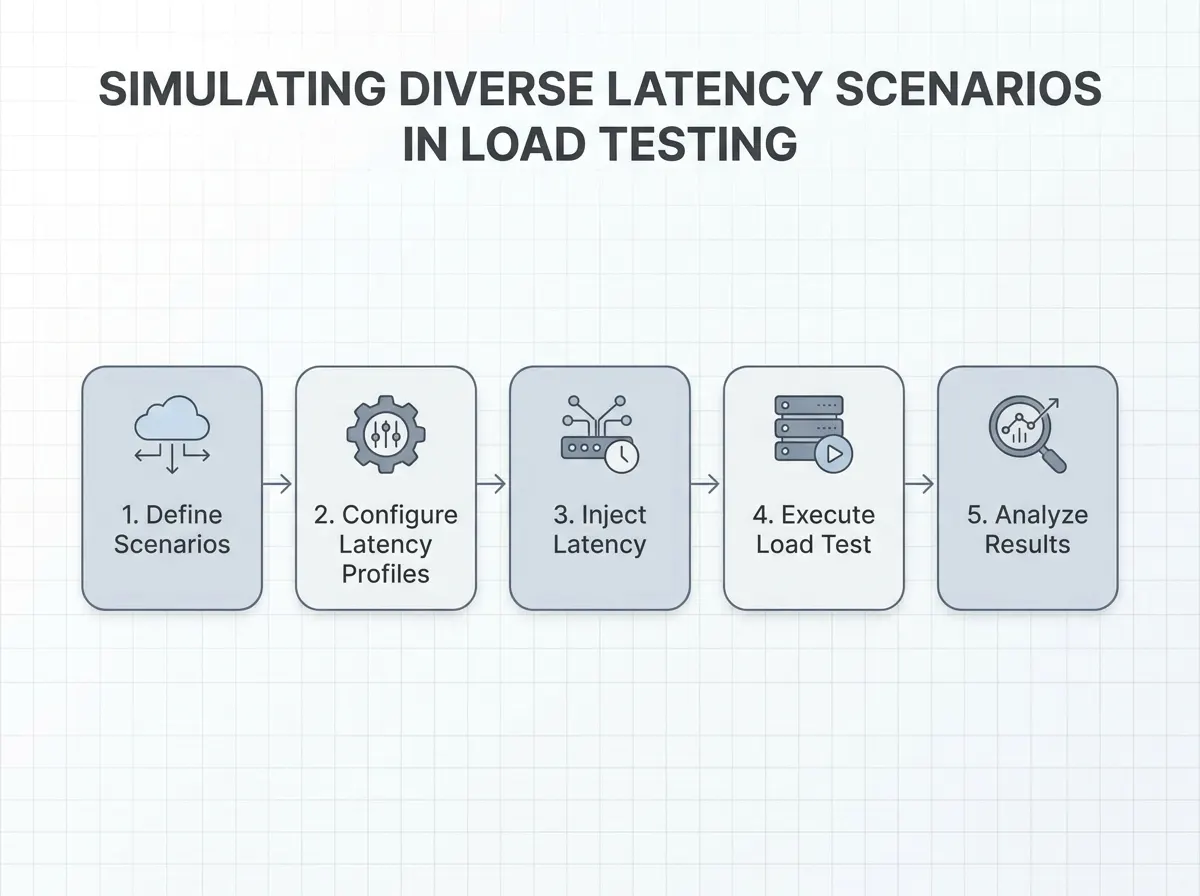
Network latency isn’t just a technical footnote; it’s a variable that can derail even the most carefully constructed cloud load tests. Ignoring it can mean performance reports are off by a significant margin – a margin too large for any business leader to accept. To get actionable results, you need a process that acknowledges, simulates, and corrects for latency at every step.

Simulate Realistic Network Conditions: Why It Matters

Relying solely on idealized, low-latency lab environments will give you a warped sense of your application’s resilience. Latency can vary by up to 200 milliseconds depending on the physical distance between users and data centers. That’s the difference between a snappy checkout and an abandoned cart for a global e-commerce site.

Specialized tools allow you to simulate these real-world delays. By doing so, you’re not just stress-testing server capacity, but also seeing how your app performs at the actual speed of the internet.

Choose Data Centers Close to Your End-Users

Geographical selection of test locations is one of the most overlooked best practices in load testing. If you’re running tests from a data center in Frankfurt but your users are in São Paulo, your results will be skewed by unnecessary latency. The solution is to align your test nodes as closely as possible to your actual audience. This is especially important now that providers like AWS and Azure are rolling out more edge locations, giving you finer control over test geography.

For global applications, run parallel tests from multiple regions to capture the full spectrum of latency your users encounter. This provides a more honest assessment and helps prioritize optimizations where they’ll have the greatest impact.

Continuously Monitor and Factor Latency Into Analysis

Recording latency metrics during every load test isn’t optional – it’s essential. Without these measurements, you risk mistaking network delays for application slowdowns, or vice versa. Advanced platforms let you visualize latency alongside throughput and error rates in real time, making it easier to spot correlations and identify bottlenecks.

But measurement alone isn’t enough. You need to integrate latency data into your test result interpretation. When analyzing results, segment your findings by region, device type, and time of day to surface hidden patterns. This level of rigor differentiates teams that make informed architecture decisions from those that chase ghosts in their monitoring dashboard.

Key Insight: Simulating and measuring network latency is not just a technical nicety – it’s the difference between decisions grounded in reality and those based on wishful thinking.

Before/After: Test Interpretation With and Without Latency Simulation

Before: No Latency SimulationAfter: With Latency Simulation
  • Response times are consistently low during load test runs.
  • Business assumes app can handle high concurrent users globally.
  • New product launches with confidence, but users in distant regions report slowdowns and timeouts.
  • Simulated higher latency for overseas regions during tests.
  • Discovered actual response times spike for users in high-latency zones.
  • Business delays launch for targeted optimizations, preventing brand damage and costly support incidents.

In the second scenario, incorporating latency simulation exposes hidden bottlenecks. This leads to better resource allocation, fewer surprises post-launch, and a more credible roadmap for global scale. The “after” approach aligns technical results with business reality – something the “before” approach simply can’t deliver.

Tool Spotlight: What to Look for in Latency Simulation Features

Not all cloud testing platforms handle latency simulation equally. When evaluating tools, make sure they offer:

  • Customizable latency profiles: Specify delays per region or user group to mimic real-world network conditions.
  • Geographically distributed test nodes: Run tests from servers that match your actual user base – not just a single cloud region.
  • Real-time metrics visualization: View latency, throughput, and errors in one dashboard for rapid diagnosis.
  • Historical latency tracking: Compare trends over time to measure the impact of infrastructure changes or new deployments.
  • Integration with performance analytics: Automatically factor latency into pass/fail criteria and root cause analysis.

These capabilities ensure that your test results reflect not just server strength, but real-world user experience. Without them, you risk greenlighting deployments based on lab conditions that never materialize in production.

Ultimately, accounting for network latency in cloud load testing isn’t an optional advanced technique – it’s a core requirement for anyone who cares about accuracy. As cloud architectures become more complex and user expectations more demanding, the teams who master latency-aware testing will be the ones trusted to deliver reliable, high-performance applications.

Chart comparing latency effects on different cloud models, including centralized, regional, and edge

Counter-Arguments: Is Network Latency Really the Main Culprit?

Other Performance Factors: Bandwidth, Server Load, and Architecture

When discussing cloud performance issues, it is tempting to single out network latency as the main culprit. However, experienced engineers know that factors like server load, bandwidth limitations, and even application architecture can have just as much impact – sometimes more. For example, if an API endpoint is under-provisioned during peak demand, no amount of latency reduction will deliver acceptable response times. Similarly, inadequate bandwidth can throttle throughput, making latency concerns less relevant in high-traffic scenarios.

Still, even in the presence of powerful servers and wide pipelines, real-world test data often reveals latency-driven performance gaps. Network latency alone can skew load testing results by as much as 30%, introducing a margin of error that outweighs the difference between “good” and “unusable” user experiences. The impact is especially pronounced in globally distributed environments, where geography can add up to 200 milliseconds of delay between test agents and target servers.

Why Network Latency Deserves Special Attention

Server load and bandwidth are typically variables you can control – scale your infrastructure, upgrade your link, or fine-tune your code. Network latency, on the other hand, is often dictated by physical distance and carrier routing policies. For testers using platforms that support distributed testing, it becomes clear that latency is the least predictable – and sometimes least correctable – variable in the stack. You can select a geographically appropriate data center, but you cannot always dictate the specific path data will take across networks.

Ignoring network latency can lead to false positives in load testing. A test environment with low latency might paint an unrealistically rosy picture of global performance, particularly for users in Asia or South America connecting to US-based servers.

Toward a Comprehensive Cloud Testing Approach

No serious practitioner would recommend testing for latency in isolation. Comprehensive load testing means accounting for all major variables – latency, bandwidth, server capacity, and application logic – in combination. Enterprise teams now routinely use tools that simulate varying network conditions, intentionally throttle bandwidth, and manipulate virtual server loads to expose bottlenecks that only emerge under real-world conditions.

Ultimately, the emphasis on network latency is about recognizing its outsized influence in multi-region cloud scenarios. Addressing latency head-on, while still considering server and bandwidth constraints, makes for a more honest and actionable performance assessment.

Framework: A Layered Approach to Reliable Cloud Load Testing

A Structured Model for Comprehensive Testing

Cloud load testing is full of traps for the unwary, and ignoring network latency is one of the most common mistakes. Too often, teams run tests that appear thorough but miss the complex interactions between latency, server load, and user experience. A layered approach cuts through the noise. By systematically evaluating each layer – starting at infrastructure and moving up to user simulation – organizations can produce actionable insights rather than misleading test results.

The Layered Testing Framework

Each layer in the framework addresses a distinct aspect of cloud performance. Importantly, network latency is considered alongside other variables, not in isolation. Here’s how the model breaks down:

LayerKey ConsiderationsImpact on Accuracy
1. InfrastructureData center selection, server location, proximity to end-users Latency can vary significantly across continents. Selecting the wrong region may inflate response times or hide regional bottlenecks.
2. Network ConditionsSimulate realistic latency profiles, bandwidth constraints, packet loss Results may be skewed if real-world latency is ignored, leading to over-optimistic performance estimates.
3. Application LayerServer load, backend processing, data caching, scalability Heavy load can amplify latency effects. Without isolating application performance, testers risk misattributing delays.
4. User SimulationGeographically distributed test agents, varied session durations, real user flows Simulating users from multiple locations exposes edge cases, such as high latency impacting time-sensitive transactions.
5. Analysis & ReportingBreakdown by region, latency, and throughput. Use of diagnostic tools. Pinpoints root causes – whether latency, server overhead, or code inefficiencies – enabling targeted fixes instead of guesswork.

Checklist: Ensuring Reliable Results

  • Select data centers close to your key user bases; don’t rely solely on your default cloud region.
  • Incorporate latency simulation tools to mimic real-world network conditions, especially for cross-continental scenarios.
  • Vary server loads and test during peak and off-peak hours to surface load-dependent latency spikes.
  • Use geographically distributed agents to capture latency’s impact on actual user experience.
  • Analyze results by region and latency segment, not just global averages – this prevents skewed conclusions.

As cloud adoption matures, organizations that treat network latency as a first-class testing variable – not a footnote – will produce more reliable performance insights and avoid the costly surprises that come from “lab-only” tests.

Workflow diagram illustrating steps to integrate latency simulation into cloud load testing protocols

Strategic Implications: The Future of Cloud Load Testing in a Latency-Conscious Era

Latency-Aware Testing Becomes the Baseline

The next few years will see latency-aware testing move from a best practice to an industry baseline. The days of running load tests without considering network latency are numbered. With research showing that latency can skew load test results by as much as 30%, stakeholders are recognizing that tests ignoring this factor are not just incomplete – they are potentially misleading.

Expect more organizations to integrate latency simulation tools directly into their testing pipelines. The focus will shift from simply measuring throughput and error rates to capturing the real end-user impact. Treating latency as an afterthought leads to false positives, giving IT teams a false sense of security about their application’s resilience. Leaders will demand test results that reflect the actual user experience, not just theoretical maximums.

Edge Computing and AI-Driven Analysis Gain Ground

Edge computing is no longer an experiment. Major providers are expanding edge networks to minimize the physical distance between apps and end-users, reducing latency variance by up to 200 milliseconds for cross-continental scenarios. Load testing protocols will need to account for these new topologies.

AI-driven analysis is also set to become critical. Instead of raw metrics, teams will rely on intelligent insights that highlight meaningful latency spikes and their causes. Platforms with AI-powered recommendations will pave the way for tools that not only report latency but also pinpoint root causes and suggest remediation steps.

Skillsets and Competitive Advantage

As these trends expand, the required skillset for performance engineers is changing. Tomorrow’s testers will need to understand network architecture, edge deployments, and AI-based analytics as much as they know HTTP protocols or scripting. Teams with these capabilities will be able to select geographically appropriate data centers, simulate realistic conditions, and communicate results that drive business decisions.

Early adopters will enjoy a substantial competitive advantage. They’ll uncover issues that traditional load tests miss – like region-specific latency spikes or edge node bottlenecks – long before users notice. This not only builds trust with clients but also allows organizations to adjust infrastructure proactively rather than reactively.

Getting network latency right will serve as a differentiator. Firms that evolve their cloud testing practices to reflect the realities of distributed infrastructure and real-world network conditions will be positioned to deliver superior digital experiences, even as user expectations and technical complexity continue to rise.

Conclusion: Time to Rethink Latency in Cloud Load Testing

Why Latency Deserves Immediate Attention

Network latency is not a minor technicality – it’s a decisive factor that can distort cloud load testing results by as much as 30%. As more organizations migrate business-critical workloads to the cloud, overlooking latency risks means relying on test outcomes that may be dangerously inaccurate. Whether you’re building real-time applications or supporting global users, even a 200 millisecond delay – the typical gap seen between continents – can have outsized effects on user experience and perceived system performance.

Practical Steps: Audit and Adapt Your Testing

It’s time to put network latency at the forefront of your testing protocols. Start by auditing your current approach: Are you selecting test locations that mirror your actual user base? Are you simulating real network conditions, or relying on ideal scenarios? Incorporating latency simulation tools and choosing geographically relevant data centers will yield more representative results. Remember, while latency is critical, it’s not the only variable – bandwidth, server load, and application design also matter. A comprehensive approach will give you a truer picture of performance under load.

Reliable Cloud Load Testing Starts with Awareness

Cloud testing doesn’t have to mean guesswork. With platforms that provide real-time insights into how latency and other factors shape your application’s behavior under stress, you can modernize your load testing approach. Revisit your protocols, prioritize network latency in your next round of cloud load testing, and make sure your tools are up to the challenge. Accuracy starts with asking the right questions – and with the right approach by your side.

Frequently Asked Questions

What is network latency, and why does it matter for cloud load testing?

Network latency refers to the time it takes for data to travel between a client and a server. In the context of cloud load testing, latency directly influences how accurately your tests reflect real-world user experiences. Even a delay of 100-200 milliseconds – seen when running tests across continents – can lead to misleading results, potentially skewing performance metrics by a significant margin.

How does latency impact the accuracy of load testing results?

When network latency is high, response times recorded during cloud load tests may appear worse than what local users would experience. Conversely, ignoring latency altogether can give a false sense of reliability.

What are the main causes of latency in cloud testing?

  • Geographical distance between users and data centers. Tests from different regions can introduce up to 200ms of extra delay.
  • Network congestion, which slows down data transmission.
  • The architecture of the application and the underlying infrastructure, including firewalls and routing policies.

How can I minimize the impact of network latency in my load testing?

  • Select test locations that are geographically close to your primary user base to reflect their actual experience.
  • Use tools that simulate a range of latency conditions, helping you see how your application performs under both optimal and suboptimal scenarios.
  • Incorporate edge computing strategies where feasible, processing data closer to the source to cut down on transmission delays.

Is network latency the only factor affecting cloud performance?

No. While network latency is a major contributor to perceived slowness, factors like server load, bandwidth, and application design also play critical roles. A comprehensive approach to cloud load testing considers all these elements – not just latency – to produce results you can trust.

What trends are shaping the future of latency management in cloud testing?

There’s a clear move toward edge computing and expanding regional data centers by cloud providers such as Amazon Web Services and Microsoft Azure. These efforts aim to reduce latency and provide more consistent performance for distributed users. Staying current with these trends helps organizations select the right testing strategies as cloud offerings evolve.

How do I know if my latency measurements are realistic?

Compare your test data against real user metrics, if available, and validate using multiple regions or ISPs for broader coverage. Regularly update test locations and simulation parameters as your user base grows or shifts. Relying on a single source or one-off test won’t capture the true effect of network latency in production environments.

Published through PostNext service

How fast is your website? Free Website Speed Test