
Performance testing matters more for mobile-first businesses because most web traffic now comes from phones, which have slower processors and less stable networks than the machines your team tests on. Test two things: how the page or app behaves on a throttled phone (Core Web Vitals), and how your backend behaves when many phones hit it at once (load).
Key takeaways
- Mobile was 58.99 percent of worldwide web traffic in September 2026, against 39.26 percent for desktop (StatCounter Global Stats, read 2026-10-23).
- Google’s “good” Core Web Vitals targets are LCP of 2.5 seconds or less, INP of 200 ms or less and CLS of 0.1 or less, judged at the 75th percentile of real page loads (web.dev/articles/vitals, read 2026-10-23).
- Test on throttled network and CPU settings, not on office Wi-Fi and a developer laptop.
- Two tests, not one: a front-end test for what the phone does, and a load test for what the servers do under many phones.
How big is mobile traffic?
StatCounter Global Stats, which measures page views across a large panel of sites, put mobile at 58.99 percent of worldwide web traffic in September 2026, desktop at 39.26 percent and tablet at 1.76 percent (gs.statcounter.com, read 2026-10-23). The split differs by country and by site, so your own analytics are the number that counts for your business. The general point stands: for many products the phone is the main way people arrive, so a release that is only checked on a laptop has been checked on the minority device.
What does “mobile-first” change about testing?
Mobile-first design means designing the small screen first. It says nothing about how fast the result is, and a lean layout can still ship a heavy bundle. Three things differ from desktop testing:
- Network. Phones move between Wi-Fi, 4G and 5G, and signal quality changes as the user moves. Round trips cost more and fail more often. The posts on network latency and test accuracy and network jitter explain how that shows up in measurements.
- Processing power. A mid-range phone takes much longer than a laptop to parse and run the same JavaScript, so a page that feels instant on your machine can be slow to respond to a tap.
- Device spread. Screen sizes, OS versions and browsers vary, so one device is not a sample.
For where emulators, local devices and cloud device farms each fit, see cloud vs local mobile performance testing. This post does not repeat that comparison.
Which metrics should you measure on mobile?
The three Core Web Vitals are the common yardstick, and Google publishes the “good” thresholds, judged at the 75th percentile of page loads and reported separately for mobile and desktop (web.dev/articles/vitals, read 2026-10-23):
| Metric | What it measures | Good |
|---|---|---|
| Largest Contentful Paint (LCP) | When the main content is drawn | 2.5 s or less |
| Interaction to Next Paint (INP) | How quickly the page responds to taps, clicks and key presses across a visit | 200 ms or less |
| Cumulative Layout Shift (CLS) | How much the layout jumps while loading | 0.1 or less |
INP is rated “needs improvement” from 200 to 500 ms and “poor” above 500 ms (web.dev/articles/inp, read 2026-10-23). A page passes only when all three are good at the 75th percentile, so one weak metric fails it. Lab tools show a single run; field data from real users, for example the Chrome UX Report, shows what your visitors got. Use the lab for debugging and the field for the verdict.
LoadFocus page speed monitoring runs scheduled audits from 25 cloud regions with desktop and mobile tests, captures Core Web Vitals, lets you set Core Web Vitals budgets that alert on regressions, and shows Chrome UX Report field data (loadfocus.com/page-speed-monitoring, read 2026-10-23). For how to set that up, see monitoring Core Web Vitals with alerts and reports.
How do you test a phone’s experience realistically?
- Throttle both network and CPU. Browser developer tools and lab tools can slow the connection and the processor to approximate a mid-range phone. Pick a profile that matches your users, not your office.
- Test cold and warm. First visit with an empty cache is the worst case, and it is the one new users get.
- Test the flows that earn money. Sign-up, search, checkout. A fast home page does not help if checkout is slow.
- Compare with a baseline. Store the numbers from the last release and fail the build when a Core Web Vital regresses past your budget.
Treat the numbers as relative. A throttled lab run is an approximation of a real phone, so use it to catch regressions and compare builds, and check the result against field data.
Why also load test the backend for mobile traffic?
A phone app or mobile site is a client of your API. Launch screens often fire several requests at once, and push notifications or a marketing campaign can send thousands of users in at the same minute. A fast front end does not help when the servers behind it queue. The load test is the same as for any API: ramp up virtual users, watch p95 response time and errors, and find the knee where response time climbs. LoadFocus load testing runs these tests from 25 cloud regions, so you can generate the load from where your users are (loadfocus.com/load-testing, read 2026-10-23). The method for an app launch is in mobile app load times with cloud load testing.
A note on scope: the LoadFocus load test replays HTTP requests against your backend. It does not emulate a phone’s screen, CPU or network throttling, so the front-end checks above need a separate tool.
How do you make mobile performance testing routine?
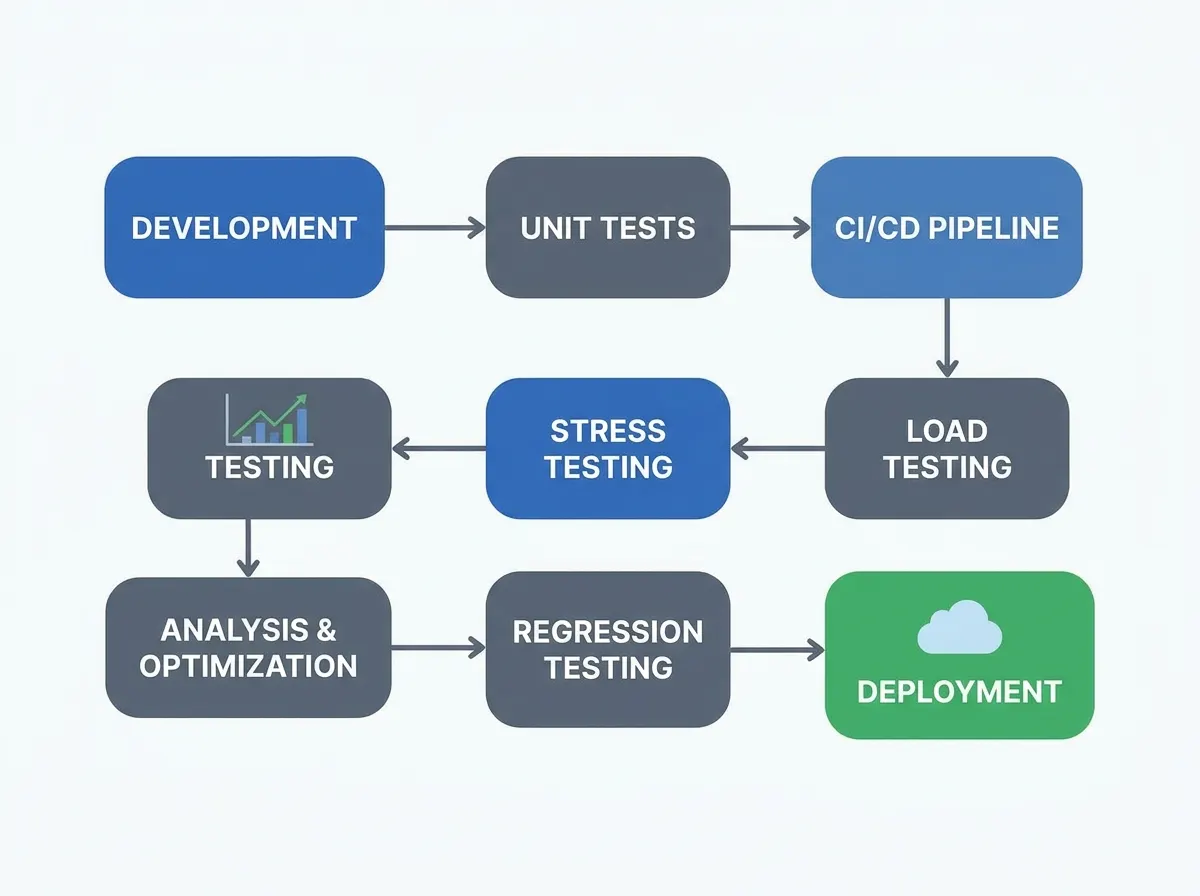
Put it in the pipeline. Run a front-end check and a short load test on every release candidate, fail on thresholds (for example p95 response time, error rate, and the three Core Web Vitals), and keep a longer test for before big launches. Monitoring in production catches what a pre-release test cannot: the real mix of devices and networks.
Frequently Asked Questions
Why is performance testing a priority for mobile-first businesses?
Because most traffic arrives on phones, which have less processing power and less reliable networks than desktops, so problems that never show up on a developer laptop show up for many of your users. Mobile was 58.99 percent of worldwide web traffic in September 2026 (StatCounter).
What are the Core Web Vitals thresholds for mobile?
Google’s “good” thresholds are LCP at 2.5 seconds or less, INP at 200 milliseconds or less and CLS at 0.1 or less, measured at the 75th percentile of page loads, separately for mobile and desktop (web.dev).
Do I need real devices to test mobile performance?
Not for everything. Throttled emulation catches many front-end regressions and is cheap to automate, while real devices show hardware-specific problems. The trade-offs are covered in the cloud vs local mobile testing comparison.
What is the difference between front-end and load testing for mobile?
Front-end testing measures what one phone experiences loading and using the page. Load testing measures what your servers do when many users connect at once. A mobile product needs both.
How often should I run mobile performance tests?
On every release for the quick checks, on a schedule for production monitoring, and before any event that will send a spike of users, such as a launch or campaign.
Sources
- StatCounter Global Stats, platform market share (gs.statcounter.com/platform-market-share/desktop-mobile-tablet, September 2026, read 2026-10-23).
- web.dev, Web Vitals (web.dev/articles/vitals) and Interaction to Next Paint (web.dev/articles/inp), read 2026-10-23.
- LoadFocus load testing and page speed monitoring pages (loadfocus.com/load-testing, loadfocus.com/page-speed-monitoring), read 2026-10-23.