Key takeaways
- A hit is one HTTP request. Hits per second counts every request the server receives in a second, successful or failed, page assets included.
- One page view can be dozens of hits, so hits per second is usually far higher than page views per second. It shows server workload rather than user activity.
- With a fixed number of virtual users, hits per second is a result of the test, not a setting: it rises with users until something saturates, then flattens while response time climbs.
- Compare it with throughput and response time; alone it says little.
Hits per second in performance testing is the number of HTTP requests sent to the server under test in each second of a load test. Every request counts as a hit: the HTML document, each image, script and stylesheet the page pulls in, and every API call. It counts them whether the server answers successfully or with an error, so it tells you how hard the server is being hit at each moment of the test.
What is hits per second in performance testing?
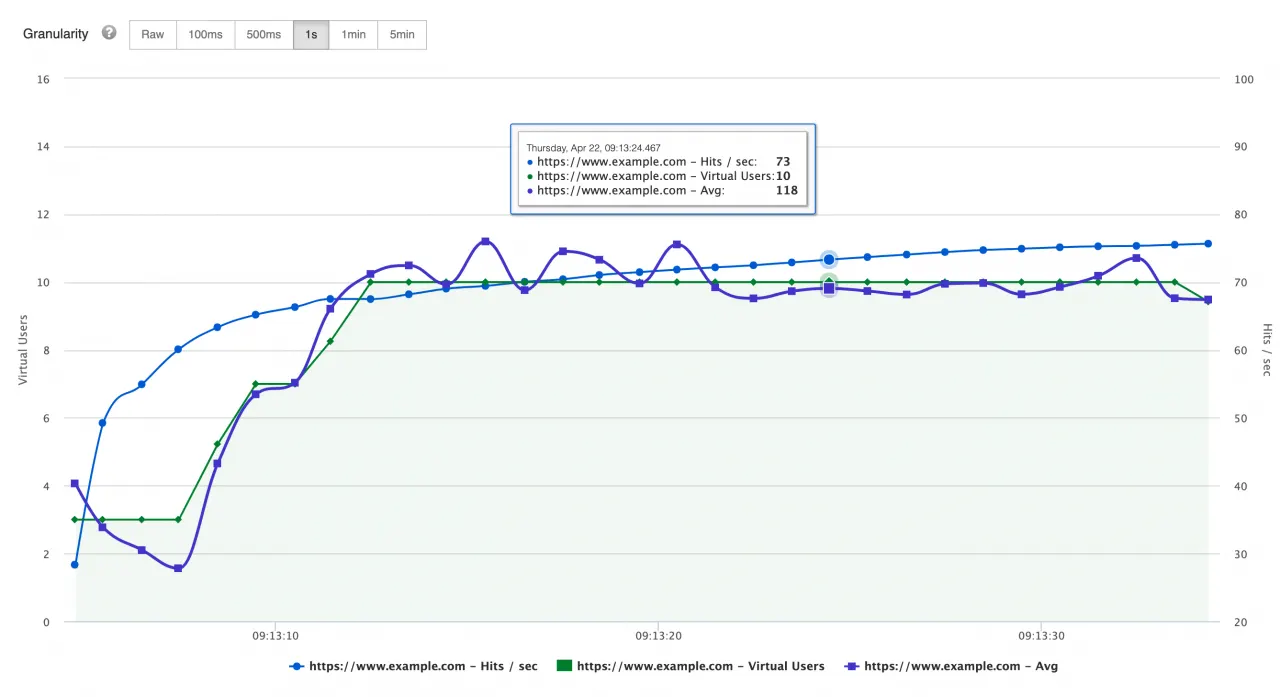
Hits per second is the request rate the virtual users generate against the server, measured second by second over the test. It is a measure of load, not of success: failed requests count the same as successful ones. Load testing tools plot it as a line over time, usually next to the number of active virtual users, so you can see how the request rate follows the load you apply.
Tools word the definition slightly differently, but they count the same thing. LoadRunner’s documentation describes its Hits per Second graph as the number of HTTP requests made by Vusers to the web server during each second of the run. JMeter’s HTML report has a Hits Per Second graph that shows the rate of finished requests over time.
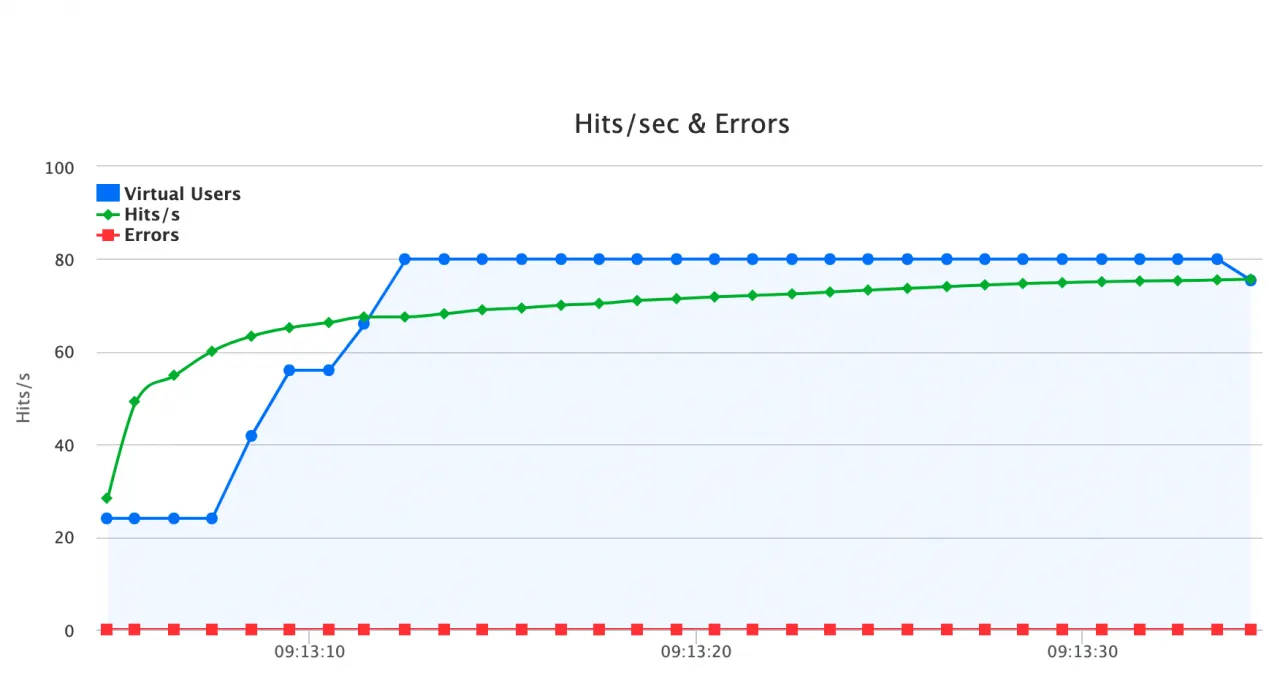
Hits per second in load test results: virtual users (blue), hits per second (green) and errors (red) over time
What counts as a hit?
A hit is any single HTTP request: a page, an image, a CSS or JavaScript file, a font, an API call or a redirect. When a real browser opens a page, it requests the HTML first and then every resource the page references, so one page view on a first visit can produce dozens of hits. Resources the browser already has in its cache are not requested again, which is why repeat visits produce fewer hits.
That is the main reason hits per second is much higher than page views per second, and why it describes server workload rather than what people were doing. Ten page views per second on a page with 40 uncached resources is roughly 410 hits per second on the servers and the CDN behind them.
Whether your load test reproduces those resource requests depends on the tool and the script:
- JMeter sends embedded resources only if you tick “Retrieve All Embedded Resources from HTML Files” on the HTTP Request sampler (or in HTTP Request Defaults). Without it, one sampler is one hit.
- k6 protocol-level scripts send only the requests you write. Grafana’s guide to load testing websites fetches a page’s CSS, images and scripts with an explicit
http.batchcall. The k6 browser module loads pages like a real browser, resources included.
So two tests with the same number of virtual users can produce very different hits per second, depending on whether they fetch page assets.
How to calculate hits per second
Over a whole test, hits per second is the total number of requests divided by the test duration. During the steady part of a test with a fixed number of virtual users, you can also predict it from the shape of one iteration:
hits per second = virtual users x requests per iteration / iteration duration (in seconds)
The iteration duration is everything one pass of the script takes: all the response times plus any think time or pacing.
A worked example. 100 virtual users run a script that loads one page with 19 assets, so 20 requests per iteration. Each iteration takes 10 seconds: about 2 seconds waiting for responses and 8 seconds of think time.
- Hits per second = 100 x 20 / 10 = 200
- Page views per second = 100 x 1 / 10 = 10, a twentieth of the hits
Now suppose the server slows down and each iteration takes 12.5 seconds instead of 10. With the same 100 users, hits per second drops to 100 x 20 / 12.5 = 160. The users did not change; the server got slower, so each user sent fewer requests per second. This is the same relationship between concurrency, response time and throughput that Little’s Law describes, covered in how throughput and response time are related.
To go the other way, from a target request rate to the number of users you need, see how to calculate concurrent users for a load test.
Hits per second vs throughput vs transactions per second
These terms overlap, and tools do not all use them the same way. The table shows how the common ones differ.
| Metric | What it counts | Where you see it |
|---|---|---|
| Hits per second | Every HTTP request per second, successful or failed, page assets included | JMeter HTML report, LoadRunner Hits per Second graph, LoadFocus Hits/s chart |
| Requests per second (RPS) | The same count under another name in most tools | k6 summary (http_reqs total and rate per second) |
| Throughput | In JMeter: requests per unit of time over the run, failed ones included. In LoadRunner: bytes per second the virtual users received from the server | JMeter Aggregate and Summary Reports; LoadRunner Throughput graph |
| Transactions per second (TPS) | Completed business transactions, such as a login or a checkout, each of which can contain many hits | JMeter HTML report (Transactions per second graph); LoadRunner transaction graphs |
Some definitions say throughput counts only successful requests. JMeter does not work that way: its glossary defines throughput as the number of requests divided by the total time, and the Aggregate Report’s Error % is a share of those same requests. If your tool reports throughput in bytes, as LoadRunner does, it measures data volume rather than request count. For the full picture of throughput, see what throughput means in performance testing.
Transactions per second sits one level up. In JMeter, a Transaction Controller groups the requests of one user action into a single transaction sample. The HTML report’s Hits Per Second graph ignores those transaction samples, while its Transactions per second graph includes them, so a “checkout” made of 12 requests adds 12 hits but only one transaction.
How to read a hits per second graph
Read hits per second next to the virtual user count, response time and errors from the same run. A few patterns come up again and again:
- Hits per second rises with the users. The system is keeping up. Each extra user adds requests at roughly the same rate as the others.
- Users keep rising, hits per second flattens. Something has saturated. Response times are climbing, so each user waits longer and sends fewer requests per second. That flat point is close to the capacity of the slowest component behind the endpoint.
- Hits per second drops while the users stay the same. The server is slowing down (the 12.5 second example above), or requests are timing out.
- Hits per second jumps at the same time as the errors. Watch for this one. A server that fails fast, for example with an immediate 503, answers quicker than one doing real work, so users loop faster and hits per second goes up while the test is failing. High hits per second with a high error rate is not a good result.
Also check the load generators. If the machines running the test are short of CPU, memory or bandwidth, hits per second flattens because the generators cannot send more, not because the server cannot take more. This is one reason to generate load from several cloud machines rather than from a single laptop.
Can you set a target hits per second?
With a fixed pool of virtual users (a closed model), hits per second is an output: you set users and think time, and the rate follows from response times. If you need a specific request rate, use an open model that starts work at a fixed rate whatever the response times:
- k6: the
constant-arrival-rateandramping-arrival-rateexecutors start iterations at a set rate. When each iteration sends one request, iterations per second equal requests per second. - JMeter: the Open Model Thread Group (experimental) schedules arrivals at a given rate, and the Constant Throughput Timer and Precise Throughput Timer pause threads to hold a target number of samples per minute. The timers cannot push the rate above what your threads and the server allow.
The virtual users guide explains the open and closed models in more detail.
Where to see hits per second in JMeter, k6 and LoadFocus
- JMeter: the HTML report you generate after a CLI run (
jmeter -n -t test.jmx -l results.jtl -e -o report) includes Hits Per Second, Transactions per second and Response Time vs Request per second graphs. The jmeter-plugins “Hits per Second” listener plots the same idea and also counts child samples from transactions and embedded resources. - k6: the end-of-test summary prints
http_reqsas a total and as a rate per second. For a graph over time, use the k6 web dashboard or send the metrics to an output such as Prometheus or InfluxDB. - LoadFocus: cloud load test results include interactive charts for response time, latency, hits per second, throughput per second, standard deviation and the 50th, 90th and 99th percentiles, and the error charts show when errors appeared and how many virtual users were running at that moment, as in the chart above. You can also upload JMeter scripts and run them in the cloud.
Written by Bogdan Vazzolla.
LoadFocus is a cloud testing platform for websites and APIs. It runs load tests and JMeter or k6 scripts from 25+ cloud locations, keeps the history of your results so you can compare runs and spot improvements or regressions, and also offers page speed monitoring and API monitoring.
Frequently Asked Questions
What does hits per second count?
Every HTTP request reaching the server in a second, including page assets such as images, scripts and stylesheets, and including requests that fail. That is why it is much higher than page views and should not be read as user activity.
Is hits per second the same as requests per second?
In most tools, yes: both count HTTP requests per second, and k6, for example, reports the figure as the rate of its http_reqs metric. The difference is usually only in naming. Check whether your tool counts page assets and child samples, because that changes the number.
What is the difference between hits per second and throughput?
Hits per second is the request rate second by second during the test. In JMeter, throughput is the same kind of count averaged over the run (requests divided by total time), failed requests included. In LoadRunner, throughput means bytes per second received from the server, so it measures data volume instead of requests.
What is transactions per second in performance testing?
Transactions per second counts completed business transactions, such as a login or a checkout, per second. One transaction can contain many HTTP requests, so transactions per second is always lower than hits per second for the same test. In JMeter you define a transaction with a Transaction Controller.
How do you calculate hits per second?
Divide the total number of requests by the test duration. For a steady phase with fixed users, hits per second is roughly virtual users multiplied by requests per iteration, divided by the iteration duration in seconds. For example, 100 users sending 20 requests every 10 seconds produce 200 hits per second.
Is it meaningful alone?
Not really. Compare it with throughput, response time and errors. High hits per second with climbing response times means something quite different from the same figure with flat latency, and a jump in hits per second together with errors usually means the server is failing fast.
Sources
- JMeter HTML report graphs (Hits per second, Transactions per second): JMeter user manual, Generating Report Dashboard (October 2026)
- JMeter throughput definition: JMeter glossary (October 2026)
- Aggregate Report columns, Retrieve All Embedded Resources, Transaction Controller, throughput timers, Open Model Thread Group: JMeter component reference (October 2026)
- jmeter-plugins Hits per Second listener: jmeter-plugins.org/wiki/HitsPerSecond (October 2026)
- k6
http_reqsmetric: Grafana k6 docs, Built-in metrics (October 2026) - k6 embedded resources with
http.batch: Grafana k6 docs, Load testing websites (October 2026) - k6 arrival-rate executors: Grafana k6 docs, Constant arrival rate (October 2026)
- LoadRunner Hits per Second and Throughput graphs: admhelp.microfocus.com, LoadRunner Analysis help (October 2026)