Key takeaways
- OpenSTF gives you remote access to real Android devices, which emulators cannot fully replace.
- The real cost is maintenance: USB stability, OS updates and device drift.
- Worth it when device-specific bugs matter; otherwise a hosted farm is cheaper.
Is Your Infrastructure Ready for Global Traffic Spikes?
Unexpected load surges can disrupt your services. With LoadFocus’s cutting-edge Load Testing solutions, simulate real-world traffic from multiple global locations in a single test. Our advanced engine dynamically upscales and downscales virtual users in real time, delivering comprehensive reports that empower you to identify and resolve performance bottlenecks before they affect your users.
What is OpenSTF ?
OpenSTF is an open source project that gives us the ability to create our own test farm with real devices.
Using OpenSTF we can create a device farm that gives us the possibility to share devices between team members without actually physically moving the device from the device farm.
Why is OpenSTF useful ?
The are quite a few advantages for using OpenSTF:
Think your website can handle a traffic spike?
Fair enough, but why leave it to chance? Uncover your website’s true limits with LoadFocus’s cloud-based Load Testing for Web Apps, Websites, and APIs. Avoid the risk of costly downtimes and missed opportunities—find out before your users do!
- it’s open source
- we do not need to physically move the devices around
- we can easy install the application on the devices
How do we install OpenSTF on our server ?
- First we need to install the dependencies for STF using home brew by running the following from the command line:
- brew install rethinkdb graphicsmagick zeromq protobuf yasm pkg-config
- If we want to run STF from source we need to:
- Clone the repository from https://github.com/openstf/stf by running:
git clone git@github.com:openstf/stf.git - build the application by running:
npm install - link the module so that you’ll be able to access the stf command directly from the command line
npm link
- Clone the repository from https://github.com/openstf/stf by running:
- If we just want to install STF without building the latest version we can simply run:
npm install -g stf - To start openstf we first need to start rethinkdb; for that we need to run the following command in the command line:
rethinkdb - Now we are ready to start STF; for that we run the following command in the command line:
stf local - Open your favourite browser and browse to:
http://localhost:7100 - Enter a username and password (you can enter any username and password)
- You should now be able to see in the OpenSTF UI the devices that you have connected to your machine as in the picture below
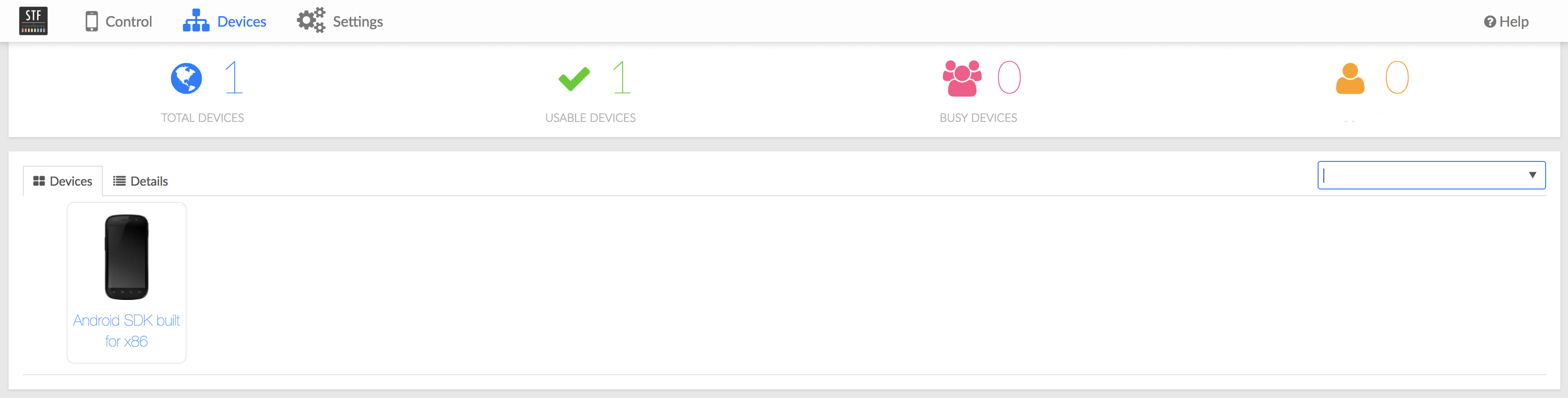
- Double clicking the device will take you to the device and you will be able to interact with the device exactly like you would do on the real device
- Note: it does not support emulators or iOS devices
What do we need to buy to create our own device farm ?
- a Mac Mini box
- a couple of Android devices (ex. 5 devices)
- a couple of USB hubs
- a couple of USB cables
Which are the features that OpenSTF supports ?
- Android OS support: Android 2.3 ~ 8.0 including Wear 5.1, FireOS, CyanogenMod
- Keyboard & Mouse Input with Multi-Touch, even in Safari iOS
- Copy & Paste to and from the device
- Take Screenshots and resize them
- Drag & Drop APK files
- Install and launch apps in 1 step
- Open URLs in any installed browser
- Display Logs with realtime filtering
- Run Shell Commands without leaving your browser
- Debug Remotely with Android Studio, Chrome Debug Tools, as if it was plugged into your computer
- Reverse Port Forwarding
- Device Rotation
- Play Store Automation
For a complete description of OpenSTF and the features please visit the project page: https://openstf.io/
LoadFocus – is a easy to use cloud testing tool, and you don’t need any setup, it runs from the browser. It helps you understand better your Website’s and WebServices’ performance and find potential bottleneck before your customers do. Run a free website speed test today.
Frequently Asked Questions
What is OpenSTF used for?
It is an open source project for running your own farm of real Android devices, with remote access from the browser. The team shares the same physical devices without anyone having to carry a handset to their desk.
LoadFocus is an all-in-one Cloud Testing Platform for Websites and APIs for Load Testing, Apache JMeter Load Testing, Page Speed Monitoring and API Monitoring!
Is a device farm better than emulators?
For anything hardware dependent, yes. Emulators cannot reproduce vendor skins, real GPUs, flaky radios or battery behaviour. For plain layout and flow checks, emulators are faster and cheaper.
What does it cost to run in house?
The devices and a machine to host them, plus ongoing maintenance. USB stability, OS updates and device drift are the real expense, and they are why a hosted farm often works out cheaper unless device specific bugs matter to you.