17 minutes read

Fishing With a Net or a Spear? The Real Startup Dilemma in Load Testing

Cloud vs On-Premise: The Analogy That Matters

Imagine a founder at the edge of a lake, deciding between casting a net to catch whatever swims by or using a spear for precision. This is the real dilemma when choosing between cloud load testing vs on-premise solutions. Each approach offers distinct advantages, and making the wrong choice can have lasting consequences for your startup’s budget, compliance, and speed to market.

The Hidden Traps: What Startups Miss

Flexibility is the standout feature of cloud load testing. You can quickly spin up virtual machines, simulate millions of users worldwide, and pay only for what you use. For example, a fintech startup’s move to AWS cut their test cycle from eight hours to just 45 minutes, making daily performance checks a reality. However, network variability can affect test results, and mishandling cloud credentials introduces security risks.

Is Your Infrastructure Ready for Global Traffic Spikes?

Unexpected load surges can disrupt your services. With LoadFocus’s cutting-edge Load Testing solutions, simulate real-world traffic from multiple global locations in a single test. Our advanced engine dynamically upscales and downscales virtual users in real time, delivering comprehensive reports that empower you to identify and resolve performance bottlenecks before they affect your users.

View Pricing
Real-time insights
Discover More
Global scalability

By contrast, the control of on-premise solutions is appealing – every server and byte remains within your infrastructure. For industries with strict compliance requirements, such as healthcare under HIPAA, this control is often essential. But it comes at a price: scaling requires additional hardware purchases and ongoing maintenance. Even with containerized agents or CI/CD integration, the operational overhead remains significant.

Key Insight: The “obvious” choice – cloud for cost or on-premise for control – often conceals trade-offs that can drain your budget or slow your team at critical moments.

Why the Easiest Path Usually Isn’t the Best

It’s easy to default to the solution that appears cheapest or most familiar. Teams sticking with on-premise tools often find themselves limited by hardware they didn’t anticipate. Others jump into cloud platforms for low upfront costs, only to face unexpected bills when running large-scale or frequent tests.

Cloud load testing vs on-premise is more than a feature comparison – it’s a decision about where your resources and focus will go over the next year. If you’re building a SaaS product and need to test with 100,000 users tomorrow, cloud tools like LoadFocus, BlazeMeter, or Azure Load Testing make that possible without procurement delays. For healthcare providers running fewer, highly sensitive tests, on-premise may be the only way to meet compliance, even if it means less agility.

Think your website can handle a traffic spike?

Fair enough, but why leave it to chance? Uncover your website’s true limits with LoadFocus’s cloud-based Load Testing for Web Apps, Websites, and APIs. Avoid the risk of costly downtimes and missed opportunities—find out before your users do!

Effortless setup No coding required

The fastest or cheapest-looking path can become the most expensive mistake. Make your decision based on real data and clear requirements, not assumptions.

Cloud Load Testing vs On-Premise: Side-by-Side Comparison Table

A Startup’s Guide to the Six Critical Dimensions

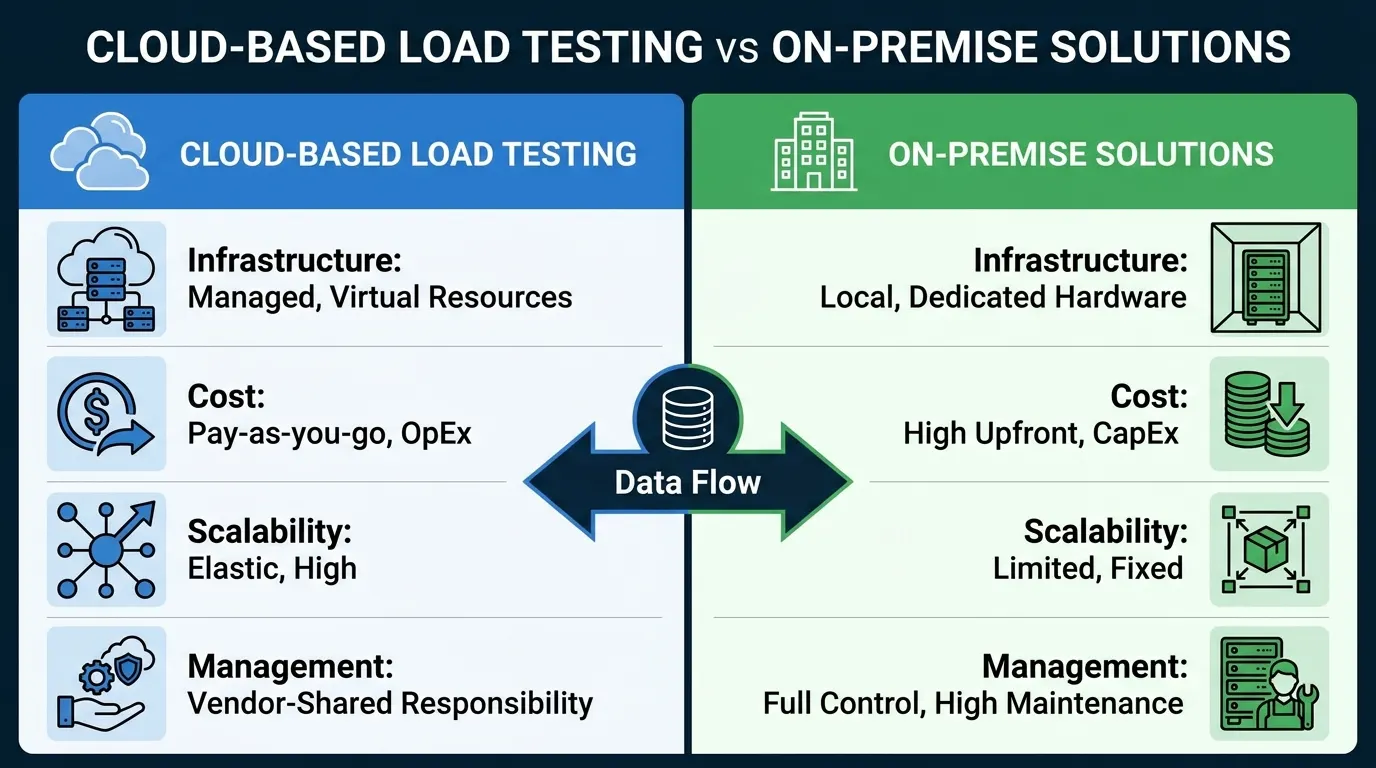
When startups consider cloud load testing vs on-premise, the choice shapes how quickly you can ship features, address compliance, and manage costs. Here’s a structured comparison across six dimensions that matter most for modern product teams.

DimensionCloud Load TestingOn-Premise Load Testing
Cost Pay-as-you-go pricing. No upfront hardware; pay only for usage. Ideal for unpredictable or bursty workloads. High capital expense for hardware and licenses. Ongoing operating costs (power, cooling) even when idle.
Scalability Instantly scale tests to millions of users worldwide. No physical limits – run global tests at any time. Limited by on-site hardware capacity. Scaling up requires purchasing and configuring more servers.
Setup Time Rapid provisioning; set up in minutes. Example: A fintech startup reduced test cycles from 8 hours to 45 minutes after moving to AWS. Lengthy setup. Installing and configuring hardware and tools like JMeter or LoadRunner can take days.
Control Less control over hardware and network specifics. Still, can run geographically distributed tests with minimal effort. Full control over environment, network, and data. Can tune every variable, but requires deep system knowledge.
Compliance Dependent on cloud provider’s certifications. Sensitive workloads may need extra safeguards or dedicated regions. Ideal for strict compliance (e.g., HIPAA, PCI). Data stays within your firewall, simplifying audits.
Maintenance No hardware maintenance. The provider handles infrastructure, updates, and scaling. Team is responsible for all maintenance – hardware failures, OS patches, and capacity planning.

Short Analysis: Which Approach Fits Your Startup?

Cloud load testing is a strong fit for startups needing to move fast and validate at scale. The ability to simulate millions of users on demand, combined with pay-as-you-go pricing, removes barriers to frequent, large-scale performance testing. For teams launching SaaS products or iterating quickly, the efficiency gains are substantial.

On-premise solutions remain important when compliance is non-negotiable or when granular control is required. Healthcare, finance, and large enterprises often stick with on-premise to meet internal security mandates. The trade-off is slower setup and ongoing maintenance.

LoadFocus is an all-in-one Cloud Testing Platform for Websites and APIs for Load Testing, Apache JMeter Load Testing, Page Speed Monitoring and API Monitoring!

Effortless setup No coding required

For most startups, the flexibility and low overhead of cloud-based tools like LoadFocus, BlazeMeter, and Azure Load Testing outweigh the benefits of building out a physical lab. Still, the best choice depends on your growth stage, risk profile, and your product’s specific demands.

Scalability and Speed: The Startup Growth Advantage of Cloud Load Testing

Global Reach and Multi-Region Testing

For SaaS startups, serving users across continents is often a necessity. Cloud load testing platforms such as LoadFocus allow you to deploy test agents in multiple regions simultaneously, simulating real-world usage from different locations. Replicating this with on-premise solutions would require physical servers in each region and complex networking.

The advantage is clear: you can identify latency spikes, regional bottlenecks, and CDN misconfigurations before launch. Cloud load testing enables you to mimic real user patterns by adjusting test intensity and timing for each locale, something on-premise setups struggle to match.

For startups targeting international markets, this means faster, more confident deployments. When you spot performance issues in a specific region, you can address them proactively, improving product quality and user trust.

Before and After: Test Cycle Time Transformation

A major difference in the cloud load testing vs on-premise debate is test cycle speed. Here’s how a typical workflow changes:

Before (On-Premise)After (Cloud)
Environment SetupManual provisioning. Wait for physical servers. Network approvals needed.Spin up virtual machines instantly. No hardware bottlenecks.
Test ExecutionLimited by hardware, often maxing out at a few thousand users.Simulate millions of users on-demand. Scale is limited only by budget.
Cycle Time8 hours per full regression test. Delays accumulate with every code change.45 minutes for the same coverage. Enables daily performance checks.

This isn’t hypothetical. A fintech startup moving to AWS reduced their test cycle from eight hours to just 45 minutes, shifting from occasional tests to daily validation. This acceleration lets teams catch regressions early and ship features faster.

Before (Weak/Generic)After (Strong/Specific)
“Switching to the cloud made our tests faster.”“After migrating to cloud-based load testing, we cut our full regression test cycle from 8 hours to 45 minutes, enabling performance checks after every code push.”

The improved approach is measurable, actionable, and clear. It demonstrates the real business impact – a shift from slow, infrequent testing to rapid, continuous validation. This agility is a key reason startups turn to the cloud.

Cloud load testing isn’t without drawbacks. While you gain scalability and speed, you need to manage cloud credentials carefully and account for network variability in your results. For most fast-moving startups, however, the ability to simulate global traffic and reduce test cycles from hours to minutes is a significant advantage.

Cost Analysis: Pay-as-You-Go Cloud vs Upfront On-Premise Investment

When comparing cloud load testing vs on-premise, the conversation often starts with sticker price but the real story is in total cost of ownership and how each model scales as your needs evolve.

Cost CategoryCloud Load TestingOn-Premise Load Testing
Upfront Capital ExpenseMinimal; pay per test or userHigh; hardware, licenses, setup
Ongoing CostsVariable; scales with usage, monthly subscription or per-test feesPredictable; support contracts, power, cooling
Maintenance & UpgradesIncluded in service fee; handled by vendorManual; hardware depreciation, software updates, IT staff
ScalabilityInstant; add virtual users on demandLimited by existing hardware; expensive to scale up
Hidden CostsPotential network variability, cloud provider data transfer feesDowntime, replacement hardware, compliance audits
Geographic ReachGlobal, out-of-the-box with providers like LoadFocusRequires multiple data centers or VPNs; complex setup

Total Cost of Ownership Over Time

Cloud load testing platforms like LoadFocus shift your costs from heavy upfront investments to flexible, operational expenses. Early-stage startups can begin testing immediately, paying only for what they use. For example, a fintech company moving testing to AWS saw test cycles drop from eight hours to just 45 minutes – without the need for expensive hardware or additional IT hires.

If your load testing needs are stable and consistently high, recurring cloud fees can eventually surpass the one-time cost of building an in-house lab. On-premise setups shine in this scenario: you pay high capital costs up front, then depreciate them over several years, making long-term budgeting more predictable. However, scaling up means more capital, and scaling down doesn’t recover sunk costs.

Hardware depreciation, unexpected outages, and the cost of maintaining compliance add layers to on-premise ownership. With cloud, hardware obsolescence disappears, but you’re subject to ongoing provider pricing changes and potential increases in usage fees as your needs grow.

Budgeting for Growth and Uncertainty

For most startups, uncertainty is the rule. Pay-as-you-go cloud models let you experiment – run tests on new features or simulate sudden spikes – without locking up cash in servers you might never fully use. This flexibility is valuable if your business priorities shift or if you pivot your product.

On-premise approaches are inflexible once you’ve invested. If you’ve bought hardware sized for 10,000 simulated users but only need 2,000 after a strategic pivot, the excess sits idle. Maintenance and upgrades continue regardless of usage. The opportunity cost of stranded capital can be significant, especially for early-stage startups.

Hidden costs also lurk – such as time lost managing hardware failures or surprise expenses when compliance standards change. Cloud options roll many of these headaches into the service, but you may face network variability or data transfer fees, depending on your provider and test locations.

The best decision balances control, cost predictability, and adaptability as your business grows. There’s no universal answer, but understanding these cost dynamics helps you make a choice that supports both your current needs and future ambitions.

Control, Compliance, and Security: When On-Premise Still Wins

For some startups, absolute control outweighs other factors. On-premise solutions put you in charge of hardware, network topology, and – most critically – sensitive data. This level of control can be a regulatory necessity, not just a preference.

Compliance-Driven Use Cases

Healthcare and finance are classic examples where the decision is often dictated by regulation. If your team handles electronic health records in the US, HIPAA regulations may require you to keep patient data within specific physical locations. Even cloud providers with compliance certifications can raise concerns about shared infrastructure or cross-border data movement. In these scenarios, on-premise testing ensures you own the entire data flow, from test scripts to result archives.

Financial services face similar boundaries. European banks, for instance, must comply with GDPR and local financial authorities. If your performance tests touch real transaction data, running those tests on a public cloud can violate policy or require lengthy legal review. On-premise keeps both auditors and your legal team satisfied by maintaining end-to-end visibility and control.

  • Healthcare providers bound by HIPAA regulations
  • Banks restricted by GDPR and local data sovereignty laws
  • Defense contractors handling sensitive government workloads

In these sectors, on-premise load testing is often non-negotiable.

Security and Data Residency Considerations

Beyond compliance, some startups choose on-premise to avoid handing over cloud credentials or increasing their attack surface. With on-premise, you maintain a predictable network environment and full transparency over data residency. This is difficult to match in multi-tenant cloud environments, regardless of provider certifications.

The trade-off is complexity and slower iteration. Hardware must be purchased, maintained, and upgraded. Test environments rarely scale instantly. While cloud platforms like LoadFocus remove infrastructure burdens and offer global scalability, on-premise teams manage rackspace and patch servers themselves.

For startups where regulatory risk is paramount, on-premise remains the preferred choice. But these gains come with increased overhead and slower delivery, so the decision should be revisited as regulations and business priorities evolve.

Ease of Use and Maintenance: The User Experience Divide

Startup teams know that every hour counts – especially when it comes to infrastructure setup and ongoing maintenance. The debate around cloud load testing vs on-premise is often framed by performance metrics, but the real day-to-day divide is user experience.

Cloud load testing tools like LoadFocus typically offer rapid onboarding. You sign up, connect your website or API, and launch your first test in minutes. The platform handles the heavy lifting: spinning up test agents, provisioning resources, and auto-scaling as needed. You won’t worry about patching servers, upgrading dependencies, or troubleshooting network drivers. Modern dashboards surface actionable insights without forcing you to parse log files or manage plugins.

On-premise solutions require manual installation and configuration. You’re downloading binaries, provisioning VMs or bare metal, opening firewall ports, and tuning JVM parameters. Patches and upgrades are your responsibility, which can lead to “version drift” and unexpected outages. Maintenance isn’t just about keeping the software running – it’s ensuring your test environments match production, which can mean hours spent cloning configs or replicating traffic patterns.

For startups with limited DevOps bandwidth, the time-to-value is dramatically different. Cloud platforms let you focus on application logic and performance improvement instead of infrastructure upkeep. The fintech example from earlier demonstrates this: migrating to AWS-based load testing dropped test cycles from 8 hours to 45 minutes, enabling daily performance checks.

There is a caveat – cloud testing introduces a need for cloud security expertise. Managing API credentials, limiting access, and ensuring data privacy are ongoing concerns. These are manageable, but they require attention.

Integrations and Automation: CI/CD and Infrastructure as Code

The automation story is another clear dividing line. Cloud platforms are built for integration. Most offer REST APIs, webhooks, or direct plugins to popular CI/CD tools like GitHub Actions, GitLab CI, and Jenkins. With Infrastructure as Code (IaC) tools such as Terraform or AWS CloudFormation, you can provision and decommission test environments automatically as part of your deployment pipeline. This enables load tests on every pull request or staging push, without manual intervention.

On-premise test automation is possible, but rarely as smooth. While tools like JMeter and LoadRunner can be wired into CI/CD workflows, you’ll often need custom scripts and careful coordination. Containerizing test agents and maintaining your own fleet of runners adds maintenance overhead and potential bottlenecks when scaling up test volumes.

For startups aiming to ship quickly and iterate fast, cloud load testing vs on-premise is about getting from code commit to actionable performance feedback with minimal friction. That difference can be the edge that lets your team outpace larger competitors.

Feature Set, Flexibility, and Extensibility: What Each Model Enables

Cloud: Rapid Feature Access and API Extensibility

Cloud platforms like LoadFocus have changed how quickly teams can access new features. When a major update is released, every user benefits immediately – no manual installs or lost engineering cycles.

This isn’t just about convenience. In the cloud load testing vs on-premise debate, cloud’s edge is its pace of innovation. You get instant access to new test types, UI improvements, and bug fixes. Need to test a new API authentication scheme? There’s often already an update or plugin available.

API-based extensibility is another advantage. Most major cloud solutions allow you to script custom test flows, connect results directly to Slack or PagerDuty, or automate test triggers from your CI/CD pipeline. For startups iterating weekly, this means less time building integrations and more time acting on test results.

On-Premise: Custom Plugins and Environment Control

On-premise load testing is about total control. You’re not just configuring tests – you’re architecting the entire environment. Need to simulate a proprietary network protocol or run agents behind a corporate firewall? With JMeter or LoadRunner, you can build or import custom plugins tailored to your stack.

This flexibility is powerful, especially for teams with edge-case requirements. For example, health tech companies bound by strict HIPAA rules often need to validate every dependency and ensure data never leaves their own hardware. On-premise setups make this possible, though at the cost of maintaining hardware and updating test agents manually.

Limits and Honest Tradeoffs

No solution is perfect. Cloud load testing platforms may lag with legacy protocol support. If your infrastructure relies on protocols not supported by mainstream cloud providers, you’ll likely hit a wall. On-premise tools, with their open plugin ecosystems and environment access, remain the fallback in these scenarios.

On the flip side, building and maintaining those plugins isn’t trivial. Teams can spend more time on tooling upkeep than on actual performance engineering. Cloud, while less flexible at the fringes, frees you from that cycle and keeps your focus on delivery.

Ultimately, your choice between cloud load testing vs on-premise should weigh the features you need today against the flexibility you’ll demand tomorrow. The fastest path isn’t always the most adaptable, but neither is total control always worth the maintenance burden.

Decision Framework: Choosing Cloud or On-Premise Load Testing for Your Startup

Choosing between cloud load testing vs on-premise is rarely just a technical decision. The right approach should reflect your growth stage, resource constraints, and legal obligations – not just your tech stack. Here’s a practical, scenario-driven framework to help you choose the model that fits your startup’s realities.

Choose Cloud If…

  • Your team is small (fewer than 10 engineers) and you can’t afford to manage infrastructure.
  • You need to simulate large-scale global traffic – for SaaS launches or campaign spikes.
  • Testing frequency is unpredictable and you want pay-as-you-go pricing.
  • Speed is critical. If your product cycles demand daily regression tests, rapid setup and teardown matter. The fintech team that moved to AWS cut test times from 8 hours to 45 minutes, enabling daily checks.
  • Geographical reach is important. You need to monitor performance from multiple continents without spinning up remote hardware.

Choose On-Premise If…

  • You have strict data compliance or security mandates (HIPAA, GDPR, or financial regulations).
  • Your client contracts require auditable, on-premise environments for testing and production parity.
  • Your infrastructure is already heavily invested in local hardware.
  • Network consistency trumps global scale. On-premise lets you control every variable, eliminating unpredictable cloud latency.
  • You plan to run frequent, predictable, long-duration tests and can justify upfront hardware costs against ongoing cloud spend.
Startup ScenarioBest Fit: Cloud or On-PremiseRationale
Seed-stage SaaS with 5 engineers, launching globallyCloudMinimal setup, instant scalability, and pay-per-test pricing make it viable for rapid pivots.
Healthcare startup processing patient data, HIPAA-boundOn-PremiseStrict control over data and network, easier compliance audits, avoids cloud credential risks.
Fintech MVP prepping for a live demo in three countriesCloudGlobal load agents and quick test provisioning allow multi-region simulations without hardware headaches.
Established B2B with legacy datacenter and long-term contractsOn-PremiseExisting investments in hardware and internal compliance policies drive on-premise preference.
Consumer app startup with variable traffic spikesCloudElastic billing and ability to scale up or down on demand with minimal commitment.

Key Insight: The best choice between cloud load testing and on-premise isn’t about technology alone – it’s about aligning your testing approach with your company’s stage and risk profile.

Hybrid Approach: Can You Get the Best of Both Worlds?

Some startups find that hybrid load testing – using both cloud and on-premise tools for different scenarios – addresses challenges that neither model fully solves. For example, you might run production-scale tests for global launches in the cloud using LoadFocus, while keeping a small on-premise JMeter setup for proprietary data or compliance checks.

This approach lets you balance cost, scale, and security. Use the cloud for bursty, high-volume simulations, and on-premise for tests requiring total control or sensitive data handling. The key is integration: aligning test results, automating triggers from your CI/CD pipeline, and standardizing reporting across both platforms.

The hybrid route adds complexity. You’ll need clear protocols for when to use each system, and your team must maintain expertise in both environments. But for high-growth startups facing frequent audits, rapid scaling, and global user bases, hybrid testing can provide the flexibility and governance that pure cloud or pure on-premise solutions can’t match.

Implementation Best Practices for Cloud and On-Premise Load Testing

Baseline Testing and Security Hygiene: The Non-Negotiables

Before ramping up virtual users or investing in automation, establish a solid baseline. For both cloud load testing and on-premise models, run a controlled, low-volume test to validate your scripts and endpoints. This step can save hours of debugging later.

Security is critical. In cloud environments, always use dedicated test accounts – never production credentials. Rotate access keys regularly and store secrets in a managed vault. For on-premise setups, secure your internal test network and lock down agent access, especially in regulated industries.

Automation and Cost Controls: Doing More with Less

Cloud load testing excels at rapid, repeated execution – if you automate wisely. Use Infrastructure as Code (IaC) templates to provision and decommission test environments. This reduces setup time and helps avoid “zombie” resources that inflate your monthly bill. Monitor your cloud spend with dashboards or third-party tools; costs can spike quickly with large-scale simulations.

On the on-premise side, containerizing test agents is the fastest route to repeatable deployments and clean rollbacks. Integrate your tests with a CI/CD pipeline to trigger them on every major release. Schedule regular hardware maintenance – don’t wait for a failed disk to derail your next test.

Before/After: The Impact of Best Practices

BeforeAfter
Generic credentials used for all cloud tests, manual environment setup, no spend monitoring. Test runs are inconsistent, and troubleshooting failures is slow. Each cloud test uses a dedicated, auto-provisioned account via IaC. Resources are torn down after tests, and cloud spend is tracked per project. Scripted baseline runs catch issues instantly.
On-premise agents deployed manually, scripts live on local machines, maintenance is ad hoc. Failures often traced to outdated dependencies or hardware. Test agents containerized with standard images, deployed via CI/CD. Maintenance windows scheduled and tracked. Test results are reliable, and failures tie back to reproducible scenarios.

The improved approach isn’t just about polish. Performance and reliability gains are tangible: faster cycles, smoother troubleshooting, and real cost savings. For example, a fintech team that automated cloud provisioning cut test times from 8 hours to 45 minutes, allowing daily checks instead of weekly fire drills.

Avoiding Early Pitfalls

  • Don’t skip baseline runs. Even the best script can fail on a network hiccup or endpoint typo.
  • Never mix test and production credentials. The risk isn’t worth it.
  • Monitor spend and usage in the cloud. Set alerts before you exceed your budget.
  • For on-premise, document every manual step – then automate it.
  • Review maintenance logs and schedule checks before peak load events, not after.

Success with cloud load testing vs on-premise comes down to discipline and repeatability. Invest in automation, prioritize security, and treat maintenance as a routine, not a reaction. The payoff is a testing foundation that scales with your ambitions, not your headaches.

Honest Limitations and Common Pitfalls in Cloud and On-Premise Load Testing

Cloud Load Testing: The Double-Edged Sword of Scale and Variability

Cloud load testing platforms like LoadFocus offer tremendous scalability and global reach. You can simulate millions of users in minutes, as the fintech startup that cut their test cycle from 8 hours to 45 minutes on AWS demonstrated. But these advantages come with trade-offs. Network unpredictability is a real constraint. Test agents may be spun up in different regions, each with their own latency quirks or bandwidth limits, making it difficult to pinpoint whether a bottleneck is in your app or the cloud provider.

Another pitfall: secure cloud credential management. With distributed tests, it’s easy to lose track of access. Relying on a single shared API key or neglecting credential rotation exposes you to risk. Best practices like using dedicated test accounts, automating provisioning with IaC tools, and running regular baseline tests help mitigate these issues, but they add operational overhead.

On-Premise Load Testing: Control at a Cost

On-premise solutions deliver total control over your testing environment, which is essential for organizations with strict compliance mandates. The downside is hardware fragility and limited scalability. If you need to simulate 100,000 users but only have infrastructure for 10,000, the test loses value. Hardware failures mid-test can wipe out hours of setup and skew your results, especially if agents aren’t containerized or backed up.

Scaling isn’t just about adding servers. There’s significant capital expense for hardware and ongoing maintenance – costs that don’t decrease if your test volume drops. Automating with CI/CD or containers helps, but physical limits are hard to ignore when demand spikes.

Risk Management: The Only Real Solution

Every team faces unique constraints when weighing cloud load testing vs on-premise. Cloud offers speed and reach, but you trade off for network variables and credential management complexity. On-premise means control, but at the risk of hardware limits and potential single points of failure. The only way to avoid the worst pitfalls is to treat risk management as an ongoing process, not a one-time setup.

Teams that succeed run regular baseline tests, rotate credentials, containerize agents, and plan for failure – because both models have their own challenges. The most resilient organizations adapt their approach as their needs and risks evolve.

Frequently Asked Questions: Cloud Load Testing vs On-Premise

What’s the fastest way for a startup to begin load testing?

Cloud load testing platforms like LoadFocus let you launch your first test within minutes. There’s no hardware to buy or configure – just sign up, upload your test script, and select your target regions. For example, a fintech startup that moved to AWS-based cloud testing cut their cycle time from 8 hours to just 45 minutes. On-premise requires considerably more ramp-up time due to procurement and setup.

How do costs really compare between cloud and on-premise load testing?

Cloud solutions use a pay-as-you-go model. You pay only for what you use, which keeps upfront costs low – especially critical for startups. On-premise requires buying and maintaining hardware. While this might look cheaper at scale, few startups have the volume or stability to justify it. Remember to factor in hidden costs, like hardware depreciation and IT overhead.

Which option is best for simulating global traffic spikes?

Cloud-based tools are designed for global reach. Need to simulate traffic from Tokyo, Frankfurt, and Virginia in a single test? That’s one click away with most cloud platforms. On-premise setups are limited by your physical location unless you invest in multiple global data centers, which is rarely feasible for early-stage companies.

Are there data security or compliance risks with cloud load testing?

Yes, but they’re manageable. Sensitive industries – such as healthcare and finance – may need to keep test data on-premise to comply with regulations like HIPAA. For most SaaS startups, using dedicated test accounts and scrubbing sensitive data from test payloads is sufficient. Always follow best practices: never use production credentials, and automate cleanup of test environments.

How do I troubleshoot inconsistent test results in the cloud?

Network variability is often the cause. Cloud environments share resources, so you may see fluctuations between tests. Run baseline tests at off-peak hours and automate test provisioning using Infrastructure as Code tools. Compare results across multiple runs to distinguish real performance issues from cloud “noise.” If absolute repeatability is required, on-premise may offer more control, but with less flexibility.

Can I automate either approach with my CI/CD pipeline?

Yes. Both cloud and on-premise tools offer APIs and integrations. With cloud load testing, you can spin up environments on demand and tear them down automatically after the test. On-premise tools benefit from containerization and can be tied into build pipelines, though you’ll manage the infrastructure yourself.

What’s the biggest mistake startups make when choosing between cloud and on-premise?

Over-investing in on-premise hardware before achieving product-market fit. Startups often underestimate the value of agility and speed in the early stages. Unless your business has non-negotiable compliance needs, start with cloud load testing and revisit your approach as your requirements mature.

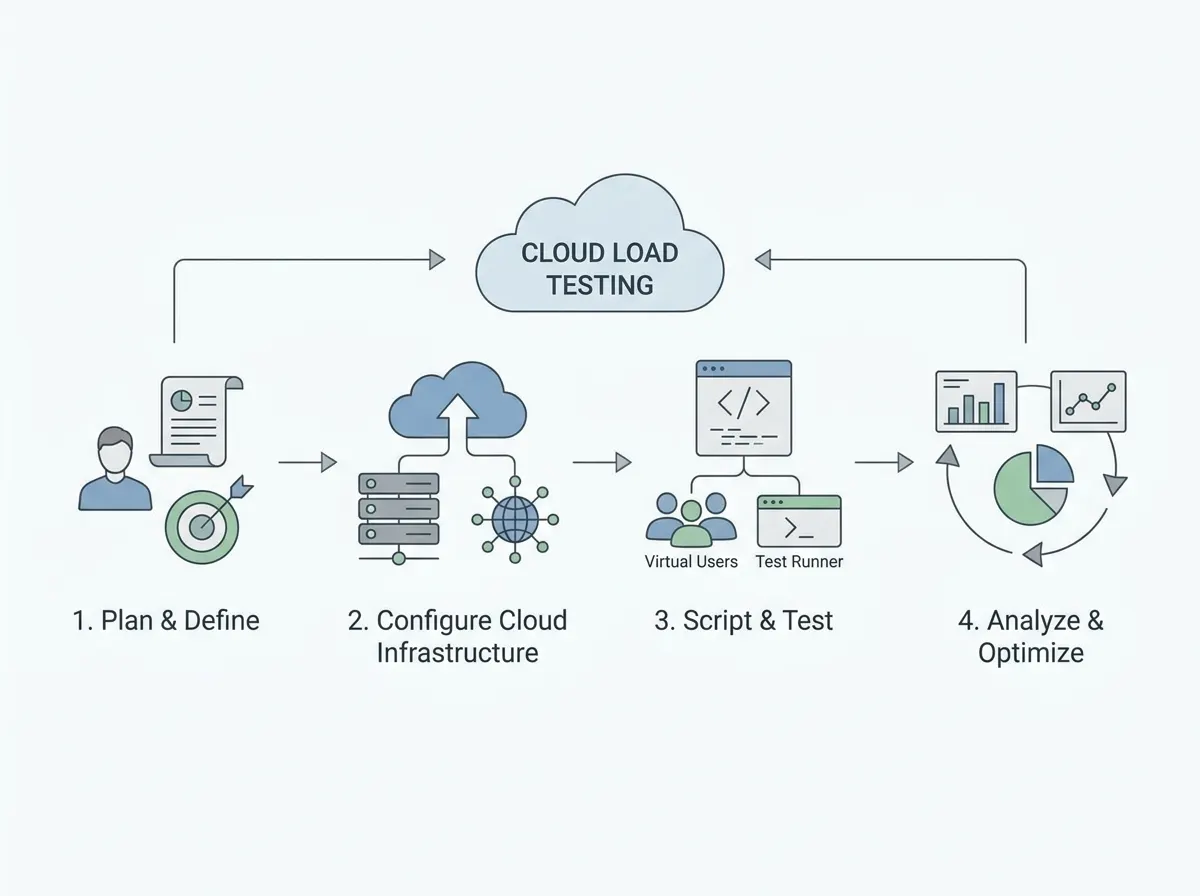
Comparison table showing cloud vs on-premise solutions with pros and cons Diagram illustrating the workflow of cloud load testing setup and execution Graph showing cost analysis of cloud vs on-premise over time

How fast is your website? Free Website Speed Test